47
3.2.2.3. OXYGEN DISPLAYS
If set to EAN mode the NITROX display, with all
labeled oxygen information, is shown immediately after
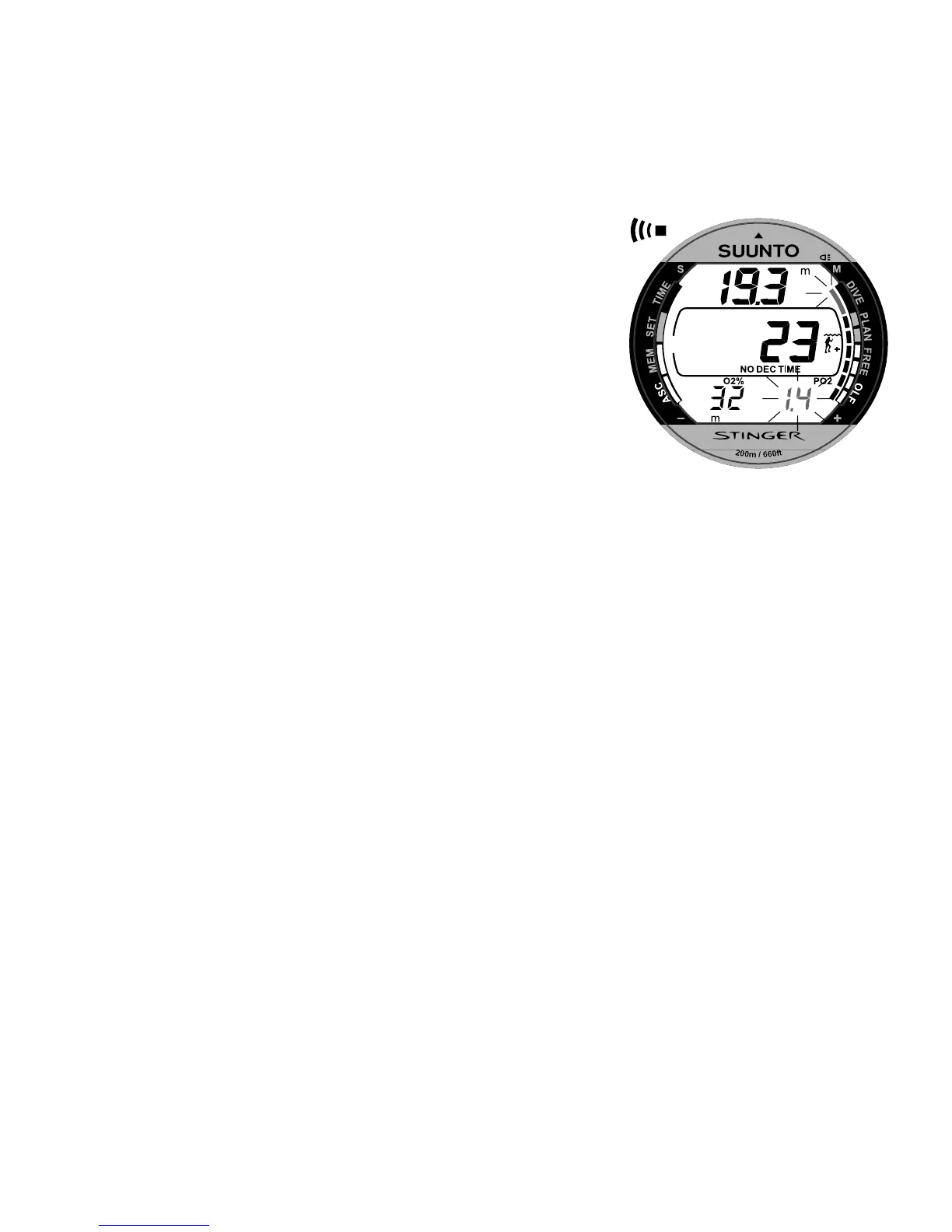
activation. The nitrox display shows (Fig. 3.21.):
oxygen percentage, labeled with O
2
%, is
shown in the left side of the lower display
set oxygen partial pressure limit, labeled with
PO
2
, is shown in the right side of the lower
display
maximum allowed depth based on the set
oxygen percentage and partial pressure limit
current oxygen toxicity exposure shown with
an Oxygen Limit Fraction (OLF) bar graph
along the right side of the display.
In the Dive mode the current oxygen toxicity exposure
is always shown with an Oxygen Limit Fraction (OLF)
bar graph and the oxygen percentage labeled with O
2
%.
The current oxygen partial pressure labeled with PO
2
is also shown, if selected (Fig. 3.22.). During a dive,
the oxygen partial pressure, labeled with PO
2
, is always
shown instead of the preselected display, if the partial
pressure is greater than 1.4 bar or the set value (Fig.
3.23.).
Fig. 3.23. Oxygen partial
pressure and OLF displays.
There is an audible alarm and the
last segment of the bar graph
starts to blink as the OLF has
reached 80% limit. When OLF
has reached 100%, all segments
starts to blink. If the OTU value
is higher than the CNS value, the
lowest segment blinks.


 To Next Page