25
SCREEN SELECTION
The multi-function gauge can select the display
screen from the following choices.
• Engine Speed
• Ground Speed/Fuel Information
• Fuel Information
• All Items Display Screen (Full Item)
To select the display screen:
Press the [SET] button and select the desired
display screen.
Every time the [SET] button is pressed, the dis-
play screen switches in the following sequence.
NOTE:
Screens that had been set to “OFF” in the dis-
play setting are not displayed and the display
skips to the next screen. (Refer to the MENU
INFORMATION SELECTION section)
Engine Speed Display Screen
Fuel Information Display Screen
All Items Display Screen
Speed/Fuel Information Display
Screen
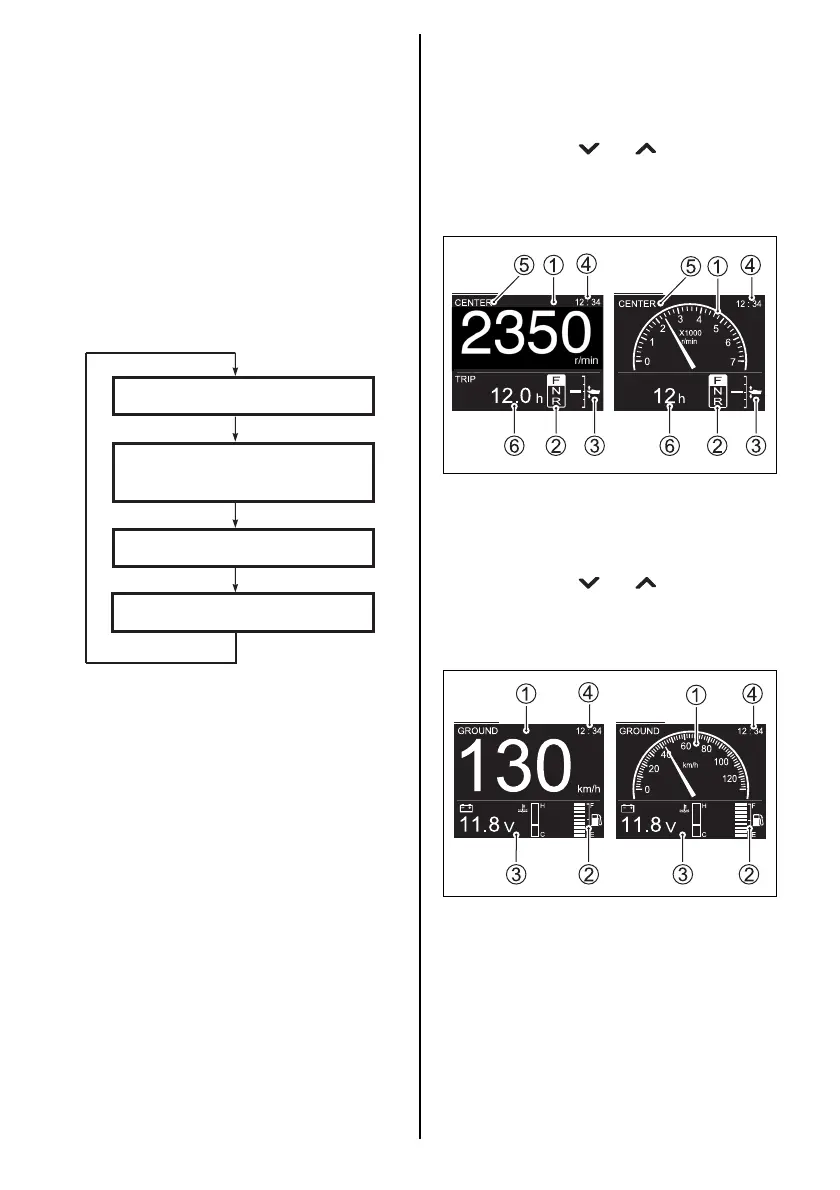
1. Engine Speed Display Screen
The engine speed 1, shift position 2, trim
position 3, time 4, engine position 5 and
sub information 6 are displayed.
The sub information display can be switched
by pressing the [ ] or [ ] buttons.
This screen can be selected between digital
and analog display. (Refer to the MENU
INFORMATION SELECTION section)
2. Speed/Fuel Information Display Screen
The speed 1, fuel level 2, sub information
3 and time 4 are displayed.
The sub information display can be switched
by pressing the [ ] or [ ] buttons.
This screen can be selected between digital
and analog display. (Refer to the MENU
INFORMATION SELECTION section)
Digital Analog
Digital Analog



 To Next Page