29
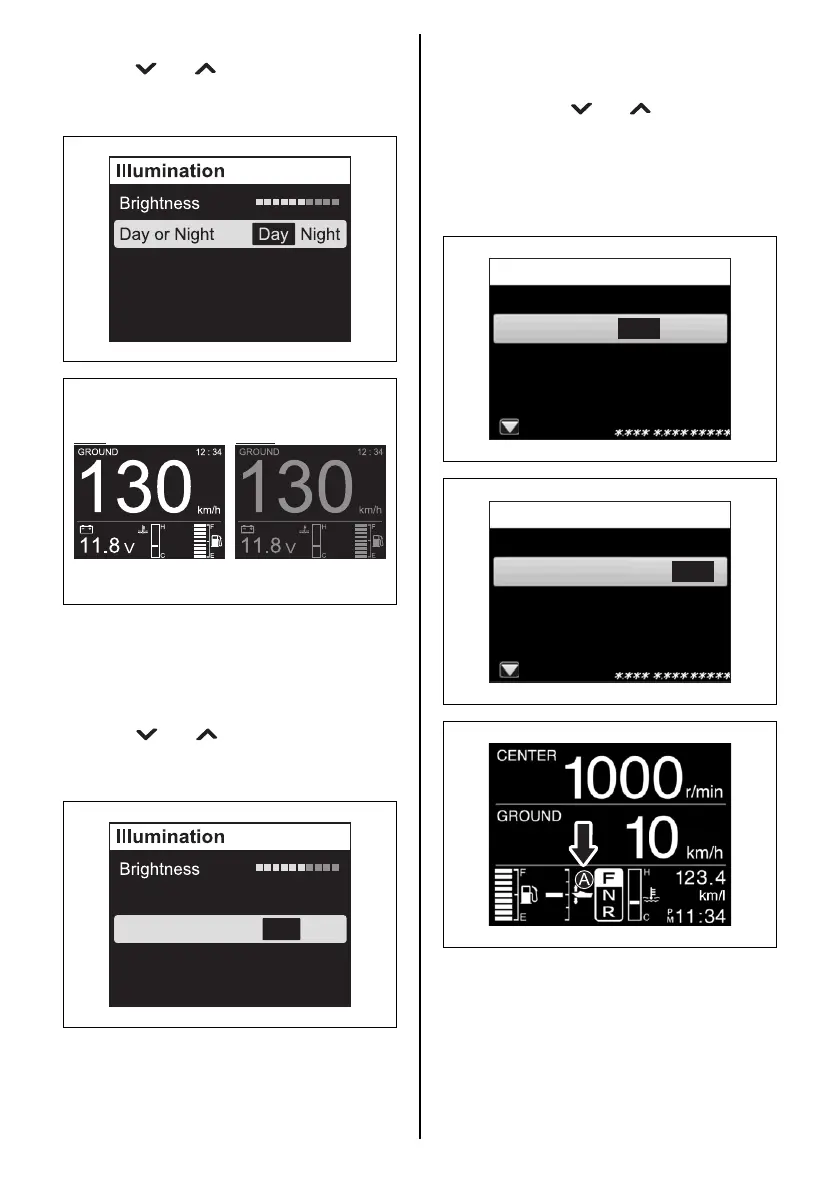
Day or Night
Press the [ ] or [ ] button to select “Day or
Night”. Next, select “Day” or “Night” using the
[SET] button.
Sync
The “Brightness” setting is synchronized with
the “Day or Night” setting for the two or more
gauges where “ON” has been selected in the
“Sync” setting.
Press the [ ] or [ ] button to select “Sync”.
Next, select “ON” (synchronous) or “OFF”
(asynchronous) using the [SET] button.
Sync ON OFF
Day or Night Day Night
2. Auto Trim
Sets the Auto Trim mode.
Set the outboard motor to the full trim down
position. Use the [ ] or [ ] buttons to select
“Auto Trim”, and press the [SET] button.
Next, press the [SET] button to select either
“ON” or “OFF”.
When the Auto Trim mode is ON, an “A” is dis-
played on the multifunction gauge screen.
Diagnosis
Display
Device List
Diagnosis
Display
Device List
Illmination
Ver.
Menu
OFFAuto Trim ON
Diagnosis
Display
Device List
Diagnosis
Display
Device List
Illmination
Ver.
Menu
OFFAuto Trim ON



 To Next Page