EasyManua.ls Logo

Suzuki SMD9 - User Manual

Suzuki SMD9
43 pages
Print Icon
To Next Page IconTo Next Page
Loading...
All brand and product names are trademarks, registered trademarks or service marks of their respective holders.
Installation Manual
IMPORTANT NOTICES AND SAFETY INSTRUCTIONS..........i
SYSTEM CONFIGURATION ....................................................iii
EQUIPMENT LIST ....................................................................iv
1. INSTALLATION....................................................................1
1.1 Disply Unit Installation............
......................................................
1
1.2 Radar Sensor (DRS4W) Installation............................................4
1.3 Transducer Installation................................................................5
1.4 Speed/Temperature Sensor (Option) Installation......................14
2. WIRING...............................................................................15
2.1 Power/NMEA0183 Port.............................................................15
2.2 XDR Port
.....................................................................................
16
2.3 NMEA2000 (CAN bus) Connections..........................................17
3. SETTINGS AND ADJUSTMENTS
.....................................
18
3.1 Starting the Setup Procedure
.....................................................
18
3.2 How to Use the Menu
................................................................
19
3.3 Initial Setup Menu
.......................................................................
20
3.4 How to Set up the SUZUKI Gateway.........................................24
3.5 SMD 7/9 Connection Examples of Various Systems
.................
28
3.6 How to Set Up the Fish Finder...................................................36
3.7 How to Set Up the Radar...........................................................37
4. INPUT/OUTPUT DATA........................................................39
4.1 How to access the [Interface] menu...........................................39
4.2 How to set up for NMEA0183 configurations .............................39
4.3 How to select a data source
.......................................................
39
4.4 How to select which NMEA2000 data to output
.........................
40
4.5 How to select which NMEA0183 sentence to output
.................
40
4.6 How to calibrate (offset) the sensors .........................................41
4.7 How to reset the [Interface] menu..............................................42
4.8 NMEA0183/NMEA2000 Monitor
.................................................
42
5. MAINTENANCE AND TROUBLESHOOTING ....................43
5.1 General Maintenance.................................................................44
5.2 Life of Parts................................................................................44
5.3 Troubleshooting .........................................................................44
5.4 How to Restore the Default Settings..........................................46
5.5 How to View the System Information .........................................46
APPENDIX 1 MENU TREE ..................................................AP-1
APPENDIX 2 RADIO REGULATORY
INFORMATION ......AP-9
SPECIFICATIONS ................................................................SP-1
OUTLINES ..............................................................................D-1
INTERCONNECTION..............................................................S-1
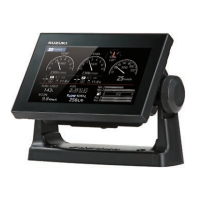
Multi-Function Display
Model
SMD7/SMD9
PACKING LISTS.....................................................................A-1


Questions and Answers

  • J
    Jeffrey KeithAug 21, 2025
    What to do if Suzuki Monitor power is not turning on?
    • S
      Steven OrozcoAug 22, 2025
      If your Suzuki Monitor is not turning on, try the following: * Ensure the power connector is securely fastened. * Inspect the power cable connector for any signs of corrosion. * Examine the power cable for damage or corrosion. * Verify the battery provides the correct voltage output. * Press and hold the power button for several seconds.
  • T
    Teresa SimpsonSep 4, 2025
    What to do if Suzuki Monitor discrimination in range is poor?
    • K
      Kathleen DixonSep 4, 2025
      If you are experiencing poor discrimination in range on your Suzuki Monitor, adjust the rain control.
  • N
    Natalie DavenportSep 2, 2025
    What to do if Suzuki Monitor range doesn't change?
    • H
      haley10Sep 3, 2025
      If you change the range on your Suzuki Monitor, but the radar picture does not change, try to change the range again. If that doesn't work, turn the power off and on again.
  • M
    mayslarrySep 1, 2025
    What to do if Suzuki Monitor own ship track is not plotted?
    • D
      davidfosterSep 1, 2025
      If the own ship track is not plotted on your Suzuki Monitor, check if [Tracks Disp] is turned on in the layered menu.
  • T
    Tanya PetersenAug 30, 2025
    What to do if Suzuki Monitor range rings are not displayed?
    • A
      Angel MorrisAug 30, 2025
      If the range rings are not displayed on your Suzuki Monitor, check if [Radar Rings] is turned on in the layered menu.
  • T
    Tara WolfeAug 29, 2025
    Why is Suzuki Monitor sensitivity weak after tuning the receiver?
    • R
      Robert PenaAug 29, 2025
      If you've tuned the receiver on your Suzuki Monitor, but the sensitivity is weak, the lifespan of the magnetron may be over. It is recommended to have a technician check the magnetron.
  • G
    Geoffrey JamesAug 27, 2025
    Why is Suzuki Monitor position not fixed?
    • J
      joseph02Aug 28, 2025
      If the position on your Suzuki Monitor is not fixed, check for interfering objects near the display unit that might be blocking reception.
  • M
    Michael TaylorAug 26, 2025
    What to do if Suzuki Monitor touch screen is not responding?
    • J
      Julie MendezAug 27, 2025
      If the touch screen on your Suzuki Monitor is not responding to touch operations: * Press the power key and check that [Touch Screen] in the [Brilliance] pop-up menu is set to [ON]. * Turn the power off, then on again. If the problem continues, contact your local dealer for assistance.
  • C
    crystal50Aug 25, 2025
    What to do if Suzuki Monitor power is on but nothing appears on the screen?
    • M
      Maria CampbellAug 25, 2025
      If your Suzuki Monitor's power is on but nothing appears on the screen, try pressing the power button several times to adjust the brilliance. Also, check to ensure the unit is properly plugged into the power source.
  • R
    Robert MillerAug 23, 2025
    What to do if Suzuki Monitor display has frozen?
    • C
      Cody SmithAug 23, 2025
      If the display of your Suzuki Monitor has frozen, try the following steps: 1. Push the power switch until the power goes off. 2. Turn the power on again. 3. Push the hard reset button, located below the microSD card slots.

Summary

IMPORTANT NOTICES AND SAFETY INSTRUCTIONS

Safety Precautions

Warnings and cautions before operation.

SYSTEM CONFIGURATION

SPECIFICATIONS OF MULTI-FUNCTION DISPLAY SMD7;9

INSTALLATION

WIRING

SETTINGS AND ADJUSTMENTS

How to Set Up the SUZUKI Gateway

Setting up the Suzuki Gateway.

How to Set Up the Fish Finder

Setting up fish finder.

How to Set Up the Radar

Setting up radar.

INPUT;OUTPUT DATA

MAINTENANCE AND TROUBLESHOOTING

Troubleshooting

General troubleshooting steps.

SMD7;9 INTERCONNECTION (DIAGRAM)

Suzuki SMD9 Specifications

General IconGeneral
BrandSuzuki
ModelSMD9
CategoryMonitor
LanguageEnglish

Related product manuals