8
Add device
<
Welcome Home
Set your home location for more
information
All Devices Living Room
Master
...
Add Device
Home Me
Work office
<
No devices
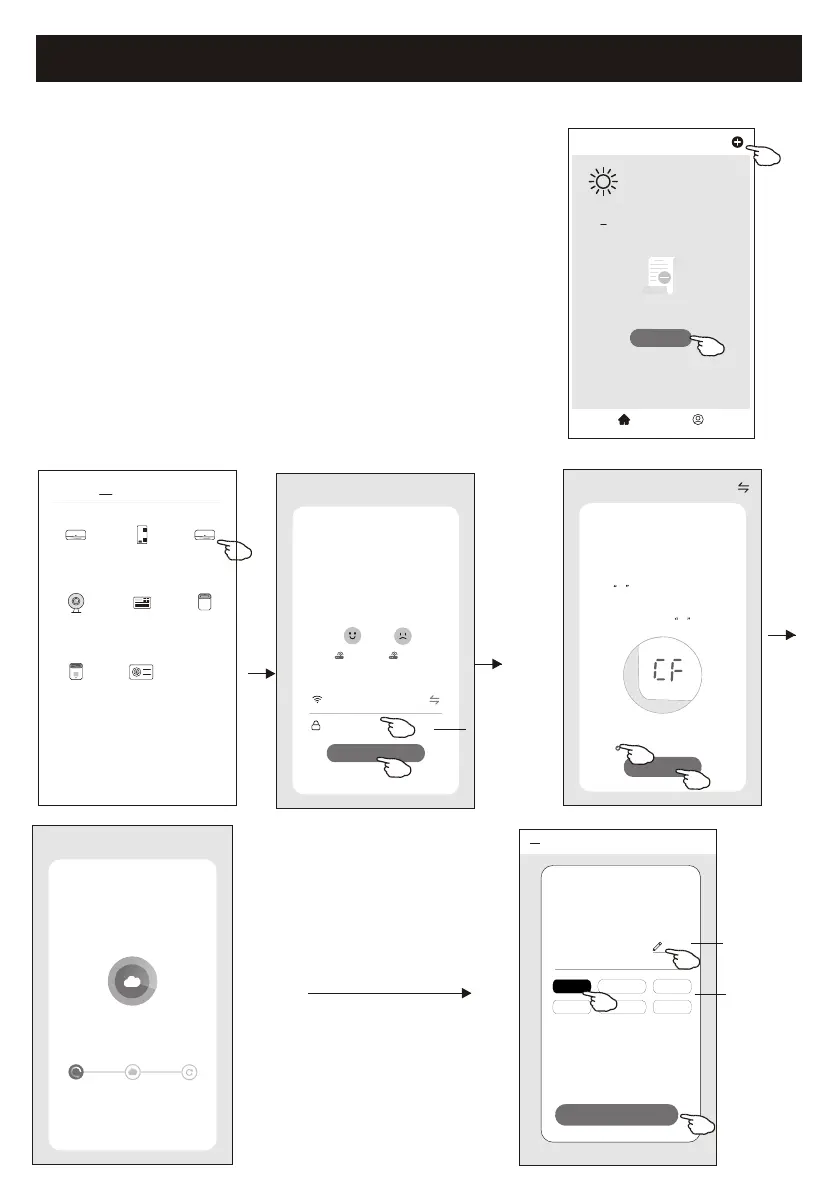
1.Power on the indoor unit, no need to launch the air conditioner.
2.Click "+" in the upper right corner of the "Home" screen
or tap "Add device" on the room which has no device.
3.Tap the "Split Air Conditioner" logo.
4.Input the password of the Wi-Fi which the same as your smart
phone connected, then tap "Next".
5.Follow the comments on the next screen to reset the Wi-Fi module
then check "Confirm the device is reset" and tap"Next".
6.You can see the percent rate of connecting process, at the same time
"PP","SA","AP" shining in turn on the indoor display.
"PP" means "Searching the router"
"SA" means "connected to the router"
"AP" means "connected to the server"
There are 2 methods to add the device.
1-CF mode
CF Mode
Reset the device first.
Method1:When there is a DISPLAY key on the
remote control, press the DISPLAY key 6 times
in the time of 8 seconds; when there is no
DISPLAY key on the remote control, press the
ECO key 6 times in the time of 8 seconds until
the device beeps twice and the LCD screen
show CF .
Next
Cancel
Confirm the device is reset.
Resetting Devices
<
Method2:Press the General key 9 times in the
time of 8 seconds until the device beeps twice
and the LCD screen show CF .
Add Device
<
Device added
successfully
Sample1
Living Ro... Master Be... Second B...
Dining R... Kitchen Study Ro...
Rename the
device
Select the
location room
Done
Select 2.4 Ghz
Wi-Fi Network and
enter password
Next
Cancel
If your Wi-Fi is 5GHz, please set it to
bo 2.4GHz.Common router setting
method
2.4GHz 5GHz
*******
Password
enter password
<
Add Manually
Auto Scan
Dehumidifier
Air Conditioner
(BT+Wi-Fi)
Fresh Air
Purifier
Split Air
Conditioner
Window Type
Air Conditioner
Portable Air
Conditioner
Security
Camera
Swimming
Pool H/P
Adding device...
Cancel
Ensure that the device is powered on.
2%
Scan
devices.
Register on
Cloud.
Initialize the
devices.


 To Next Page