8
Adicionar dispositivos
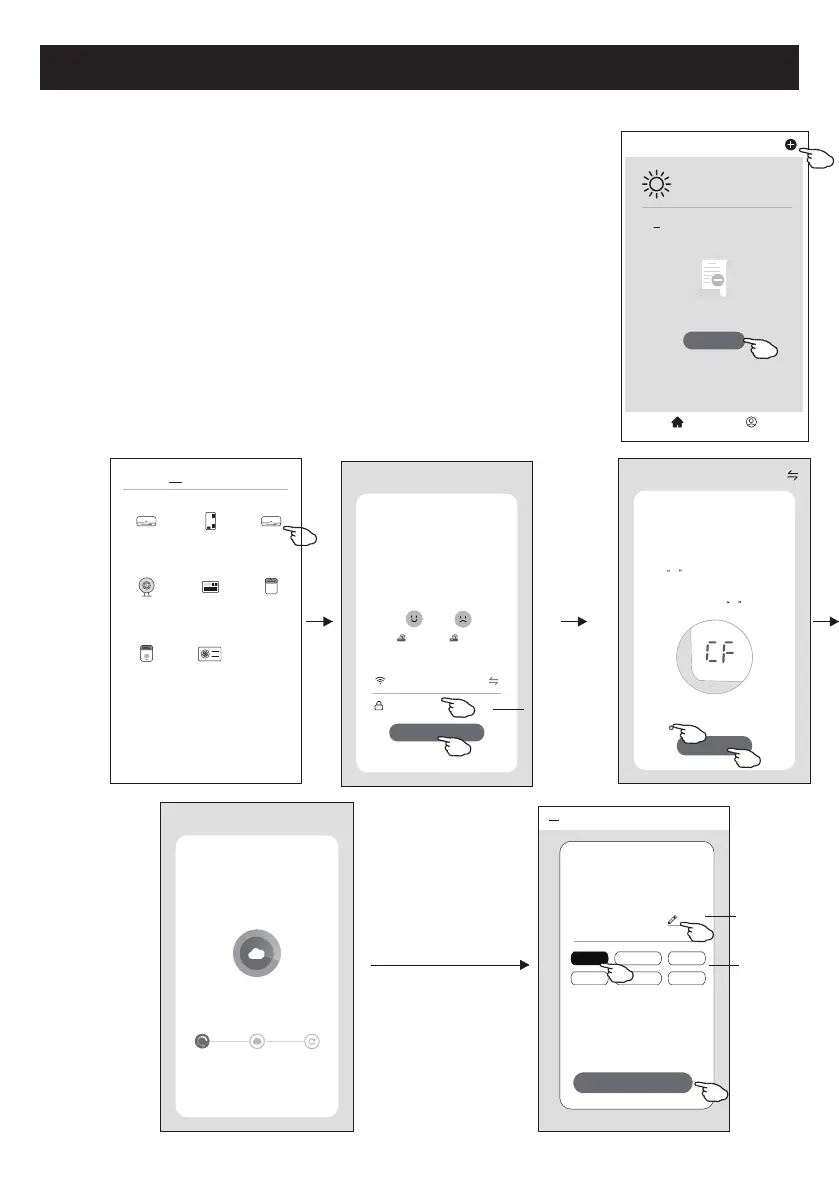
Há dois modos CF (conexão rápida) e AP (ponto de acesso) para adicionar o
dispositivo.
Modo CF
1. Ative a unidade interna. Não há necessidade de ligar o ar condicionado.
2. Clique em "+" no canto superior direito do ecrã principal ou toque em "Add device" do
quarto que não possuir um dispositivo.
3. Toque na logo "Split Air conditioner".
4. Digite a senha do Wi-Fi, que é a mesma que o seu telemóvel inteligente utilizou para
conectar, e então toque em "Next”.
5. Siga os comentários do próximo ecrã para redenir o módulo Wi-Fi e então marque
"Conrm the device is reset", e toque em "Next”.
6. Você pode ver a taxa percentual do processo de conexão, ao mesmo tempo, que vê
"PP", "SA” e "AP" piscando no visor interno.
"PP" signica "Searching the router”
"SA" signica "Connected to the router”
"AP" signica "Connected to the server”
<
Welcome Home
Set your home locaon for more
information
All Devices Living Room
Master
...
Add Device
HomeMe
Work office
<
No devices
CF Mode
Reset the device first.
Method1:When there is a DISPLAY key on the
remote control, press the DISPLAY key 6 mes
in the me of 8 seconds; when there is no
DISPLAY key on the remote control, press the
ECO key 6 mes in the me of 8 seconds unl
the device beeps twice and the LCD screen
show CF .
Next
Cancel
Confirm the device is reset.
Reseng Devices
<
Method2:Press the General key 9 mes in the
me of 8 seconds unl the device beeps twice
and the LCD screen show CF .
Add Device
<
Device added
successfully
Sample1
Living•Ro••• Master•Be••• Second•B•••
Dining•R••• Kitchen Study•Ro•••
Done
Select 2.4 Ghz
Wi-Fi Network and
enter password
Next
Cancel
If your Wi-Fi is 5GHz, please set it to
bo 2.4GHz.Common router seng
method
2.4GHz 5GHz
*******
Password
<
Add Manually
Auto Scan
Dehumidifier
Air Condioner
(BT+Wi-Fi)
Fresh Air
Purifier
Split Air
Condioner
Window Type
Air Condioner
Portable Air
Condioner
Security
Camera
Swimming
Pool H/P
Adding device...
Cancel
Ensure that the device is powered on.
2%
Scan
devices.
Register on
Cloud.
Inialize the
devices.
digite a senha
Renomear
dispositivo
Selecione a sala
de localização


 To Next Page