Air conditioner control
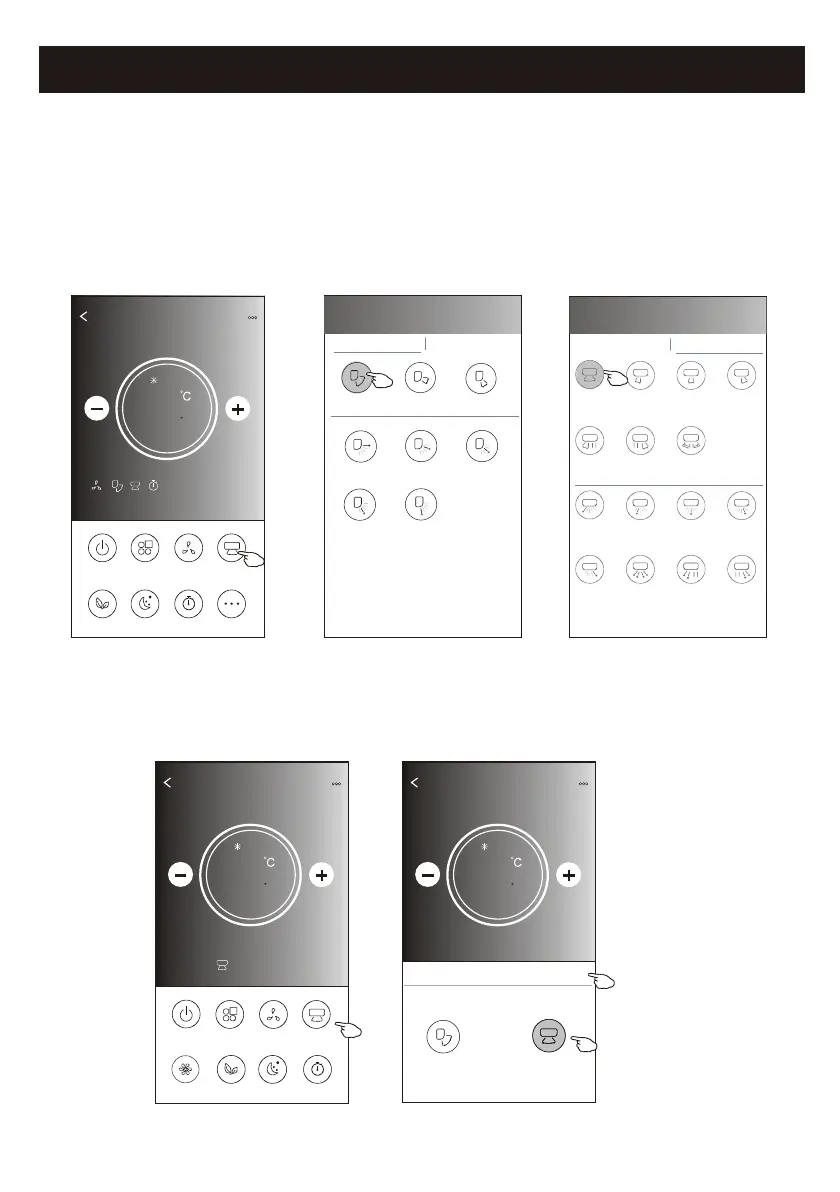
1.Tap the Precision Air Flow button or Swing Flow button.
2.Choose your desired air flow and tap it.
3.Tap the X button to back to the main control screen.
4.The selected air flow indicator will appear on the screen.
ON/OFF
Fan Speed
Precision
Air Flow
More
Eco Sleep
Mode
Timer
Sample1
25
Cool
0
17
ON/OFF
Sample1
25
Cool
0
Fan Speed
Swing Flow
Eco Sleep
Mode
Timer
Turbo
Left-Right Flow
Note: The Main control screen and Air Flow screen may appear slightly different ,
depending on the air conditioner model.Example as below:
Get verification code
< Precision Air Flow
Up-Down Flow Control Left-Right Flow Control
Downwards
Swing
Up-Down
Swing
Upwards
Swing
Middle Fix
Top Fix
Upper Fix
Lower Fix
Bottom Fix
< Precision Air Flow
Up-Down Flow Control Left-Right Flow Control
Right
Swing
Left-Right
Swing
Left
Swing
Middle
Swing
Center-Left
Swing
Center-Right
Swing
Wide
Swing
Center-Right
Fix
Left fix
Center-Left
Fix
Middle Fix
Right Wide
Angle Fix
Right Fix
Whole
Anger Fix
Left Wide
Angle Fix
Back
Sample1
25
Cool
0
Swing Flow
X
Up-Down
Left-Right
Note: For some models without auto Left-Right wind, If you active it, you will hear a beep,but no any actions.
Control form2-Air Flow control


 To Next Page