ENG
4
2.1 Multimedia
Speaker System
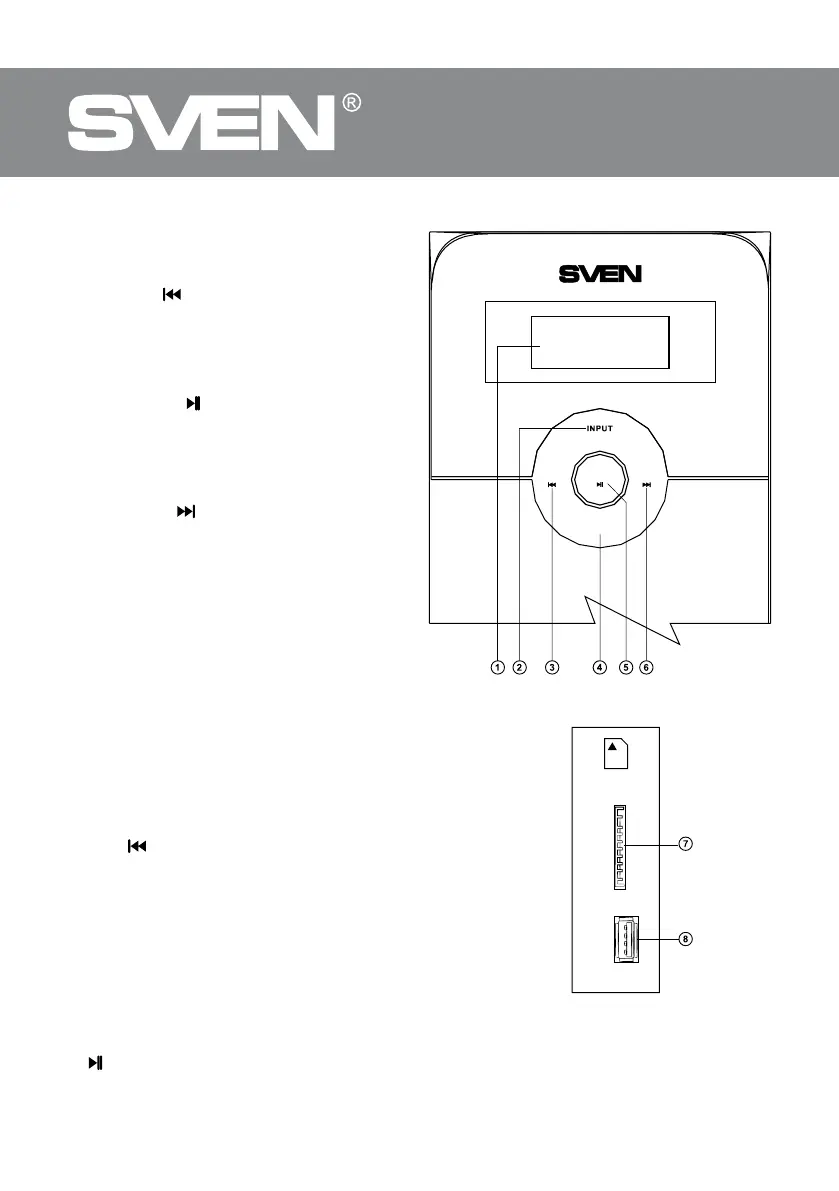
Subwoofer control panels
a LED display.
b INPUT: input switch, PC/AUX/FM/Player/
Bluetooth mode switch (pressed short).
c VOL-/СН-/
: previous track (pressed short
inthe Player and Bluetooth mode); previous
station* (pressed short in the Tuner mode);
volume/timbre down (pressed long).
d TIMBRE: bass/treble selection (pressed
short in any mode).
e ST-BY/AUTO/
: play/pause (pressed short
in the Player and Bluetooth mode); start/stop
auto scan (pressed short in the Tuner mode);
Standby mode (pressed long in any mode);
disconnect from device (long pressing in Blue-
tooth mode).
f VOL+/СН+/
: next track (pressed short
inthePlayer and Bluetooth mode); next sta-
tion* (pressed short in the Tuner mode); vol-
ume/timbre up (pressed long).
g SD/MMC CARD: slot for SD/MMC cards**
containing МР3 audio les.
h USB: slot for a USB ash device** con-
taining МР3 audio les.
i ON/OFF: power switch (see Fig. 3).
j Power cord.
k RADIO ANT: radio antenna input jack.
l PC AUDIO INPUT: PC input jack.
m AUX AUDIO INPUT: line input jack.
n AUDIO OUTPUT: satellite output terminals.
Remote control (see Fig. 4)
a INPUT: the MSS mode selection.
b TREBLE-/+: treble level up/down.
c TUNE+/-: manual band scanning (in the Radio mode).
d CH-/
: previous track (pressed short in the Player mode)
previous station** (pressed short in the Radio mode).
e BASS-/+: bass level up/down.
f SW+/-: subwoofer volume level control.
g 0-9: numeric pad.
h REPEAT: player operation mode selection.
i RESET: return to default settings.
j CLOCK: current time display.
k VOL+/-: volume level control.
l SET: current time setting.
m CH+/ : next track (pressed short in the Player mode);
next station** (pressed short in the Radio mode).
n
/AUTO: Play/Pause ( pressed short in the Player mode); auto scan start/stop (pressed long
in the Radio mode); disconnect from device (long pressing in Bluetooth mode).
Fig. 1. Subwoofer control panel
Fig. 2. Subwoofer side panel
++VOL- CH VOLC H-
TIMBRE
ST.BY/// AUTO
SD/MMC
CARD
USB



 To Next Page