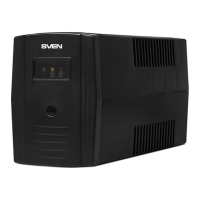
This document describes the SVEN PRO series of Uninterruptible Power Supplies (UPS).
Function Description
The SVEN PRO series UPS devices are line-interactive uninterruptible power supplies designed to protect personal computers and peripheral devices from power outages and fluctuations. In the event of a mains power failure, the connected equipment is powered by the UPS's battery through an inverter, which converts the +12/24V DC voltage to 220V AC. This allows users to save data and properly shut down the operating system. When mains power is normal, the voltage passes through an Automatic Voltage Regulator (AVR) module, which adjusts the voltage to a standard 220V before supplying it to the connected equipment. Simultaneously, the built-in charging unit recharges the battery.
Important Technical Specifications
The SVEN PRO series offers several models with varying capacities and features: Pro 400, Pro 600, Pro 650 (LCD, USB), Pro 800, Pro 1000 (USB), and Pro 1500 (LCD, USB).
General Specifications:
- Automatic Voltage Regulation (AVR): 175-280V ± 3% (built-in stabilizer).
- Input Voltage: 175-280V ± 3%.
- Input Frequency: 50 Hz.
- Output Voltage: 220V ± 10%.
- Output Frequency (backup mode): 50 ± 1 Hz.
- Transfer Time: < 10 ms.
- Efficiency: > 70%.
- Operating Temperature: 0-40 °C.
- Operating Humidity: 10-90%.
- Short Circuit Protection: Overcurrent (restorable fuse).
- Case Material: Fire-proof ABS plastic.
- Type of Load: PC, monitor.
Model-Specific Specifications:
| Parameter |
Pro 400 |
Pro 600 |
Pro 650 (LCD, USB) |
Pro 800 |
Pro 1000 (USB) |
Pro 1500 (LCD, USB) |
| Apparent Power (VA) |
400 |
600 |
650 |
850 |
1000 |
1500 |
| Active Power (W) |
240 |
360 |
390 |
480 |
720 |
900 |
| Battery Capacity (A·h) |
4.5 |
7 |
7 |
9 |
2 × 7 |
2 × 9 |
| Battery Voltage (V) |
12 |
12 |
12 |
12 |
2 × 12 |
2 × 12 |
| USB Port |
– |
– |
+ |
– |
+ |
+ |
| LCD Display |
– |
– |
+ |
– |
– |
+ |
| Backup Time (min) |
3-20 (dependent on connected load) |
|
|
|
|
|
Usage Features
Initial Setup:
- Before first use, the UPS battery must be charged for at least 12 hours without any load connected. This is crucial even if the battery is fully discharged or the UPS has been unused for three months, to ensure optimal battery life.
- The UPS is designed exclusively for use with PCs equipped with switching power supply units. Operation with equipment featuring Active Power Factor Correction (APFC) is not guaranteed.
- Install the UPS in a well-ventilated area, maintaining a minimum air gap of 25 cm around the device.
- Avoid dusty environments, areas with flammable gases, direct sunlight, heating elements, excessive vibration, or outdoor use.
- The device casing may heat up to 50°C during operation, which is normal.
Operation:
- Turning On: Connect the UPS to the mains. The LED/LCD display will turn on. Models with an LCD display feature an "autostart" function, meaning they will turn on automatically when connected to the mains. For LED models, press the power button (④) to turn on the UPS; a short beep will confirm activation.
- Connecting Devices: Connect peripheral devices to the UPS. It's recommended to connect the most powerful equipment first, followed by less powerful devices.
- Automatic Restart: The "autostart" function ensures the UPS automatically restarts after a power failure.
- Power Outage Behavior:
- When mains power is lost, the UPS switches to battery power and emits an audio alarm every few seconds.
- As the battery runs low, the alarm frequency increases to every two seconds.
- Upon complete battery discharge, a continuous long alarm sounds, and the UPS automatically switches off.
- Turning Off: Disconnect all connected equipment, then turn off the UPS using the power button (④). For LCD models, the power button is non-latching; control is achieved by pressing the button to activate the command.
PC Connection (USB models):
- Models with a USB port (Pro 650 (LCD, USB), Pro 1000 (USB), Pro 1500 (LCD, USB)) can be connected to a PC using the included USB cable.
- Install the provided software from the CD.
- The software allows monitoring UPS parameters, gracefully shutting down the PC during power outages, and logging power supply status.
- In the software settings, select "Mega USB" for the communication port type.
- Important: The UPS is intended for powering only computers and monitors. Avoid connecting peripherals like laser printers, scanners, or speaker systems, as this can overload the UPS.
- During a power outage, save all open documents and shut down the PC, then turn off the UPS. Battery operation time depends on the connected load and battery condition.
Maintenance Features
Battery Maintenance:
- The UPS contains one or two maintenance-free sealed lead-acid batteries (depending on the model).
- Factors like high humidity, extreme temperatures (very high or very low), and frequent battery discharge can reduce battery lifespan.
- If the battery is not used for an extended period, its durability can also be negatively affected.
- It is recommended to perform a full battery discharge/charge cycle at least once every three months to maintain battery health.
Storage Conditions:
- Store the UPS in a dry, cool place in a vertical position with a fully charged battery.
- Before storing the UPS, ensure the battery is charged for at least 12 hours.
- Warning: Do not operate the UPS in environments where the ambient temperature does not match the values specified in the technical specifications.
Troubleshooting:
- UPS connected but shows no voltage/enters off-line mode: This indicates over- or undervoltage in the mains. Disconnect the PC and UPS, then reconnect once mains voltage normalizes.
- UPS does not start: Check if the fuse has tripped or if the battery is discharged. Reset the fuse and charge the battery.
- UPS immediately switches off during power drop:
- The battery may be discharged; perform a full charging cycle.
- The battery may be faulty and needs replacement.
- The connected load's power requirements might exceed the UPS's capacity.
- If problems persist, contact an authorized service center. Do not attempt self-repair.
Warranty:
- The battery warranty is 6 months from the sale date (but not more than 18 months from the UPS manufacturing date).
- The general warranty period for the UPS is 24 months.
- The service life of the UPS is 5 years.

 Need help?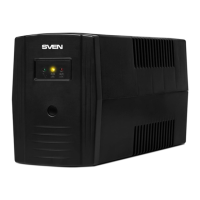

 To Next Page
 General