ENG
5
Operation Manual
Pro
Important!
Before the first start-up of the UPS
it is necessary to charge the battery for at least
12 hours without load.
6. MAIN FUNCTIONS
• If there is no electric power supply in the mains,
the UPS is powered with a battery, while the device
connected to the PC produces an audio alarm every
few seconds.
• When the battery is running down, the UPS starts
to produce an audio alarm every 2 seconds.
• When the battery has fully run down, there is a
long audio alarm after which the UPS automatically
switches off.
• When electric power supply restores in the mains,
the UPS automatically switches on. Then the battery
should be charged for at least 12 hours.
7. CONNECTION AND OPERATION
• Place the UPS in an appropriate position with proper
ventilation (free space around the UPS must be not
less than 25 cm).
• Connect the devices to the UPS.
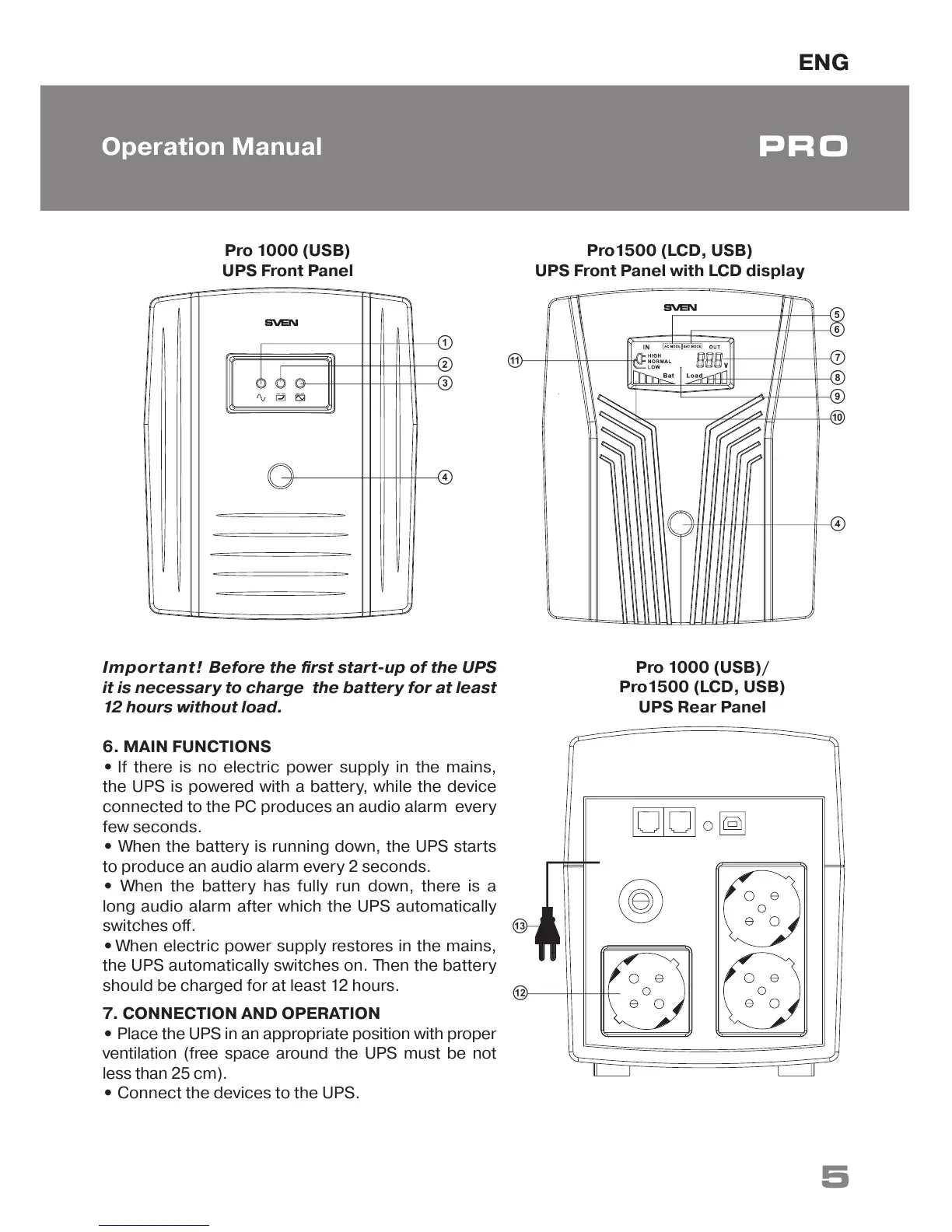
Pro1500 (LCD, USB)
UPS Front Panel with LCD display
g
d
f
e
j
i
h
Pro 1000 (USB)/
Pro1500 (LCD, USB)
UPS Rear Panel
l
m
Pro 1000 (USB)
UPS Front Panel
c
d
b
a
k



 To Next Page