4
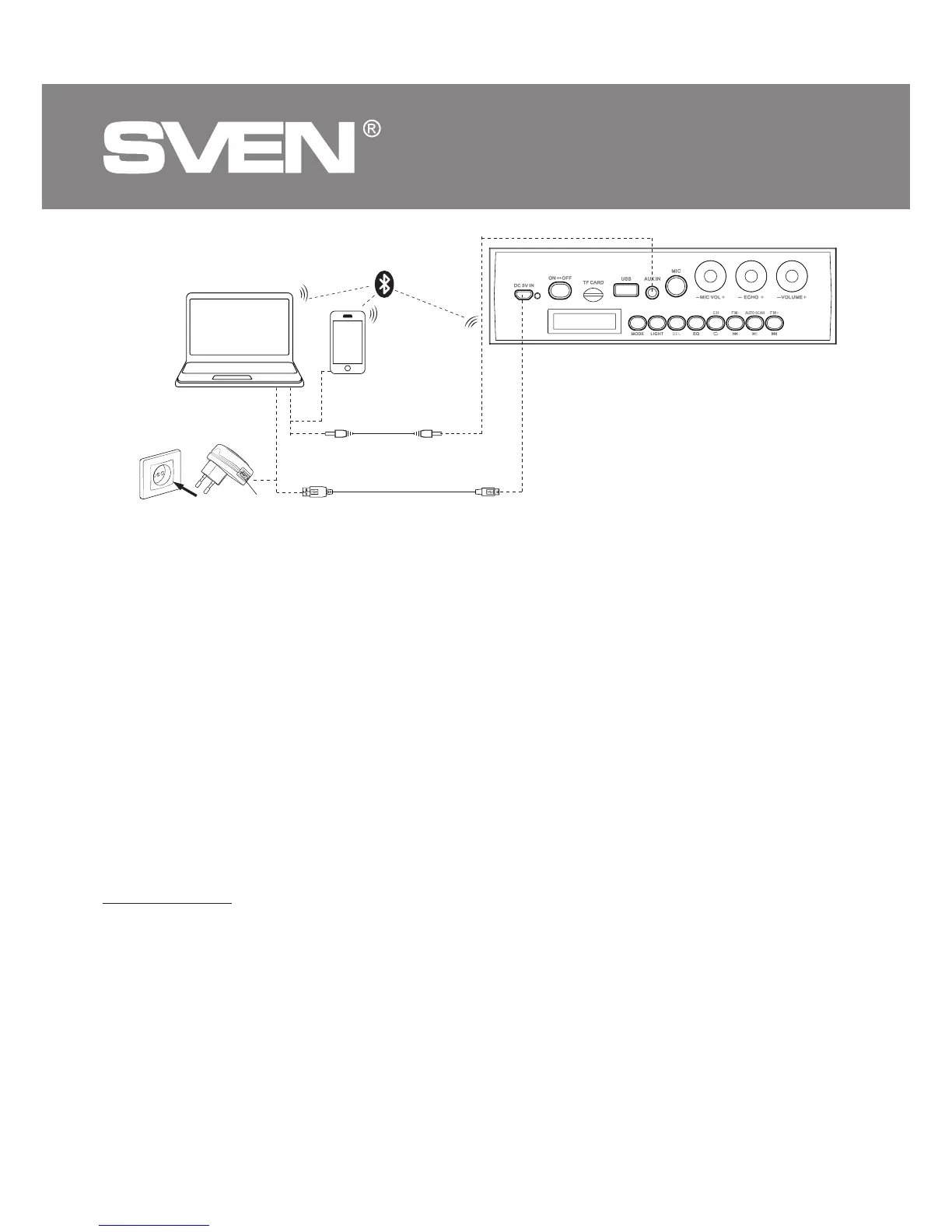
Fig. 2. Connection diagram
USB to micro USB
power cable
USB jack
Mini-jack to mini-jack
signal cable
Mobile device
PC
Socket
OPERATION MODES
Bluetooth mode
• Wireless data transfer via the Bluetooth protocol enables to connect speaker system to compatible
devises. Maximum radius of action of data transfer is 10 m. Such obstacles as walls or other electronic
devices can interfere with the signal transfer.
• Turn on the speaker system Bluetooth mode – press button a several times until display shows
«bt» inscription.
• It is necessary to select the search mode of devices with Bluetooth on a signal source (telephone,
notebook, smartphone, etc.). «SVEN PS-485», massage will be displayed on the screen which is to
be connected to*.
• When connection is successful, there will be a short beep and the indication of the search mode on
speaker system is over**.
* You might have to enter “0000” code to connect some models of devices via Bluetooth.
** If the item has been already registered in the device list of a source, then the second search mode
activation is not obligatory. Choose the item name «SVEN PS-485» and the “connect” command on
the source.
Radio mode
• To improve the reception quality of the radio signal, connect the 3.5 mm mini-jack cable (included)
to the AUX IN input o.
• Turn on the speaker system – press button МODE a several times until the display shows the
station frequency. Long-term pressing button g activates auto search mode. After scanning
completion, the rst scanned radio station will start to operate automatically. With buttons f and
h select a desired radio station.


 To Next Page