IR INPUT CODES
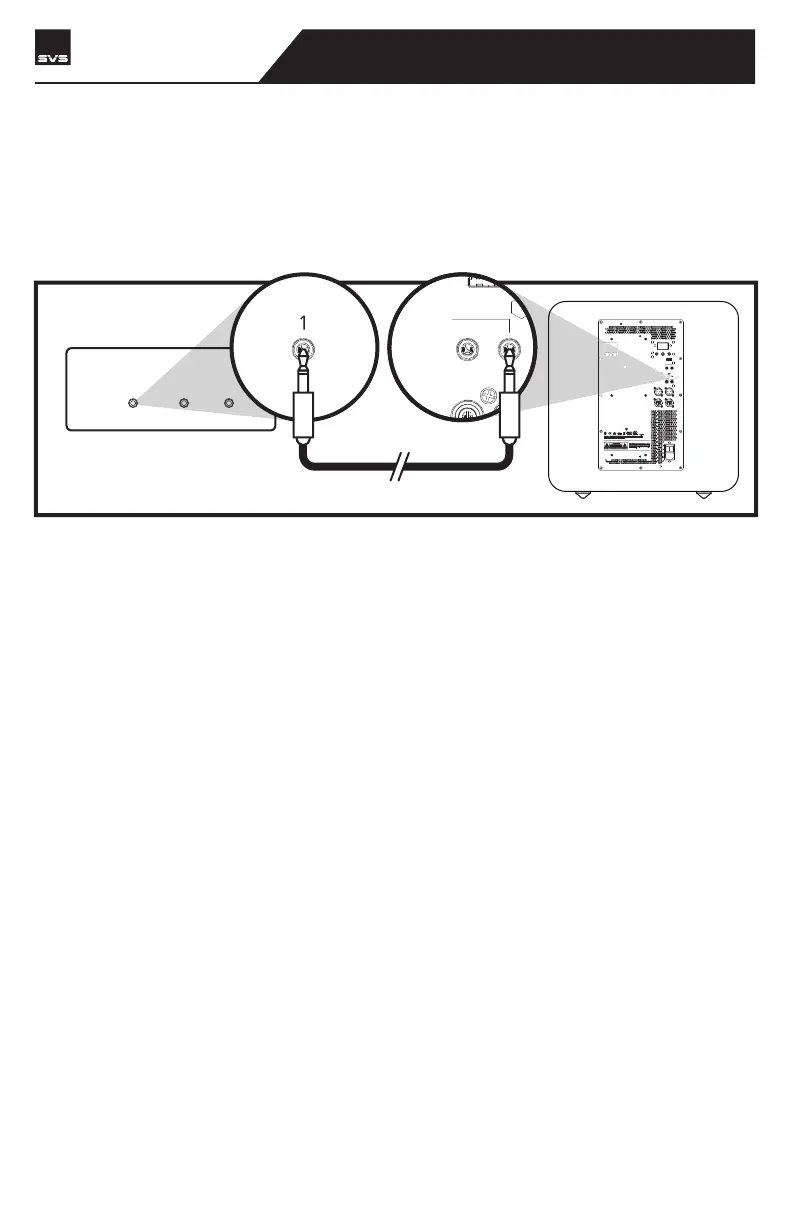
The Rear IR input will allow IR based control systems to send specific commands to the subwoof-
er amplifier. A powered IR repeater must be used, passive IR sensors will not work. The IR
control system must be able to send NEC format commands. For more information please
consult your IR control system for more details. The IR pin layout is as shown below where the
“tip” is signal, and the “sleeve” is ground. For NEC programming, the below table show the
available IR commands and their codes.
Volume Up #define VOL_DOWN_IR_CODE 0x020220DF
Volume Down #define VOL_UP_IR_CODE 0x0202609F
Load Preset 1 #define PRESET1_IR_CODE 0x020228D7
Load Preset 2 #define PRESET2_IR_CODE 0x0202A857
Load Preset 3 #define PRESET3_IR_CODE 0x02026897
IR OUTPUTS
R
BALANCED
INPUT
OUTPUT
LFE
ON
OFF
100V-240V
50-60Hz 2000W
AC/DC
TRIGGER INPUT
IR INPUT
SVS SOUNDPATH
WIRELESS AUDIO ADAPTER
SVS | 340 Victoria Rd. Youngstown, OH 44515, USA | svsound.com
SVS | 340 Victoria Rd. Youngstown, OH 44515, USA | svsound.com
USB Output:
LINE LEVELLINE LEVEL
INPUTINPUT
12V 3V-12V | AC/DC AC/DC
GGER INPUTTRIGGER INPUT
IR INPUTIR INPUT
OUNDPATHSVS SOUNDPATH
O ADAPTERWIRELESS AUDIO ADAPTER
IR REPEATER
123
PB17-Ultra R|Evolution
SUBWOOFER


 To Next Page