Contents
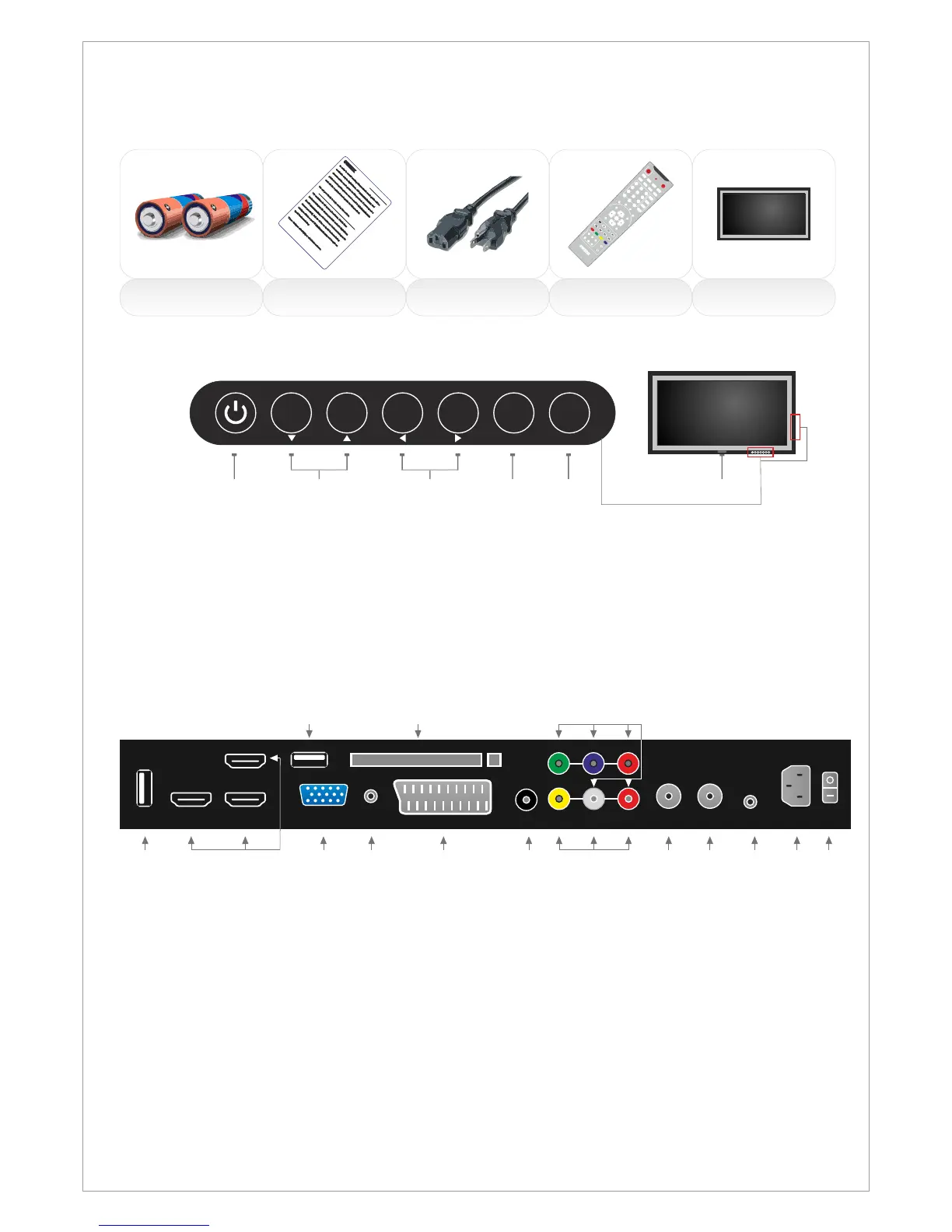
Included items in SG-series:
2 x AAA Battery
Remote Control
Notice AC Cable
POWER
SOURCE
MUTE SLEEP
STILL INFO.
DUAL I-II
ARC
PSM SSM
PIP
P.INPUT
P.POSITION
P.SIZE
3
21
6
5
4
9
8
7
PRE/CH
PC
HDMI
S.SELECT
TV
MENU EXIT
PR+
VOL+
PR-
VOL-
ENTER
Scart
Component
TTX ON
MIX
SIZE HOLD
CANCEL INDEX TIME
REVEAL
RED GREEN YELLOW
BLUE
PIP PR+
PIP PR-
PG UP
PG DOWN
FAV
GUIDE
TV/RADIO
DTV SETUP
0
-/--
LCD
Notice! / Information
1. USB/FW USB Media Player / Firmware update
2. HDMI 1-2-3 HDMI1, HDMI2 and HDMI3 inputs
3.
4. VGA Audio
Scart Scart
Composite video (AV)
Component Component
VGA PC (VGA) input
Audio-input of PC/VGA
input
6. CI Module CI Module input
7. D.Audio Digital Audio output (Coaxial)
input
input (YPBPR)
10. DVB-T DVB-T Digital channels input
DVB-C DVB-C Digital channels input
ATV Aerial Analog channels input
11. SAT. DVB-S/S2DVB-S/S2 Satellite channels input
12. Sp. Out Speakers output
13. Power Power Input 110-240 V @ 50-60Hz
14. On/Off Main On/Off Switch
5.
8. AV
9.
1. ON/OFF: Power switch ON/OFF
2. CH+/-: Zap the channels / Navigate the OSD menu
3. Vol+/-: Decrease and increase the audio volume / Navigate the OSD menu / Adjust
values in the OSD
4. Select/Menu: Activate the OSD menu / Select in the OSD menu or Sources
Activate the input source menu / Exit the OSD menu
6. LED: Power indicator
7. IR: Remote control Infra Red receiver
Connections on the rear of the LCD-TV
5. Source/Exit:
ON/OFF SELECT EXIT
MENU
SOURCE
VOL+VOL-CH+CH-
2 3
4
5
1
6,7
Control buttons:
The control buttons’s outlook on your SWEDX LCD-TV is on the bottom or on the side:
ON/OFF SELECT EXIT
MENU
SOURCE
VOL+VOL-CH+CH-
6
2
3 5 10 13 141 4 7
6 9
12
HDMI 1 HDMI 2
VGA
D. Audio
VGA
Audio-in
Input
Power Input
On/Off Switch
AC - 100-240 V @ 50/60 Hz
AV
Component
Sp. Out
CI Module / PCMCIA
Scart 1
DVB-T
SVB-C
ATV
11
Input
SAT
DVB-S/S2
HDMI 3 USB
USB
8
1
Design and specifications are subject to change without notice.



 To Next Page