Design and specifications are subject to change without notice.
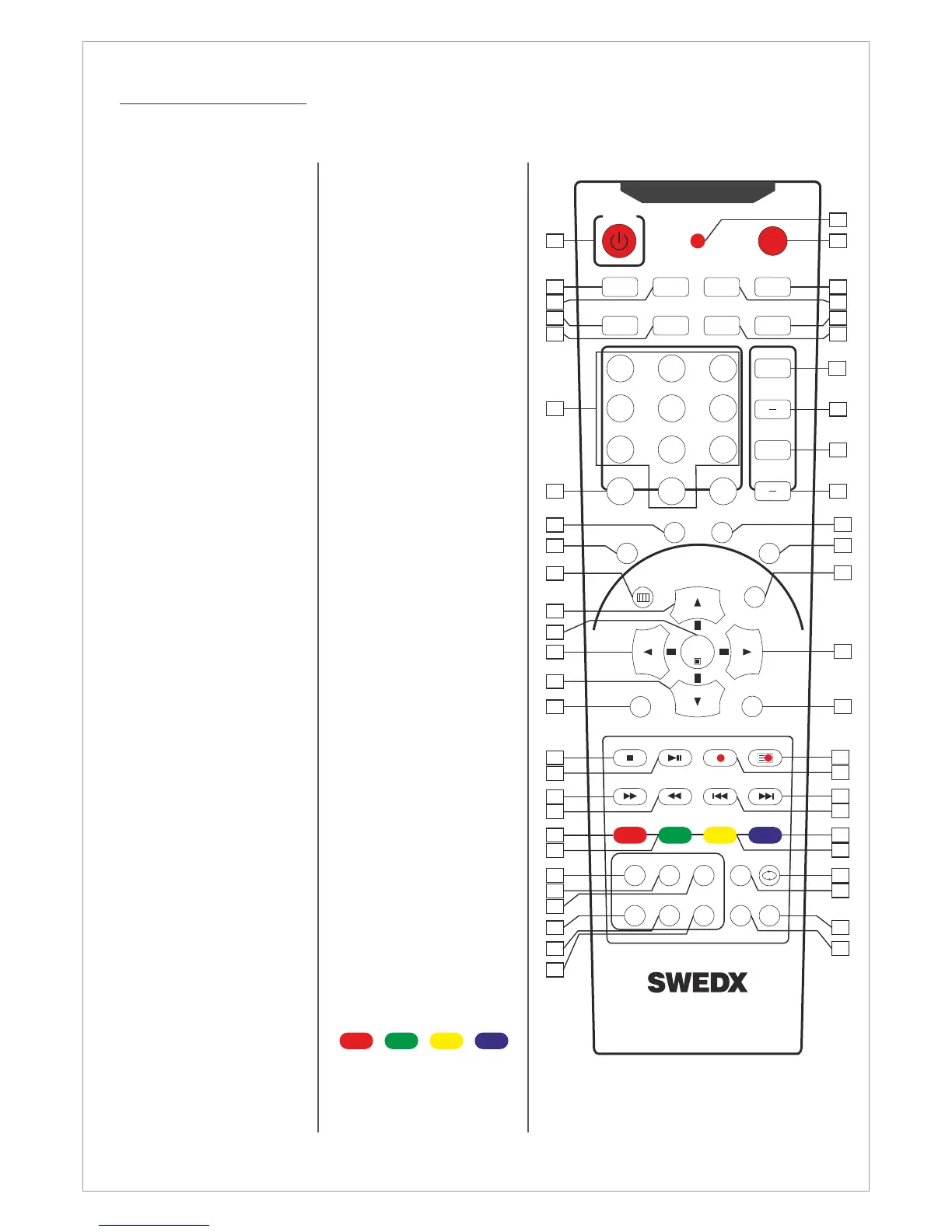
1. On/Off button
2. Turn Off/On TV
speakers
3. Enter sleep mode in
certain chosen time
4. Select audio mode
5. Aspect Ratio selection
6. Number buttons for
direct channel access
7. One/Two-digit channel
selection
8. Shortcut to HDMI
inputs.
9. Shortcut to PC input
10. Menu display. In OSD
sub-menu press to
access previous menu
11. Navigation button UP
12. Confirm/activate
button
13. Navigation/adjust
button LEFT
14. Navigation button
DOWN
15. Shortcut to
Component
16. Stop recording/playing
and Activate Teletext
17. Start/Pause play,
Start/Paus time shift
and alter Teletext mix
18. Fast forward and
Teletext cancel
19. Fast backward and
Teletext index
20. Fast-text topic
selection in Teletext
RED
21. Fast-text topic
selection in Teletext
GREEN
22. List TV-channels
23. Alter TV/Radio
Channels mode
24. Choose Audio
language in DTV
25. EPG (Electronic
Program Guide)
26. Display favorite
channels list
27. Activate/alter subtitles
in USB movieplayer
and DTV
28. Flash when a button
is pressed
Remote control buttons
29. Available sources
selection
When the channel list
is displayed, it scrolls
up to previous page in
the list.
Navigation/adjust
button RIGHT
Shortcut to Scart
43. Display Recorded List
and Hold Teletext
44. Instant Recording and
Teletext size selection
45. Next Title and Reveal
Teletext
46. Previous Title and
Display time in
Teletext
47. Fast-text topic
selection in Teletext
Blue
48. Fast-text topic
selection in Teletext
Yellow
49. Alter Replay mode in
USB mode
50. N/A for this model
51. N/A for this model
52. N/A for this model
Buttons
16,17,18,19,20,21,43,44,
45,46,47,48,49 are used
with the USB Media
Player.
30. Display additional
information
31. Picture freeze
32. Alter sound mode
33. Alter picture mode
34. Volume increase
35. Volume decrease
36. Next channel. When
the channel list is
displayed, it scrolls
down to next page in
the list.
37. Previous channel.
38. Shortcut to DTV
39. Shortcut to ATV
40. Exit the OSD
41.
42.
7
POWER SOURCE
MUTE SLEEP STILL INFO.
DUAL I-II ARC PSM SSM
+
VOL
CH
321
65
4
987
PRE/CH
PC
HDMI
DTV
ATV
MENU EXIT
ENTER
Scart
Component
TTX ON MIX SIZE HOLD
CANCEL INDEX TIME REVEAL
RED GREEN YELLOW BLUE
S.SELECTPIP
POSITIONSIZE
AUDIO
SUB-T
TV/RD
FAV
LIST
EPG
0-/--
+
1
2
3
4
5
30
31
32
33
29
28
7
8
9
10
11
12
13
14
15
38
39
40
41
42
16
18
19
17
43
45
46
44
20
21
47
48
22
23
24
25
26
27
49
50
51
52
34
35
36
37
6



 To Next Page