
 Need help?
Do you have a question about the switel WTF 719 and is the answer not in the manual?
Please read this operating instruction manual thoroughly.
These walkie-talkies have been conceived for communication with other walkie-talkies complying to the same standards.
Prevent excessive exposure to smoke, dust, vibration, chemicals, moisture, heat and direct sunlight.
Only use the power adapter plug supplied because other adapter plugs could damage the walkie-talkies.
Never throw batteries into a fire. Only use batteries of the same type. Pay attention to correct polarity.
Never use the walkie-talkies in the vicinity of medical equipment. Effects on such equipment cannot be fully ruled out.
Dispose of old electronic and electrical devices in a separate waste container. Batteries represent a hazard to health and the environment!
It is essential to read the Safety Information in Chapter 1 before starting up.
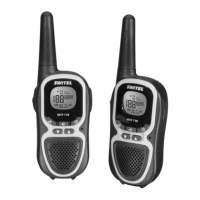
The package contains: two walkie-talkies with belt clip, an operating manual, two rechargeable battery packs, a power adapter plug.
Connect the walkie-talkie as illustrated in the diagram. For safety reasons, only use the power adapter plug supplied.
Open the battery compartment. Insert the battery pack supplied. Pay attention to correct polarity. Close the battery compartment.
Before using the walkie-talkies for the first time, charge them for at least 14 hours. Do not charge with units from other manufacturers.
Your walkie-talkies are provided with an energy-save mode to increase the service life of the batteries.
Slide the belt clip in the guide from the top until it audibly snaps into place. To detach, prize the fastening tab up.
The buttons in this operating manual are subsequently depicted with a uniform contour.
Identifies key components of the walkie-talkie unit with numbered labels.
Details various indicators and icons displayed on the walkie-talkie screen.
Explains the display and notation of operating sequences for the walkie-talkie.
Details how to interpret button symbols and operating sequences shown in the manual.
Instructions on how to turn the walkie-talkie on and off, including confirmation signals.
Instructions on how to raise or lower the volume on the walkie-talkie.
Describes how the display illumination works and when it activates.
Explains the process of transmitting and receiving radio signals with the walkie-talkie.
Hold the walkie-talkie approx. 5 to 7 cm from your mouth and speak at a normal volume.
Radio signals cannot be received when the PTT button is being pressed.
The confirmation signal is issued on releasing the PTT button, signalling the end of transmission.
Instructions on how to activate or deactivate the confirmation signal.
Procedure to activate programming mode and select the desired channel.
Explains how to set CTCSS/DCS codes for communication and compatibility.
Signals are searched for on all eight channels and all CTCSS codes in a continuous cycle.
Procedure to activate programming mode and start channel scanning.
Allows resuming channel scanning after it has been stopped.
Procedure to activate programming mode and scan for CTCSS codes.
Procedure to activate programming mode and scan for DCS codes.
Instruction to press the PTT button to end channel scanning.
Walkie-talkie automatically switches between two channels until a communication signal is detected.
Procedure to activate programming mode and set up dual-channel monitoring.
Procedure to activate programming mode and end dual-channel monitoring.
Ringing tones indicate to other subscribers that you want to talk to them.
Procedure to activate programming mode and select the desired ringtone.
Enables search for weak signals on the channel currently set. Switch to a free channel if you receive an external signal.
Prevents inadvertent modification of settings. The icon flashes in the display when activated.
Procedure to activate the key lock function.
Procedure to deactivate the key lock function.
An acoustic confirmation signal is issued each time a button is pressed. This key tone can be switched on or off.
The walkie-talkies can be used as stopwatches.
Walkie-talkie automatically starts to transmit when the unit detects a voice or a sound.
Three sensitivity levels available for operation in VOX mode, selectable according to ambient noise.
Procedure to activate the programming mode and select the VOX sensitivity.
Procedure to activate the programming mode and deactivate VOX mode.
Connect the headset on the right-hand side. Clip the walkie-talkie on your belt and fix the headset cable.
Refer to the following information first. In case of technical problems, contact the hotline service.
Contact details for technical problems and guarantee claims.
Lists common problems with walkie-talkies and their corresponding solutions.
Details technical specifications like output power, range, and battery pack.
Lists key technical features and their corresponding values.
Explains how obstructions affect range and provides a diagram of expected range under different conditions.
States that the device fulfills the requirements stipulated in the EU R&TTE directive.
Provides instructions for maintenance and details the terms of the guarantee.
Instructions on how to clean the housing surfaces using a soft, fluff-free cloth.
Details the 24-month guarantee period, terms, and conditions for claims.
An alphabetical listing of topics and their corresponding page numbers for quick reference.

 To Next Page
 General