Operating Instructions
www.snopakebrands.com
10
Essential Information
Cold Lamination
• Never insert a pouch until the previous lamination has been removed from the machine. Failure to do so could cause a jam.
• The maximum capacity of this machine (pouch + contents) is 0.6mm.
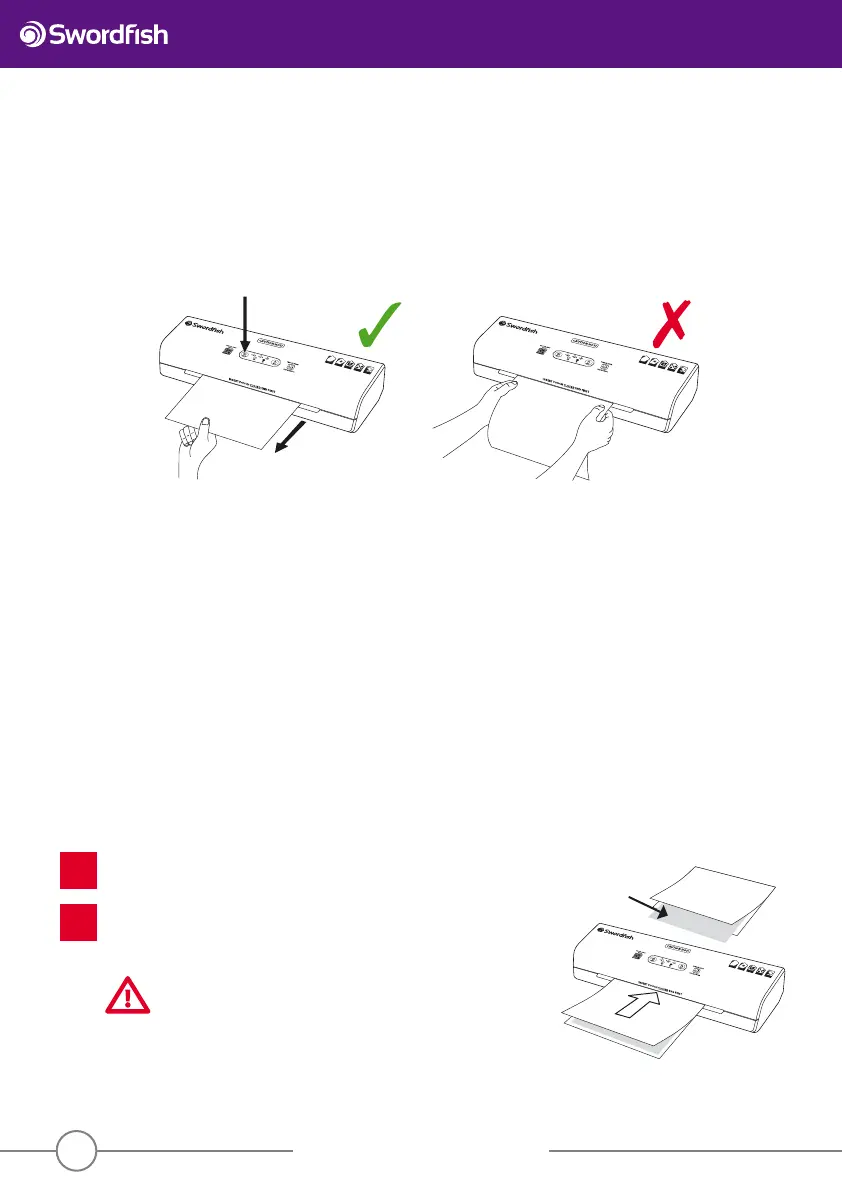
• Should a miss-feed or jam occur, press the “reverse button” to eject the pouch. The rollers will reverse direction and the pouch
will be ejected through the entry slot. Do not use force to pull the pouch from the machine as this could cause serious damage.
The majority of lamination is done using pouches that are coated with adhesive that melts at high temperature. However,
pouches coated with pressure-activated adhesive - so-called cold lamination pouches - are also available.
If you wish to use cold lamination pouches, the isolating switch on the back of the machine to the “on” position. The “cold” and
“ready” lights will illuminate and the machine will start running in cold lamination mode. It can be used for cold lamination
immediately. If the machine is still warm from previous hot lamination,“READY” will flash in the control panel while the rollers
cool down.
Maintenance
Turn on the laminator until the READY light glows.
Fold a sheet of fresh A3 copy paper once in the middle and insert a piece
of A4 card to the folded end of the copy paper. Pass through the laminator
with the folded end inserted rst. Repeat the procedure 3-5 times.
CAUTION
Do not use printed paper or the toner on the paper will melt in the
heat of the laminator and may cause laminator malfunction.
Do not insert copy paper without first folding it around a card
for support.
Do not reverse the lamination during this process - the paper will jam!
1
2
Cleaning the laminator
After laminating several documents, adhesive material from the pouch may accumulate inside the laminator. Please clean
the laminator regularly as follows:
SuperFast Laminator
PO
U
CH
TH
ICKNE
S
S
LAM
IN
ATION
TH
I
C
K
N
E
SS
NO SM
A
LL
ITEMS
N
O
ORG
A
NIC
MATERIA
L
MAX
B
ORDER
A
L
LOW
ED
Roller
Reverse button
SuperFast Laminator
POUCH
TH
I
CKNESS
LAMIN
A
TIO
N
THI
C
KNESS
NO
S
M
A
L
L
IT
E
MS
NO
OR
GANIC
MATE
R
IAL
MA
X
BORDER
ALLOWED
SuperFast Laminator
POUCH
THICKNESS
LAMINATION
THICKNESS
N
O SMALL
ITEMS
NO ORGANIC
MATERIAL
MAX BORDER
ALLOWED
Roller cleaning
support card


 To Next Page