MODE
SET
15
E
7. Favourite key
The «favourite» key gives direct access to a predefined function, and can be configured according to the needs of the user.
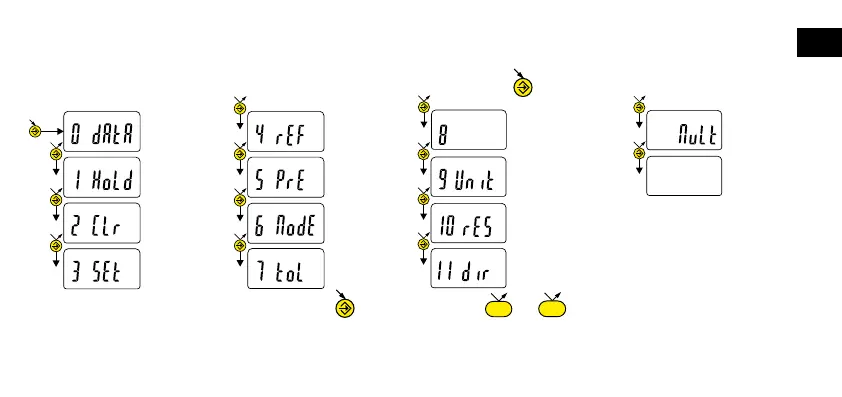
In order to assign a function to the «favourite» key, give a prolonged press on , and then select the required function :
Validation of selection: By a prolonged press on or a short press on or .
Note :
- A function can also be assigned via RS232 using the command <FCT + Function No.> (FCT 0..9 A..F)
example : Toggle unit = <FCT9>, reverse measurement direction = <FCTB>.
12
bt
13
no.F
Data
transmission
(default)
Hold display
Re-initialise
Min-Max-Delta
Zero reset
REF1 - REF2
Recall Preset
Nor-Min-Max-
Delta
Tol ON - Tol OFF
1:1 - N:
1 factor
No function
Bluetooth
®
ON-OFF
(depending on model)
mm – IN
0.01 ↔ 0.001 or
0.001 ↔ 0.0001
Measurement direction,
positive - negative











 To Next Page