MODE
MODE
MODE
MODE
SET
SET
MODE
SET
MODE
SET
MODE
SET
OFF On
MODE
MODE
SET
MODE
SET
bt,CFG
HId
PAIr
SIMPLE
SET
MODE
MODE
9
E
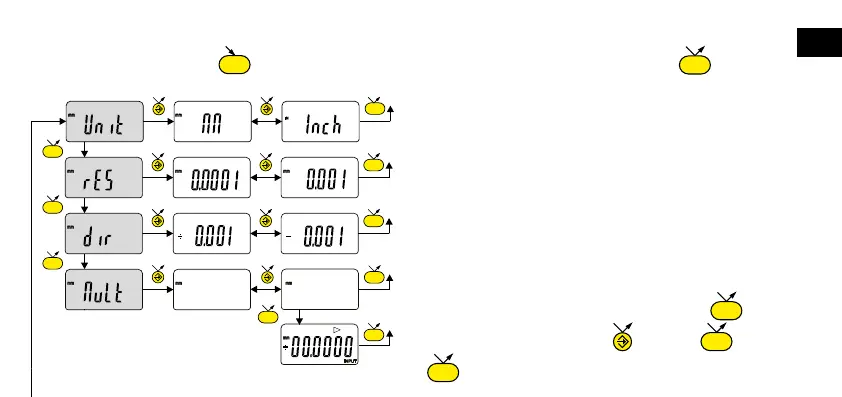
4. Advanced functions
Prolonged pressure (>2s) on gives access to the advanced functions. Then, each short press on accesses
the required function:
– Unit selection (mm or inch)
– Choice of resolution 0.01 / 0.001 or 0.001 / 0.0001
(depending on version)
– Choice of measurement direction
(positive or negative direction)
– Multiplication factor, enable or disable multiplication factor
(value can be modified if On is confirmed by button)
– Input of multiplication factor, next digit 0....9
save MULT











 To Next Page