5
E
Description
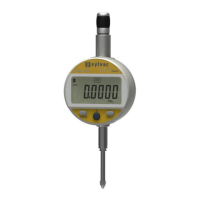
1. MODE button
2. SET button
3. “ Favourite ” button
4. Clamping shaft Ø8 or 3/8”
5. Lifting cap
6. Contact point Ø2 / M2.5 or 4-48-UNF
7. Slot for Proximity cable
8. Slot for battery or Power cable
9. Measurement units (mm / INCH)
10. + / - Indicator
11. Low battery
12. Mode menu display
13. MIN/MAX/DELTA mode
14. Preset mode
15. Tolerance mode
16. 7- digit display
17. Hold measured value
18. Keypad lock
19. Send data
20.
Bluetooth
®
active ( depending on model )
21. Multiplication factor
22. Tolerance indicators
23. Active reference











 To Next Page