Setup
–
8
–
EN
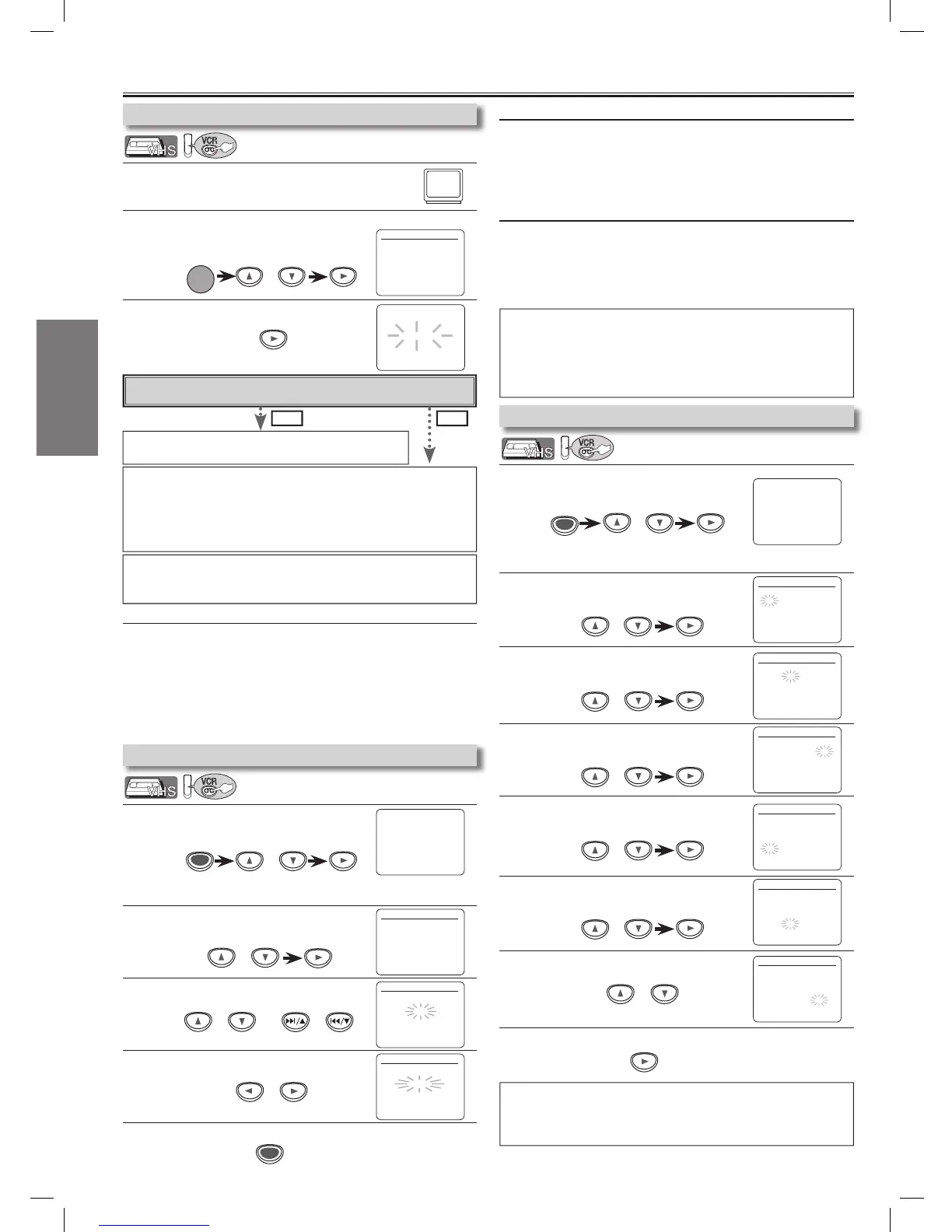
1
Turn on the TV and set it to channel 3.
•
If channel 3 has been already occupied for broadcasting,
see “RF Output Channel” section on page 6.
2
Select your language in the first time you turn on this unit.
Then press [B] to go to next step.
3
Press [B] to start Auto Set Up.
or
1
Press [MENU] and select “CHANNEL SET UP”.
Then press [B] to go to next step.
2
Select “MANUAL SET UP”.
Then press [B] to go to next step.
3
Select the channel to be added or deleted.
4
Select “ADD” or “DELETE”.
5
To exit the menu
1
Press [MENU] and select “CLOCK SET”.
Then press [B] to go to next step.
2
Select the current month.
Then press [B] to go to next step.
3
Select the current day.
Then press [B] to go to next step.
4
Select the current year.
Then press [B] to go to next step.
5
Select the current hour.
Then press [B] to go to next step.
6
Select the current minute.
Then press [B] to go to next step.
7
Select “AM” or “PM”.
8
To exit the CLOCK SET screen
To Preset the Channel Again
1) Press [MENU] until the main menu appears.
2)
Select “CHANNEL SET UP” by using
[K//L]
, then press
[B]
.
3)
Select “AUTO SET UP” by using [K//L], then press [B].
After scanning, the tuner stops on the lowest memorized
channel.
To Change the On-Screen Language
1)
Press
[MENU]
until the main menu appears.
2) Select “LANGUAGE SELECT” by using [K/L], then
press [B].
3) Select “ENGLISH” , “FRANCAIS” or “ESPAÑOL” by
using [K/L] then press [CLEAR/C.RESET].
To Select a Channel
You can select a channel by using the Number buttons or
[
SKIP/CH.
G
/
K
,
H
/
L].
Notes for using the Number buttons:
• When selecting cable channels which are higher than 99,
enter channel numbers as a three-digit number.
(for example: 117, press [1], [1], [7])
• You must precede single-digit channel numbers with a zero.
(for example: 02, 03, 04 and so on)
• If the clock is not set, the CLOCK SET screen appears when
you press [MENU]. In this case, go to step 2.
Preparation for Use
Hint
• Repeat these steps only if either there was a power failure or this
unit has been unplugged for more than 30 seconds.
No Please wait for a few minutes. After scanning...
• The tuner stops on the lowest memorized channel.
• You can select only the channels memorized in this unit by using
[SKIP/CH. G///K, H//L] (or [CHANNEL K///L]).
• If “AUTO SET UP” appears on the TV screen again, check the
cable connections. Then, press [B] once again.
Yes Press [MENU] to exit.
•
Refer to “Hint for Cable Box or Satellite Box” section on page 6.
Do you connect the cable from the cable box or the satellite box to
the unit’s ANT-IN jack?
Hint
• To go back one step, press [s] (during steps 2 to 7).
• Your clock setting will be lost if either there is a power failure or this
unit has been unplugged for more than 30 seconds.
or
or
Operations described in this manual are
mainly based on the remote control.
Hint
• If you accidentally select Spanish or French and need English: Press
[MENU] and choose SELEC. IDIOMA or SELECTION LANGUE.
Press [B] and select ENGLISH. Finally, press [CLEAR/C.RESET].
•
To add or delete channels in this unit, [SKIP/CH. G/K, H/L] button
works on the channel number memorized in this unit, [K/L] works on all.
To Add or Delete Channels


 To Next Page