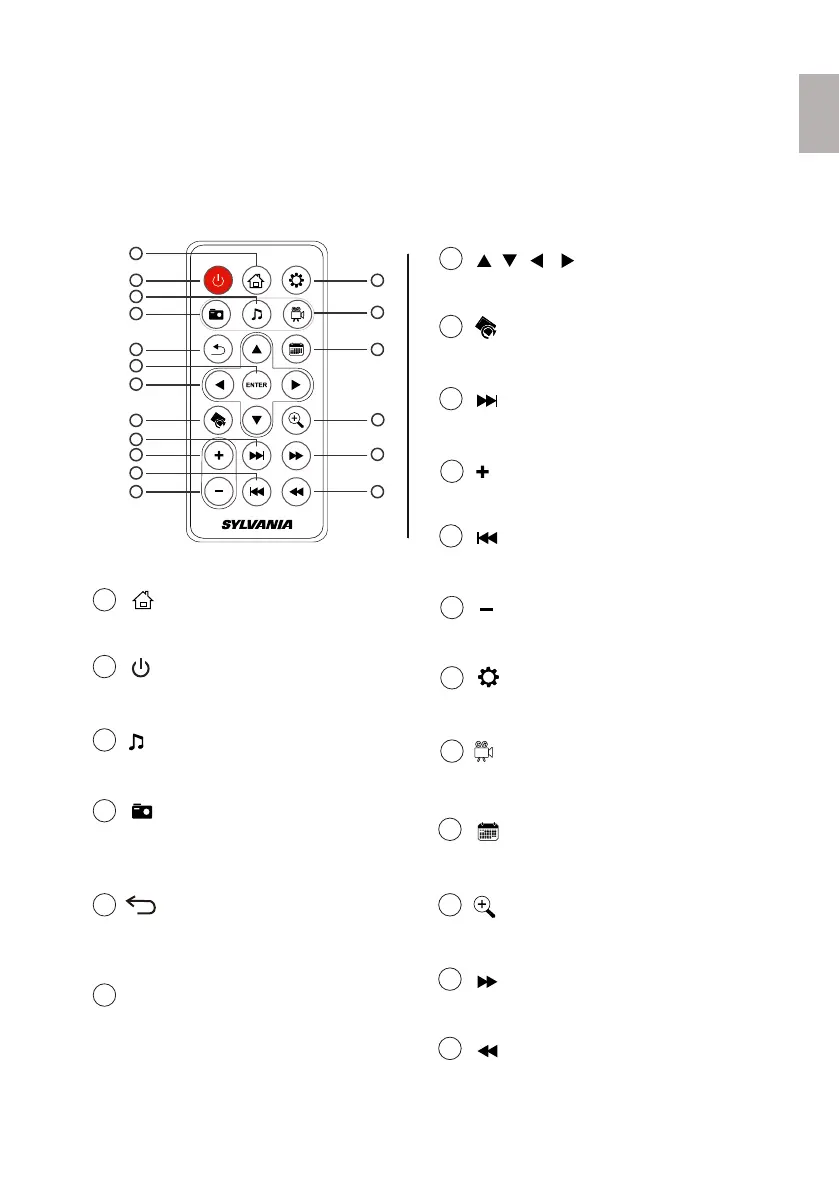
1.5 Remote Control
- Selects object
- Starts/pauses slideshow or play
2
Power On / Off
- Turns on or off the DPF.
3
Music
- Switches to Video mode
1
Home/Main Menu
- Accesses Settings menu
- Navigates Up/Down/Left/Right
You can access all of the DPF’s features, and perform all of the functions by using the
remote control.
- Increases volume
Note:
Before first time use, pull the plastic tab sticking out of the remote control. It protects the
battery and the remote control will not work unless it is removed.
4
Photo
- Switches to Photo mode
- Starts slidewshow
5
Return
- Returns to previous menu
- Exits slideshow or play
7
Directions
- Rotates image
8
Rotate
- Skips to next file
9
Next
- Skips to previous file
11
Previous
10
Vol +
- Decreases volume
12
Vol -
6
Enter
13
Settings
14
Video
- Switches to Calenda mode
15
Calenda
- Zooms in images
16
Zoom In
17
Fast Forward
18
Fast Reverse
1
2
13
14
15
16
17
18
3
4
5
6
7
8
9
10
11
12
4
EnglishEnglish



 To Next Page