Note:
USB or SD/MMC Card Playback
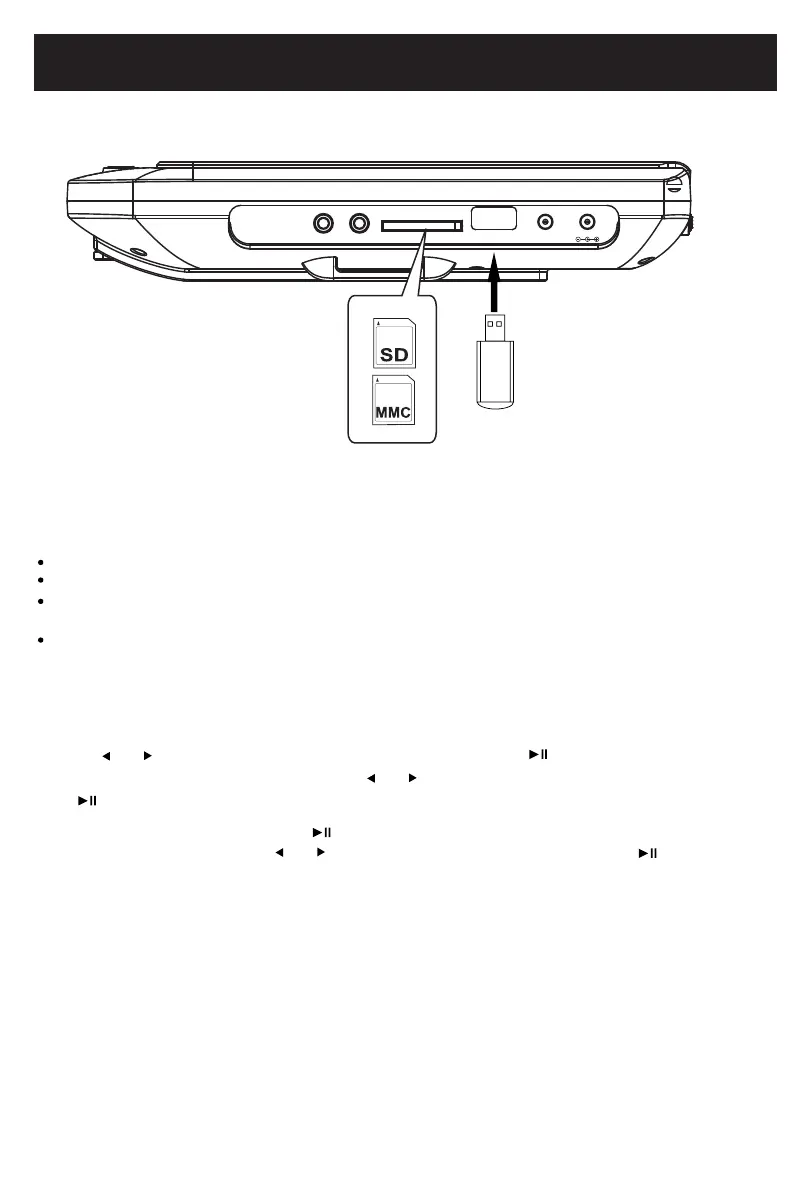
1. Insert the USB Device or SD/MMC memory card into the USB port/card slot as shown below:
PHONE AV OUT
USBSD/MMC CARD
DC OUT
DC IN
14
USB/SD
SD, MMC card
(not included)
USB device
(not included)
3. Press or button to highlight the USB or CARD,
then press twice to confirm, wait until
the folder/file list appear on screen, press or button to highlight the desired file, press
the button to start playing.
The unit supports the following file formats:
MP3, WMA(Music File)
JPEG(Pictures)
MPEG2, AVI, VOB(Video files up to 640X480 pixels)
Make sure correct files were saved in the USB device or memory cards.
4. During playing, press and hold the button to display the number 0--9 for selecting desired
folder or track number, press or to cursor to desired number, press the button to
select the number, if correct number is input, it will start playing automatically.
2. Wait until "No Disc" stays on screen, then press and hold the button to display DVD,
CARD or USB function selection list.
If there is no device inserted, it will display "EMPTY".



 To Next Page