6
Operating with the remote control
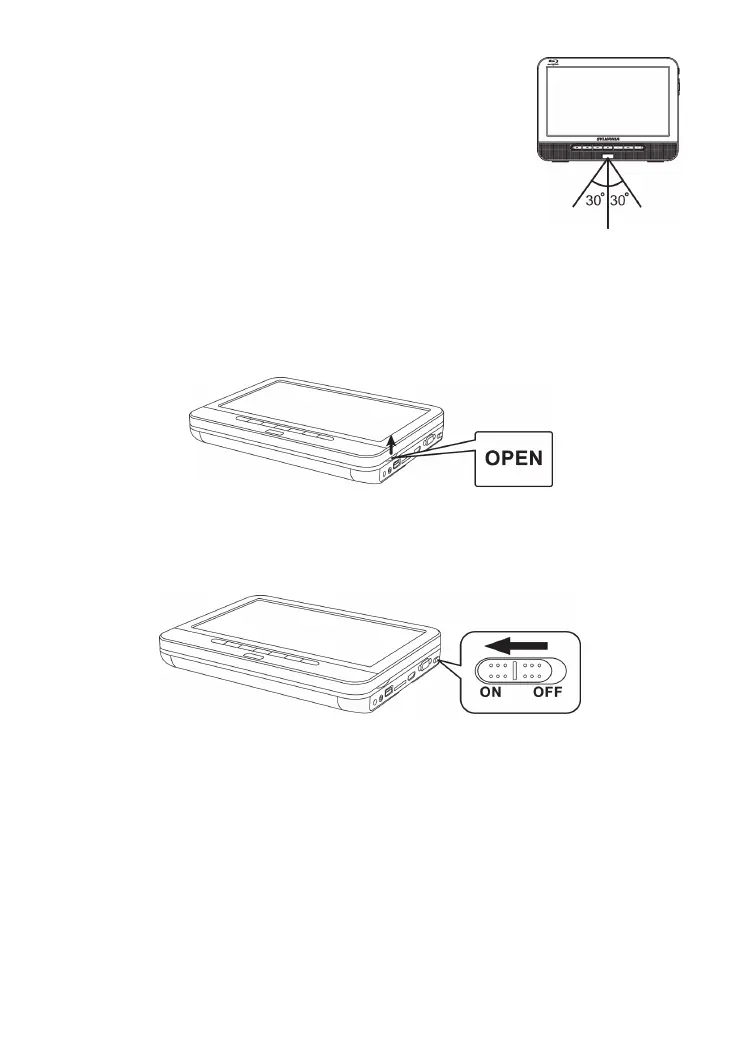
1. The remote control must point at the remote sensor, in order for
the DVD player to function correctly.
2. The remote works best at a distance less than 5 meters and at
an angle of up to +/-30° toward the front of the unit.
3. Obstacles should not remain in between the remote control and
the remote sensor on the main unit.
Quick Starting Guide
1. Connecting to an External Power Source
Connect the power adapter (supplied with the player) to the side input plug and to a wall
outlet. Do not use any other device otherwise specified by your dealer.
2. Open the disc cover.
3. Insert a DVD disc with label side facing upward.
Align the center of the DVD disc with the center of the disc guide. Press gently down on the
DVD to snap the disc into place, and then close the disc cover.
4. Slide the power switch on the right side of the unit to power it on.
5. Press the OK button on the unit to start playback.
In most cases, when you leave by the PLAY/PAUSE button, continue to be used by
PLAY/PAUSE button.
The DVD player will immediately start rendering the DVD program.
When you want to stop, press the STOP button, it will return to the power-on logo.
The player can be recharged while playback.


 To Next Page