4
This product incorporates copyright protection technology that is protected by U.S. patents
and other intellectual property rights. Use of this copyright protection technology must be
authorized by Rovi Corporation, and is intended for home and other limited viewing uses
only unless otherwise authorized by Rovi Corporation. Reverse engineering and
disassembly are prohibited.
The terms HDMI, HDMI High-Definition Multimedia Interface, and the HDMI Logo are
trademarks or registered trademarks of HDMI Licensing Administrator, Inc.
CAUTION: This product utilizes a laser.
Do not open cover and do not repair yourself. Refer servicing to qualified personnel.
Do not touch the lens by finger.
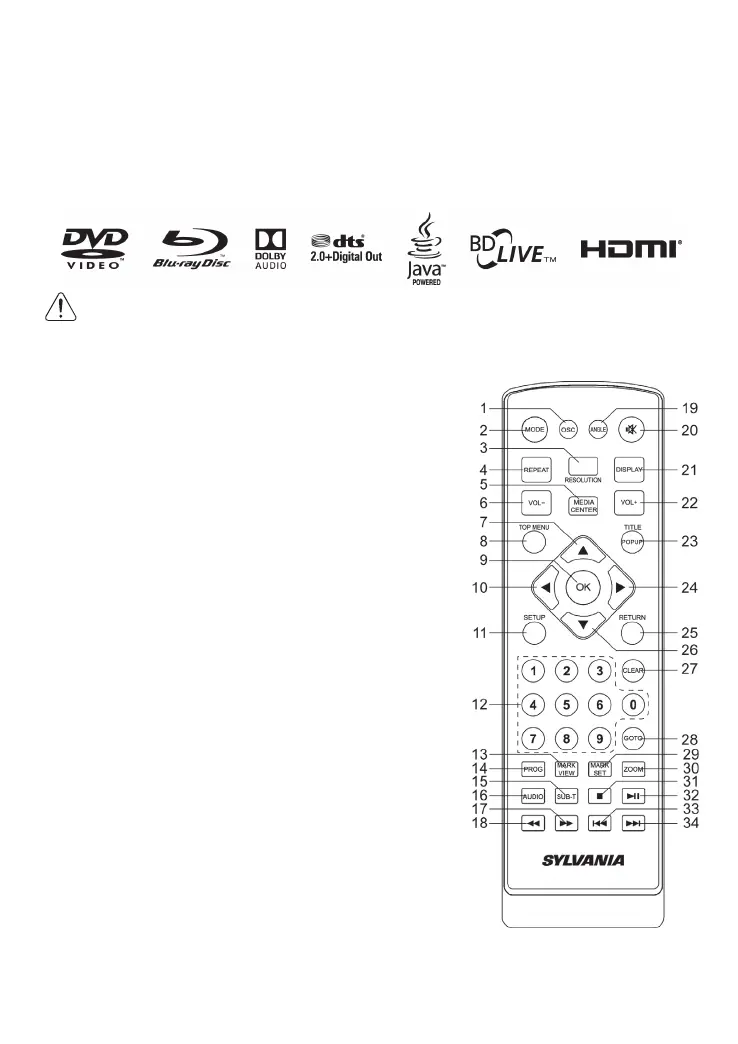
Remote Control
(1) OSC: To access On Screen Control Menu.
(2) MODE: Switch between DVD and AV IN
(3) RESOLUTION: Press to change the resolution mode
of the player.
(4) REPEAT: The specific repeat mode is different
according disc type.
DVD: RepeatCH>RepeatTT>RepeatAll>Repeat Off.
CD/VCD: Repeat track>Repeat all> Repeat Off.
Playlist: Repeat file>Repeat playlist>Repeat Off.
(5) MEDIA CENTER: To turn on/off Media center.
(6) VOL-: Decreases volume.
(7) UP: Navigates through the Menus.
(8) TOP MENU: To open the Top menu of BD/DVD
video disc.
(9) OK: Confirms an entry or selection.
(10) LEFT: Navigates through the Menus.
(11) SETUP: Access the SETUP menu.
(12) NUMBERS: For direct channel access.
(13) MARK VIEW: View bookmarks of the currently
playing disc
(14) PROG: Edit the program and play.
(15) SUBTITLE: Select a subtitle language on a disc.
(16) AUDIO: Select an audio language.
(17) FAST FORWARD: Search forward.
(18) FAST REVERSE: Search backward.
(19) ANGLE: Playback a scene recorded with multiple
angles. (The angle function will not work on DVD video discs that does not contains
recorded with multiple angles.)
(20) MUTE: To mute the sound and press again to restore.
(21) DISPLAY the current status or the disc information.


 To Next Page