1110
System Setup
General Setup
Video Setup
Preference Setup
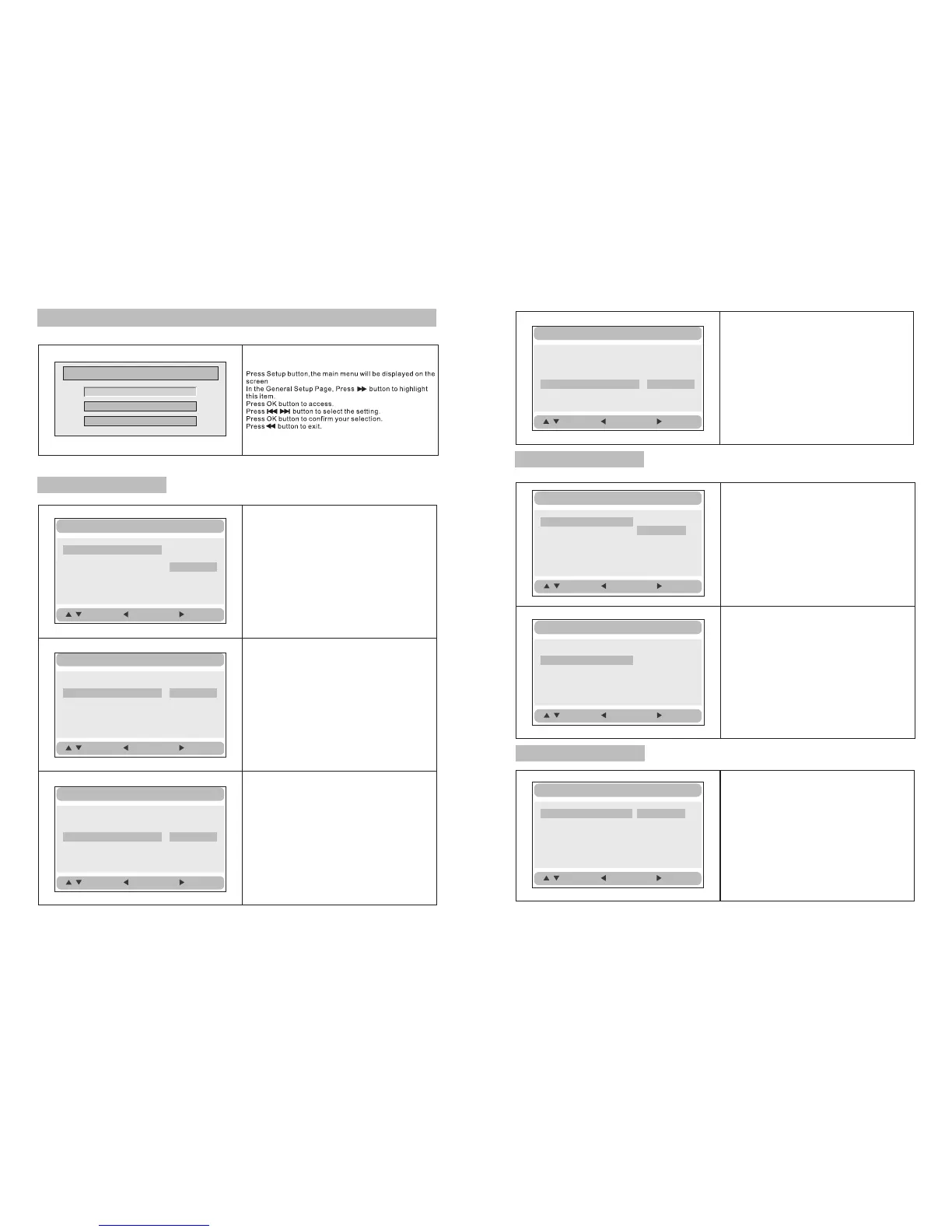
Setup Menu -- Main Page
General Setup Page
General Setup
TV Display Wide
Angle Mark ON
OSD Lang ENG
Screen Saver ON
Normal/PS
Normal/LB
Wide
:Move
:Return
:Entry
TV display:
Enter this option,user can set screen display
format(Nomal/PS,Nomal/LB,Wide)
The default isWide
Note:
☆ The function depends on the display ratio
with which the DVD disc is recorded.
☆ Please chooseWide(16:9)when using
a 16:9 wide screen TV set.
General Setup
TV Display Wide
Angle Mark ON
OSD Lang ENG
Screen Saver ON
On
Off
:Move
:Return :Entry
Angle Mark:
Enter this option to set the angle during
playback.
Optional setting:ON,OFF
The default is:ON
General Setup
TV Display Wide
Angle Mark ON
OSD Lang ENG
Screen Saver ON
English
French
German
Italian
:Move
:Return
:Entry
OSD Language:
In the option user can set OSD menu
language(English,French,German,Italian).
The default:English
TV Display Wide
Angle Mark ON
OSD Lang ENG
Screen Saver ON
On
Off
:Move
:Return :Entry
General Setup
Screen Saver:
Enter this option to set whether to activate
the screen saver function.
The default is ON.
Video Setup Page
Video Setup
:Move
:Return
:Entry
Panel Quality
TV Type NTSC
Set the Video Quality of PANEL
TV Type:
Enter this option to select TV type(PAL,NTSC)
The default is NTSC.
Video Setup
:Move
:Return :Entry
Panel Quality
TV Type NTSC
PAL
NTSC
Preference Page
Audio:
Enter this option,user can select your preferred
audio language for DVDs.
The default is English.
Note:
☆ The audio language depend on the material
on each disc.
☆ User can also change the audio language
during playback by pressing the Audio button.
Preference Setup
:Move
:Return :Entry
Audio ENG
Subtitle Off
Disc Menu ENG
Parental
Default
English
French
German
Italian






 To Next Page