6
Control Panel
1
13
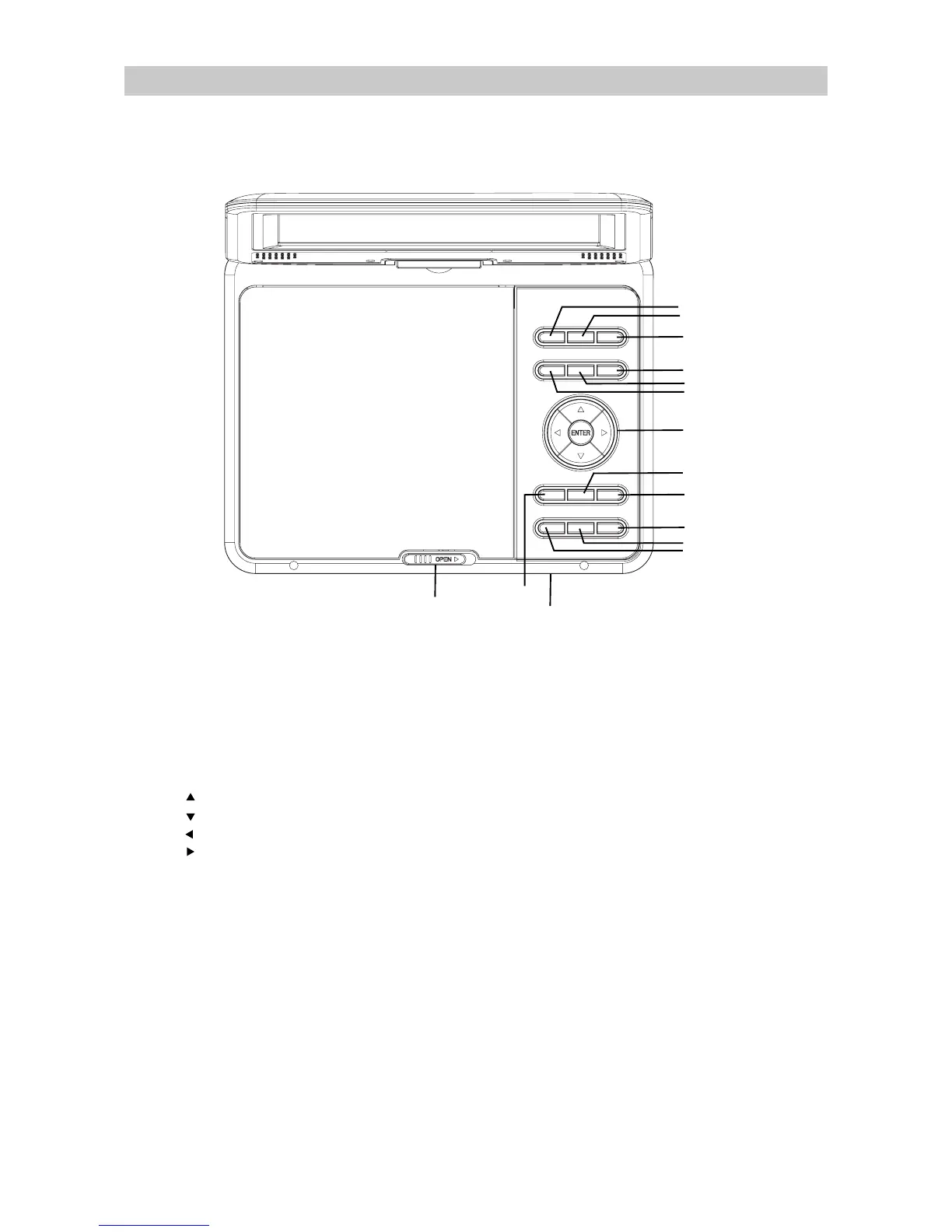
1. LCD ON/OFF: Press to turn on or turn off the display.
3. SOURCE:3UHVVUHSHDWHGO\WRVKLIWWKHPRGHEHWZHHQ'9'86%FDUG
6. SETUP: Press to enter DVD system setup menu and press again to exit.
10. AUDIO:3UHVVWRVKLIWVRXQGFKDQQHO
9. REPEAT:3UHVVWRUHSHDWDVSHFL¿HGWLWOHFKDSWHUWUDFNRUWRUHSHDWWKHHQWLUHGLVF
14. VOL-: Press to decrease volume level.
12. PLAY/PAUSE:3UHVVWRVZLWFKEHWZHHQSOD\DQGSDXVH
11. STOP: Press once to pre-stop. Press twice to stop completely.
13. INDICATOR:
15. OPEN:
0RYHULJKWWRRSHQWKH'9'OLG
LCD ON/OFF OSD SOURCE
SETUP T ITLE
MENU
VOL- VOL+
REPEAT
PLAY/PAUSE
STOP AUDIO
2
3
4
5
6
8
9
10
11
12
15
14
2. OSD:
3UHVVWRGLVSOD\WKHGLVFRUSOD\EDFNLQIRUPDWLRQ
4. MENU: Press to return to the disc's menu.
5. TITLE:
3UHVVWRGLVSOD\WKHWLWOHPHQXWKDWDUHDYDLODEOHLQWKH'9'
8. VOL+ : Press to increase the volume.
7
7. Up / Tune- button
ENTER : Press to confirm the operations.
Product Overview
Down / Tune+ button
Left / Fast rewind button
Right / Fast forward button
Power / charging indicator
GLVF




 To Next Page