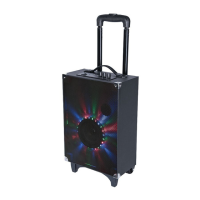
3.MIC1: Microphone signal input.
4.MIC2: Microphone signal input.
5.Play/Pause/Mute (In FM mode, hold this button for 3 seconds the device will enter into
automatic scan. In Bluetooth mode, press and hold this button for 3 seconds that it can
disconnect BT connection and enter to pairing mode when the bluetooth is connected.)
6.VOLUME-/+&MENU PUSH: Master volume adjustment&Menu selection button&PUSH
knob enter menu.
7.USB: USB Player/Power Bank 5V 1A output
8.LINE input/FM ANT.
9.LED CHARGE STATUS: RED = Charging GREEN = Fully charged
10.DC 9V external input.
11.Next song for Bluetooth and USB mode. Next preset station for FM mode. Press and
hold this button for 5 seconds that it can go to factory reset mode.
12.Previous song for Bluetooth and USB mode. Previous preset station for FM mode.
BASIC OPERATION
1. POWER/INPUT: long press (for above 2 seconds) to turn on this product; during
working status, short press to select mode: BT/LINE/FM (circulating); during working
status, long press (for above 2 seconds) to turn off this product.
2. PLAY/PAUSE: during playing status, short press to pause/mute; during FM mode,
long press to automatically scan radio station.
3. VOLUME-MENU PUSH: Clockwise and anticlockwise to adjust volume; PUSH knob
enter menu: bass volume adjustment -9~+9Vo → treble volume adjustment-9~+9 →
IU MIC input volume adjustment → EC MIC reverb depth adjustment→dL MIC reverb
delay adjustment →LED light mode switch→br light brightness adjustment→volume
adjustment
(circulating).
4. PREVIOUS/NEXT: during playing status, press to get back to a previous or
next song.
5. USB: USB Player/Power Bank 5V 1A output.
FM Operation:
A. Lightly press Power/Input button to switch to FM mode, long press PLAY/PAUSE button
to automatically scan radio station, by pressing PREVIOUS or NEXT button you can
select previous or next station.
03
B. When it selects to FM Mode, please insert the AUX in cable as an antenna.


 To Next Page