PREPARATION FOR USE
I lltliIII |l !1 Dlb"lWI Dill I (0h
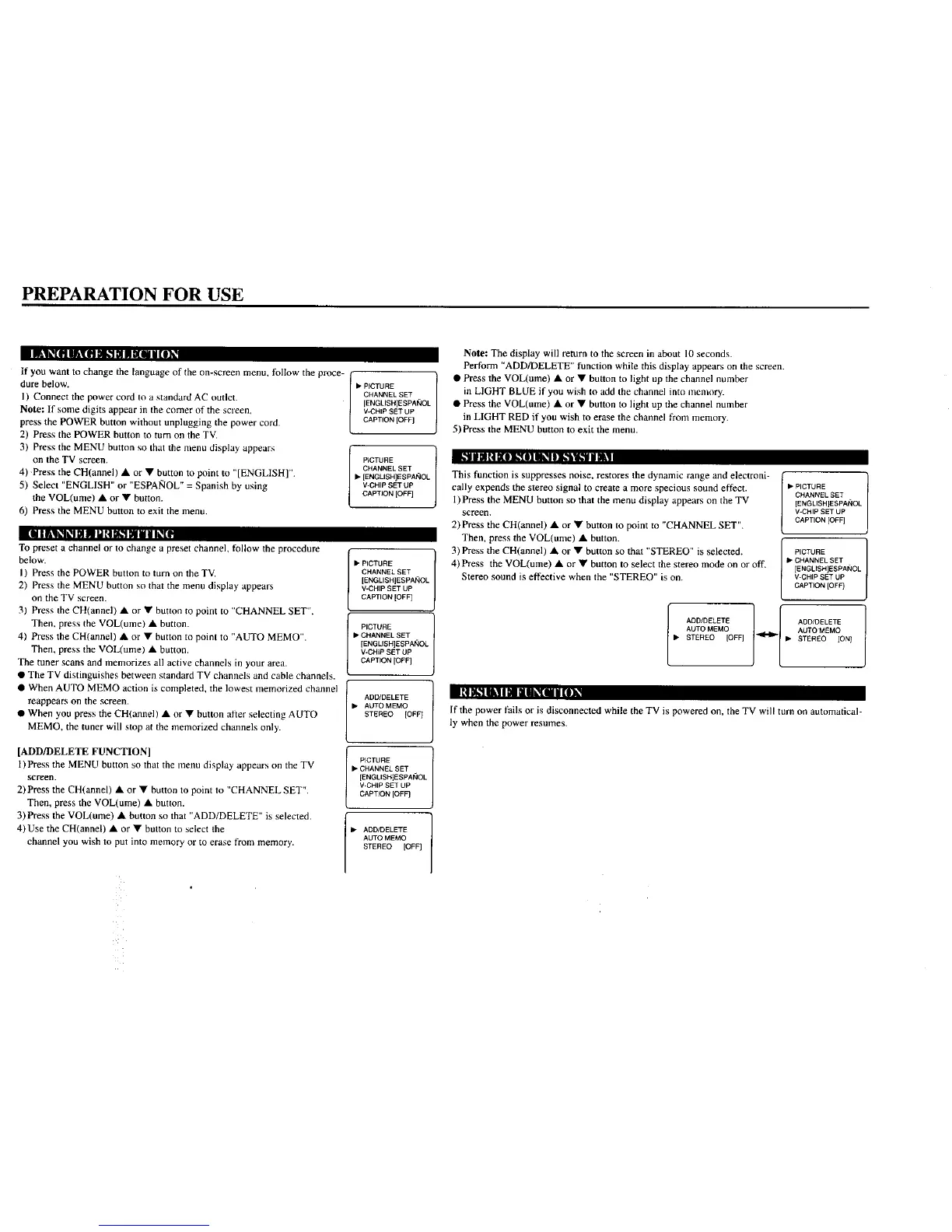
If you want to change the language of the on-screen menu, follow the proce-
dure below.
I) Connect the power cord Io a standard AC outlet.
Note: If some digits appear in the comer of the screen,
press the POWER button without unplugging the power cord.
2) Press the POWER button to turn on the TV.
3) Press the MENU button so that the menu display appears
on the TV screen.
4) Press the CH(annel) • or • button to point to "[ENGLISH]".
5) Select "ENGLISH" or "ESPAIqOL" = Spanish by using
the VOL(ume) • or • button,
6) Press the MENU button to exit the menu.
[111ILlk_il._l| I PH_i L"I Pill li_(.
To preset a channel or to change a preset channel, follow the procedure
below.
I) Press the POWER button to turn on the TV.
2) Press the MENU button so that the menu display appears
on the TV screen.
31 Press the CH(annel) • or • button to point to "CHANNEL SET".
Then, press the VOL(ume) • button.
4) Press the CH(annel) • or • button to point to "AUTO MEMO".
Then. press the VOL(ume) • button.
The tuner scans and memorizes all active channels in your area.
• The TV distinguishes between standard TV channels and cable channels.
• When AUTO MEMO action is completed, the lowest memorized channel
reappears on the screen.
• When you press the CH(annel) • or • button after selecting AUTO
MEMO. the tuner will stop at the memorized channels only.
I "| m._lll| I | II Ik_[i i [I1.
[ADD/DELETE FUNCTION]
l)Press the MENU button so that the menu display appears on the TV
screen.
2) Press the CH(annel) • or • button to point to "CHANNEL SET".
Then. press the VOL(ume) • button.
3) Press the VOL(ume) • button so that "ADD/DELETE" is selected.
4)Use the CH(annel) • or • button to select the
channel you wish to put into memory or to erase from memory.
• P_CTURE
CHANNEL SET
[ENGLISHIESPAi_IOL
V-CHIP SET UP
CAPTION [OFF]
P{CTURE
CHANNEL SET
IP [ENGLISH]ESPAi_IOL
V-CHIP SET UP
CAPTION [OFF]
[
• PICTURE
CHANNEL SET
[ENGLISH]ESPAi_IOL
V-CHIP SET UP
CAPTION [OFF]
PICTURE
• CHANNEL SET
[ENOL/SH]ESPANOL
V-CHiP SET UP
CAPTION [OFF]
l ADD/DELETE
• AUTO MEMO
STEREO [OFF]
PICTURE
• CHANNEL SET
[ENGLISR]ESPAt;IOL
V-CHIP SET UP
CAPTION [OFF]
• DD/DELETE
AUTO MEMO
STEREO [OFF]
Note: The display will return to the screen in about 10 seconds.
Perlorm "ADD/DELETE" function while this display appears on the screen.
• Press the VOL(ume) • or • button to light up the channel number
in LIGHT BLUE if you wish to add the channel into memory.
• Press the VOL(ume) • or • button to light up the channel nunther
in LIGHT RED if you wish to erase the channel from memory.
5) Press the MENU button to exit the menu.
This function is suppresses noise, restores the dynamic range and electroni-
cally expends the stereo signal to create a more specious sound effect.
1)Press the MENU button so that the menu display appears on the TV
screen.
2) Press the CH(annel) • or • button to point to "CHANNEL SET".
Then, press the VOL(ume) • button.
3) Press the CH(annel) • or • button so that "STEREO" is selected.
4)Press the VOL(ume) • or • button to select the stereo mode on or off.
Stereo sound is effective when the "STEREO" is on.
• PICTURE
CHANNEL SET
[ENGLISH]ESPAIqOL
V-CHIP SET UP
CAPTION [OFF]
PICTURE
II,-CHANNEL SET
[ENGLISHJESPANOL
V-CHIP SET UP
CAPTION [OFF]
ADD/DELETE 1 I ADD/DELETE
AUTOMEMO AOTOMEMO
• STEREO [OFF] _ • STEREO [ON 1
If the power fails or is disconnected while the TV is powered on, the TV will turn on automatical-
ly when the power resumes.




 To Next Page