OPERATIONS
lU[HNNN|II] II&_l ULll_l
Llll_l Ill I I k_[FIF.II |! U _(IIH [t[ll_
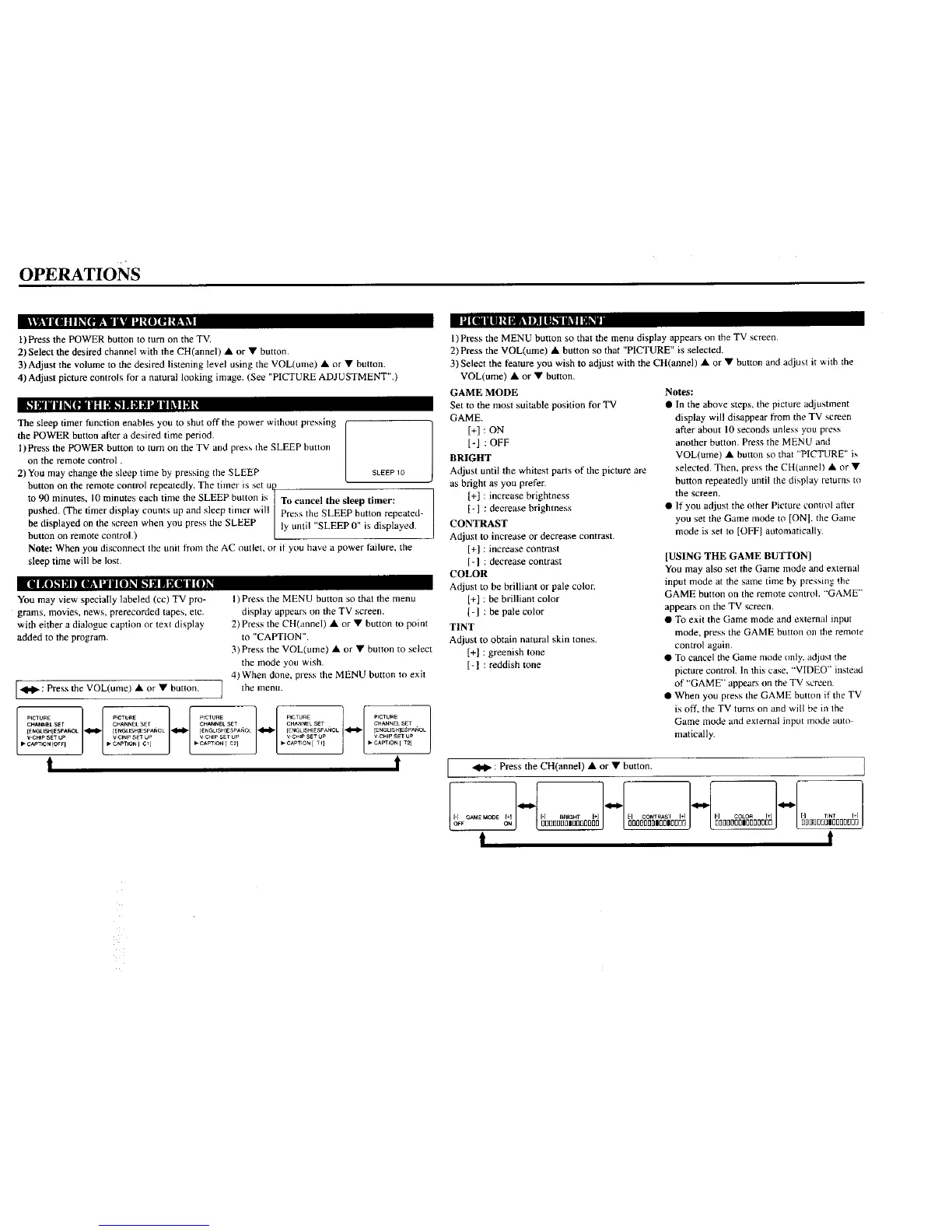
1)Press the POWER button to turn on the TV.
2) Select the desired channel with the CH(annel) • or • button.
3)Adjust the volume to the desired listening level using the VOL(ume) • or • button.
4) Adjust picture controls for a natural looking image. (See "PICTURE ADJUSTMENT".)
k_tNiIk'tF Ii|lDl_lam HHHILllal
The sleep timer function enables you to shut off the power without pressing ("
the POWER button after a desired time period.
L
l)Press the POWER button to turn on the TV and press the SLEEP button
on the remote control.
2) You may change the sleep time by pressing the SLEEP SLEEP10
button on the remote control repeatedly. The timer is set up
to 90 minutes, 10 minutes each time the SLEEP button is To cancel the sleep timer:
pushed. (The timer display counts up and sleep timer will ] Press the SLEEP button repeated-
be displayed on the screen when you press the SLEEP ly until "SLEEP 0" is displayed.
button on remote contro .)
Note: When you disconnect the unit from the AC outlet, or if you have a power failure, the
sleep time will be lost.
lid i(OK_NE [OA151U(|]_i,,_ MmD[OHN[O]l
You may view specially labeled (cc) TV pro-
grams, movies, news, prerecorded tapes, etc.
with either a dialogue caption or text display
added to the program.
["_1_': Press the VOL(ume) • or • button. ]
l) Press the MENU button so that the menu
display appears on the TV screen.
2) Press the CH(annel) • or • button to point
to "CAPTION".
3) Press the VOL(ume) • or • button to select
the mode you wish.
4) When done, press the MENU button to exit
the menu.
ipuE][CTURliP,cuEI.......IctE
CHANNEL SET CHANNEL SET CHANNEL SET CHAt4NEL SET CHANNEL SET
[ENGLI_]ESPAfiOL _ [ENGLISH]ESPAf_OL _ IENGLISIt]ESPA_OL _ [ENGLI$fl]ESPANOL _ [ENGLISHIESPANOL
V-CHiP SET k_P V CHiP _ LJP V CHIP SET UP _/CHIP SET UP V CHIP SET UP
• CAPTION [OFF I _ CAPTION I C1 _ • CAPTION [ C2] b" CAPTION [ TI] CAIJT_ON [ T2]
t !
l)Press the MENU button so that the menu display appears on the TV screen,
2) Press the VOL(ume) • button so that "PICTURE" is selected.
3)Select the feature you wish to adjust with the CH(annel) • or • button and adjust it with the
VOL(ume) • or • button.
GAME MODE
Set to the most suitable position for TV
GAME.
[+] : ON
[-] : OFF
BRIGHT
Adjust until the whitest parts of the picture are
as bright as you prefer.
[+] : increase brightness
[-] : decrease brightness
CONTRAST
Adjust to increase or decrease contrast.
[+] : increase contrast
[-] : decrease contrast
COLOR
Adjust to be brilliant or pale color.
[+] : be brilliant color
[-] : be pale color
TINT
Adjust to obtain natural skin tones.
[+] : greenish tone
[-1 : reddish tone
Notes:
• In the above steps, the picture adjustment
display will disappear from the TV screen
after about 10 seconds unless you press
another button. Press the MENU and
VOL(ume) • button so that "PICTURE" is
selected. Then, press the CH(annel) • or •
button repeatedly until the display returns to
the screen.
• If you adjust the other Picture control after
you set the Game mode to [ON]. the Game
mode is set to [OFF] automatically.
[USING THE GAME BUTTON]
You may also set the Game mode and external
input mode at the same time by pressing the
GAME button on the remote control, "'GAME"
appears on the TV screen.
• To exit the Game mode and external input
mode, press the GAME button on the remote
control again,
• To cancel the Game mode only. adjust the
picture control. In this case, "VIDEO" instead
of "GAME" appears on the TV screen.
• When you press the GAME button if the TV
is ofT, the TV turns on and will be in the
Game mode and external input mode auto
matically.
: Press the CH(annel) • or • button.
1- ]- ]-/-[N
G_,NE NOOE
I+1 [-1 8_IGHT [+1 [q ¢ONTR,_ST I+1 1"1 ¢OLO_ I I ['1 TINT I+l
o_r ON O012DDD[IBDDDOOflO OOOOOOO|O01100DD DDDDOOOIIOOOOOI]D DDB_[JODIIOOOOOOD
t t


 To Next Page
 Loading...