OPERATIONS (Continued)
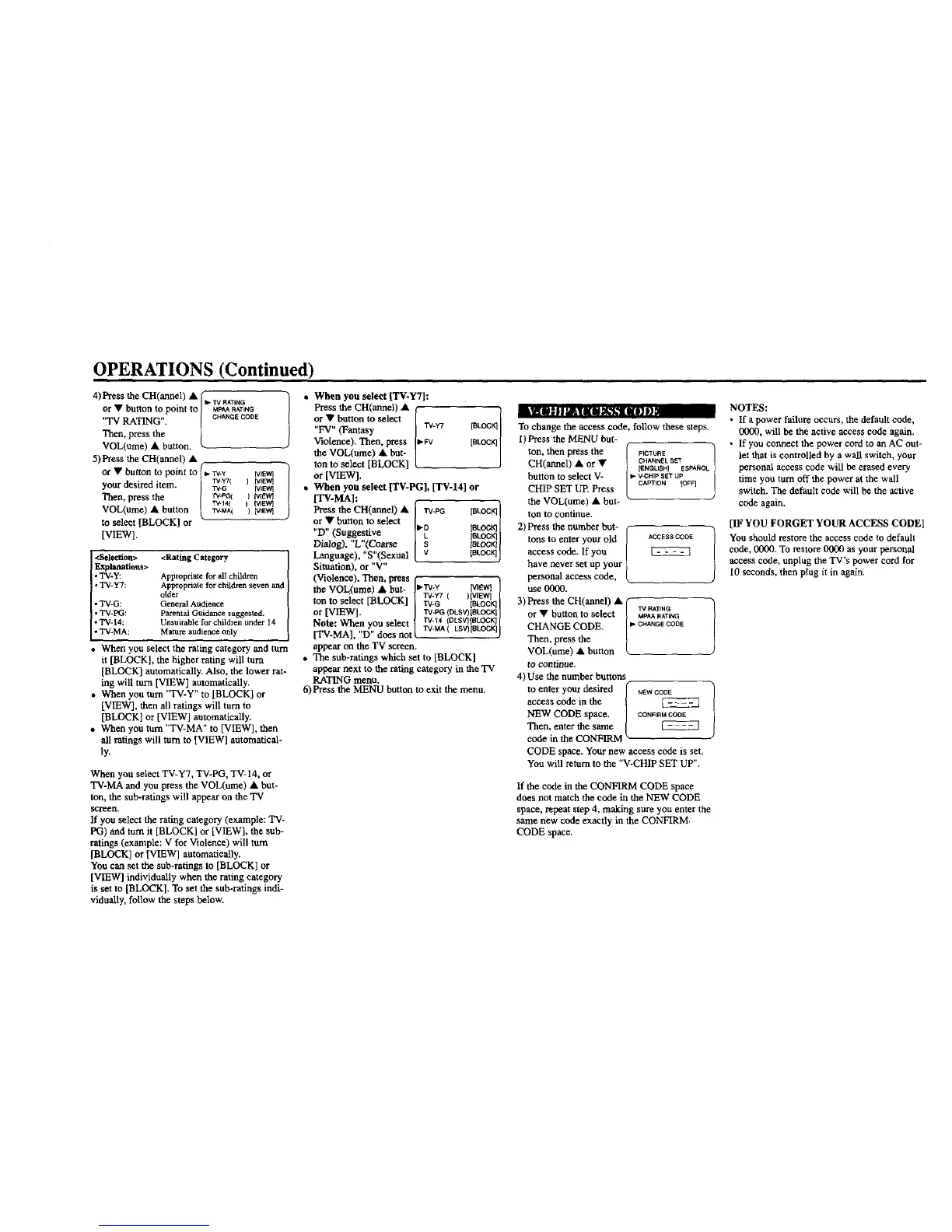
4) Press the CH(annel) • (
or • button to point to J*"M_P_ARA'_ANTGNG
"TV RATING". ! CHANGECODE
Then, press the
VOL(ume) • button.
k
5) Press the CH(annel) •
/
or • button to point to _. rv.y
your desired item. i _YTI
Then, press the [ rv-_(
VOL(ume) • button t wi_l
to select [BLOCK] or
[VIEW].
Lyrlll JI I _T|| _'fh_ [KO] |}
[VlE_t] l
) [VIEW]
[VIEW}
I tvfEw}
) (VIEW}
) [VIEW}
<Selection> <Rating Category
Explanations>
• TV-y: Appropriate for all children
• TV-Y7: Appropriate for children seven and
older
• "IN-G: General Audience
• TV-PG: Parental Guidance suggested.
• TV- 14: Unsuitable for children under 14
• TV-MA: Mature audience only
When you select the rating category and turn
it [BLOCK], the higher rating will turn
[BLOCK] automatically, Also, the lower rat-
ing will turn [VIEW] automatically.
• When you turn "TV-Y" to [BLOCK] or
[VIEW], then all ratings will turn to
[BLOCK] or [VIEW] automatically,
• When you turn "TV-MA" to [VIEW], then
all ratings will turn to [VIEW] automatical-
ly.
When you select TV-Y7, TV-PG, TV- 14, or
TV-MA and you press the VOL(ume) • but-
ton, the sub-ratings will appear on the TV
screen,
If you select the rating category (example: TV-
PG) and tom it [BLOCK] or [VIEW], the sub-
ratings (example: V for Violence) will turn
[BLOCK] or [VIEW] automatically.
You can set the sub-ratings to [BLOCK] or
[VIEW] individually when the rating category
is set to [BLOCK]. To set the sub-ratings indi-
vidually, follow the steps below.
**v,ij
• When you select
Press the CH(annel) •
or • button to select
"FV" (Fantasy 'TV-W [BLOCK]
Violence). Then, press • FV [BLOCK]
the VOL(ume) • but-
ton to select [BLOCK]
or[VIEW].
• When you select [TV-PG], [TV-14] or
[TV-MA]:
Press the CH(armel) • / _-PG [BLOC
or • button to select K]I
"D" (Suggestive II_O [BLOCK]i
[CLOCK]I
Dialog), "L"(Coarse [ot.ocK]I
Language), "S"(Sexual [BLOCK]J
Situation), or "V"
(Violence). Then, press f "l
the VO ume • but- IP'W-Y [vEcq /
L_ ) rvy7 ( )tvl_q
ton to select [BLOCK] [ rV-G [BLOCK]|
or [VIEW]. / TV'PG(DLSV)tBLOCK]I
TV-t4 (DLSV) IGLOCK]
Note: When you select { . [
[TV-MA], "D" does notL rv Ma( LS'OIBLOCIqJ
appear on the TV screen.
• The sub-ratings which set to [BLOCK]
appear next to the rating category in the TV
RATING menu.
6) Press the MENU button to exit the menu.
To change the access code, follow these steps.
1)Press the MENU but-
ton, then press the P_CXURE /
CH(annel) • or • CHANNELSET
IENGLISH} ESPAK'OL
button to select V- _. V.CHIP SET UP
CHIP SET UP. Press CAPTION [OFF]
the VOL(ume) • but- "
tontocontinue.
2)Pressthe numberbut- f-
tons to enter your old / ACCESSCODE
access code. If you /
have never set up your }
personal access code, L
use 0000.
3) Press the CH(annal) • (
or • button to select | M_A_[_NTGNG
CHANGE CODE. I"CHANGECODE
/
Then, press the 1
VOL(ume) • button _.
to continue.
4) Use the number buttons
to enter your desired [ NEWCODE
access code in the |
NEW CODE space. / CONFIRMCOOE
Then, enter the same |
code in the CONFIRM "-
CODE space. Your new access code is set.
You will return to the "V-CHIP SET UP".
If the code in the CONFIRM CODE space
does not match the code in the NEW CODE
space, repeat step 4, making sure you enter the
same new code exactly in the CONFIRM,
CODE space.
NOTES:
• If a power failure occurs, the default code,
0000, will be the active access code again.
• If you connect the power cord to an AC out-
let that is controlled by a wall switch, your
personal access code will be erased every
time you turn off the power at the wall
switch. The default code will be the active
code again.
[IF YOU FORGET YOUR ACCESS CODE]
You should restore the access code to default
code, 0000. To restore 0000 as your personal
access code, unplug the TV's power cord for
10 seconds, then plug it in again.


 To Next Page