PREPARATION FOR USE
It,I _.'ll_ l lq imIi,._II II[O]hIi_'_ MIllLIH DIl_'lHIllill II[I_
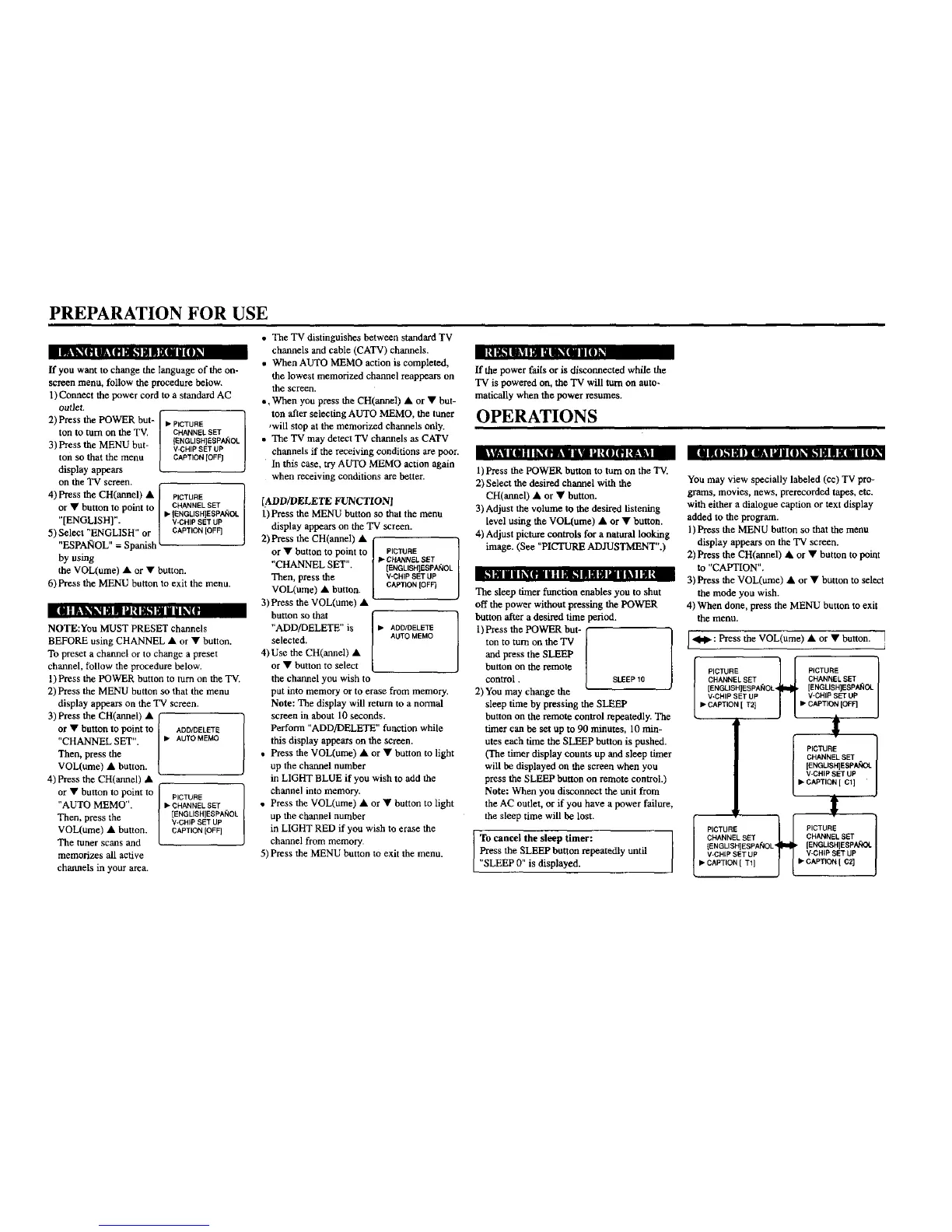
If you want to change the language of the on-
screen menu, follow the procedure below.
1) Connect the power cord to a standard AC
outlet.
2) Press the POWER but-
ton to turn on the TV.
3) Press the MENU but-
ton so that the menu
display appears
L111[iI l_l_ _lillll IlIl(lIflIiLtl 11 |I_I | llIltJ iIOlb?I_1| III I III
on the TV screen.
• ICTURE
CHANNEL SET
(ENGLISH]EEPA_IOL
l V-CHIP SET UP
CAPTION [OFF]
4) Press the CH(annel) & I PICTURE
or • button to point to l CHANNELSET
.... I• {ENGLISHIESPANOC
[ENGLISH]. / V-CHIPSETUP
5)Select'ENGLISH"or 1 CAPTION[OFF]
ES PAlr,IOL :Spanish _-
by using
the VOL(ume) • or • button.
6) Press the MENU button to exit the menu.
;IIlUIIIIIIII L_II|II|II|I
illLI_\I|NU!ILIN I I_[l
NOTE:You MUST PRESET channels
BEFORE using CHANNEL • or • button.
To preset a channel or to change a preset
channel, follow the procedure below.
1) Press the POWER button to turn on the TV.
2) Press the MENU button so that the menu
display appears on the TV screen.
3) Press the CH(annel) • /
or • button to point to ADO/DELETE
CHANNEL SET". I • AUTOMEMO
Then, press the ]
VOL(ume) • button. /
4) press the CH(annel) •
f.
or • button to point to [
PICTURE
/
"AUTO MEMO'. J• CHANNELSE-F
[ENGLISH]ESPANOL
Then, press the / V-CHIP SET UP
VOL(ume) • button. / CAPTION[OFF]
The tuner scans and L
memorizes all active
channels in your area.
• The TV distinguishes between standard TV
channels and cable (CATV) channels.
• When AUTO MEMO action is completed,
the lowest memorized channel reappears on
the screen.
*, When you press the CH(armel) • or • but-
ton after selecting AUTO MEMO, the tuner
,will stop at the memorized charnels only.
• The TV may detect TV channels as CATV
channels if the receiving conditions are poor.
In this case, try AUTO MEMO action again
when receiving conditions are better.
[:4.DD/DELETE FUNCTION]
1) Press the MENU button so that the menu
display appears on the TV screen.
2)Press the CH(annel) • I
or • button to po!nt to I
' CHANNEL SET , I
Then, press the I
VOL(ume) • button. [
3) Press the VOL(ume) •
button so that
"ADD/DELETE" is
selected.
4)Use the CH(annel) •
or • button to select
the channel you wish to
PICTURE
t_ CHANNEL SET
[ENGLISHIEEPAJ'_OL
V-CHIP SET UP
CAPTION [OFF)
• ADD/DELETE ]
AUTO MEMO
put into memory or to erase from memory.
Note: The display will return to a normal
screen in about 10 seconds.
Perform "ADD/DELETE" function while
this display appears on the screen.
• Press the VOL(ume) • or • button to light
up the channel number
in LIGHT BLUE if you wish to add the
channel into memory.
• Press the VOL(ume) • or • button to light
up the channel number
in LIGHT RED if you wish to erase the
channel from memory.
5) Press the MENU button to exit the menu.
If die power fails or is disconnected while die
TV is powered on, the TV will turn on auto-
mafically when the power resumes.
OPERATIONS
1) Press the POWER button to turn on the 'IV.
2) Select the desired channel with the
CH(annel) • or • button.
3) Adjust the volume to the desired listening
level using die VOL(ume) • or • button.
4) Adjust picture controls for a natural looking
image. (See "PICTURE ADJUSTMENT".)
The sleep timer function enables you to shut
off the power without pressing the POWER
button after a desired time period.
ton to turn on the TV
and press the SLEEP
button on the remote
control. SLEEP10
2) You may change the
sleep time by pressing the SLEEP
button on the remote control repeatedly. The
timer can be set up to 90 minutes, 10 min-
utes each time the SLEEP button is pushed.
(The timer display counts up and sleep timer
will be displayed on the screen when you
press the SLEEP button on remote control.)
Note: When you disconnect the unit from
the AC outlet, or if you have a power failure,
the sleep time will be lost.
To cancel the sleep timer:
Press the SLEEP button repeatedly until
"SLEEP 0" is displayed.
You may view specially labeled (cc) TV pro-
grams, movies, news, prerecorded tapes, etc.
with either a dialogue caption or text display
added to the program.
1) Press die MENU button so that the menu
display appears on the TV screen.
2) Press the CH(annel) • or • button to IX;rot
to "CAPTION".
3) Press the VOL(ume) • or • button to select
the mode you wish.
4) When done, press the MENU button to exit
the menu.
I_ : Press the VOL(ume) • or • button. J
I ICTURE <_ PICTURE
CHANNEL SET CHANNEL SET
[ENGLISH]ESPA_OL [ENGLISH]EEPA_OL
L V-CHIP SET UP _ I V-CHIP SET UP
I_"CAPTION [ T2] J [ • CAPTION [OFF)
PICTURE
[ENGLIEH]EEPA_DL
CHANNEL SET
V-CHIP SET UP I
• CAPTION [ C1]
I
.,c u 0l I
CHANNEL SET
[ENOLISH]ESPAROL,'_Im!I_ [ENGLISH]ESPAt_OL I
V-CHIP SET UP J [ V-CHIP SET UP l
• CAPTION [ TI] • CAPTION [ C2]


 To Next Page
 Loading...