–
12
–
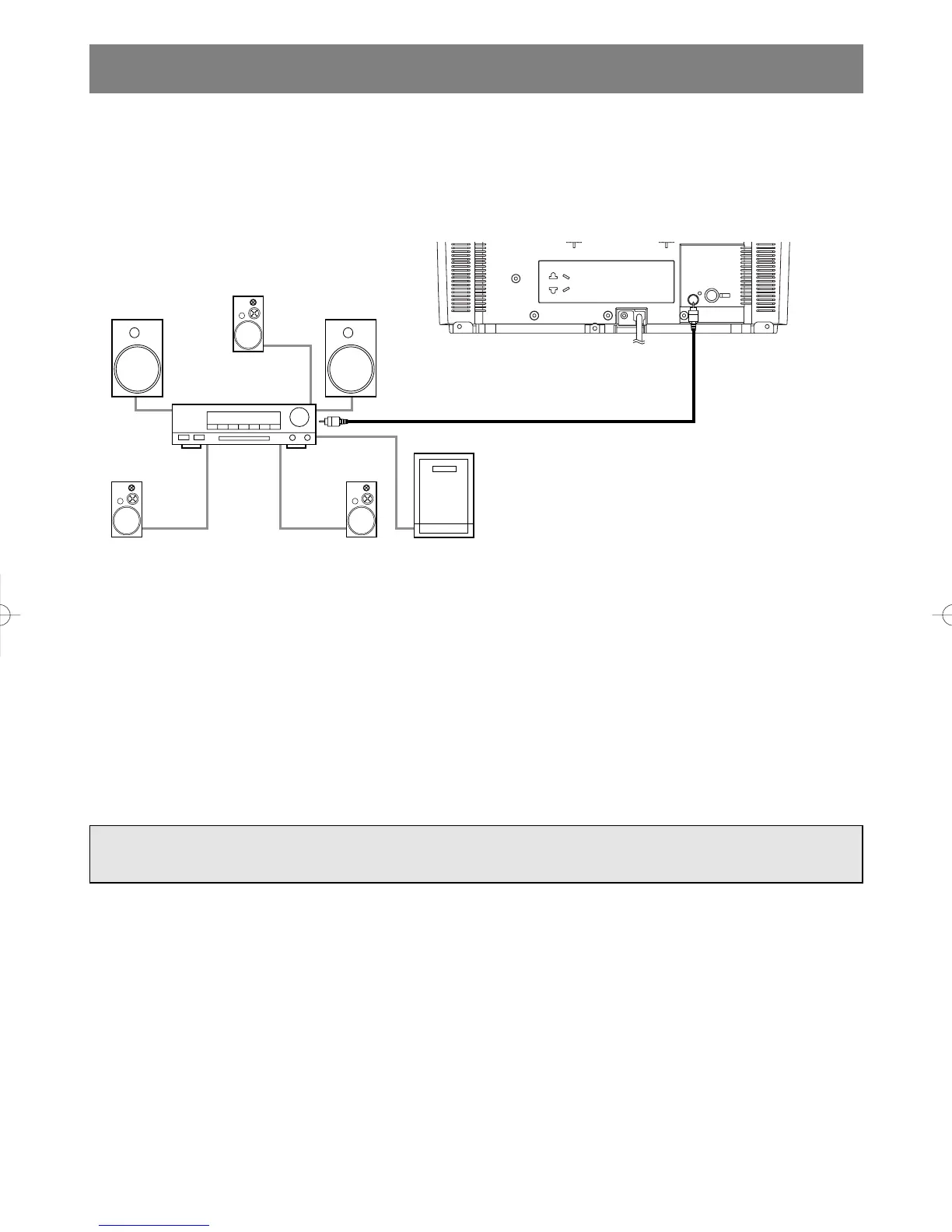
CONNECTING TO AN AMPLIFIER/RECEIVER WITH A
DOLBY DIGITAL DECODER (for DVD)
To use this TV/DVD to play a DVD disc in a 5.1 channel Dolby Digital surround format, the TV/DVD can
outputs a DOLBY DIGITAL Data stream from its COAXIAL digital audio out jack. By hooking the TV/DVD
up to a receiver with Dolby Digital decoder, you can enjoy high-quality surround sound as enjoyed in movie
theaters.
Use audio coaxial digital cables available at retail stores for the audio connections.
NOTES:
•
Be sure to turn off the power to all components in the system before connecting another component.
•
Refer to the Owner's Manuals for the components to be connected to the TV/DVD.
•
If connected to a receiver with Dolby Digital decoder, set DOLBY DIGITAL to ON for audio output in the
setup mode. (See page 28 to set DOLBY DIGITAL to ON.)
•
Unless connected to a receiver with Dolby Digital decoder, set DOLBY DIGITAL to OFF for audio output
in the setup mode. Playing a TV/DVD using incorrect settings may generate noise distortion and may also
damage the speakers.
•
Only DVD audio is available using the digital audio out jack.
[Fig. 7]
Manufactured under license from Dolby Laboratories. “Dolby” and the double-D symbol are
trademarks of Dolby Laboratories.
EN
0C28



 To Next Page