s
2.
Connection
Description
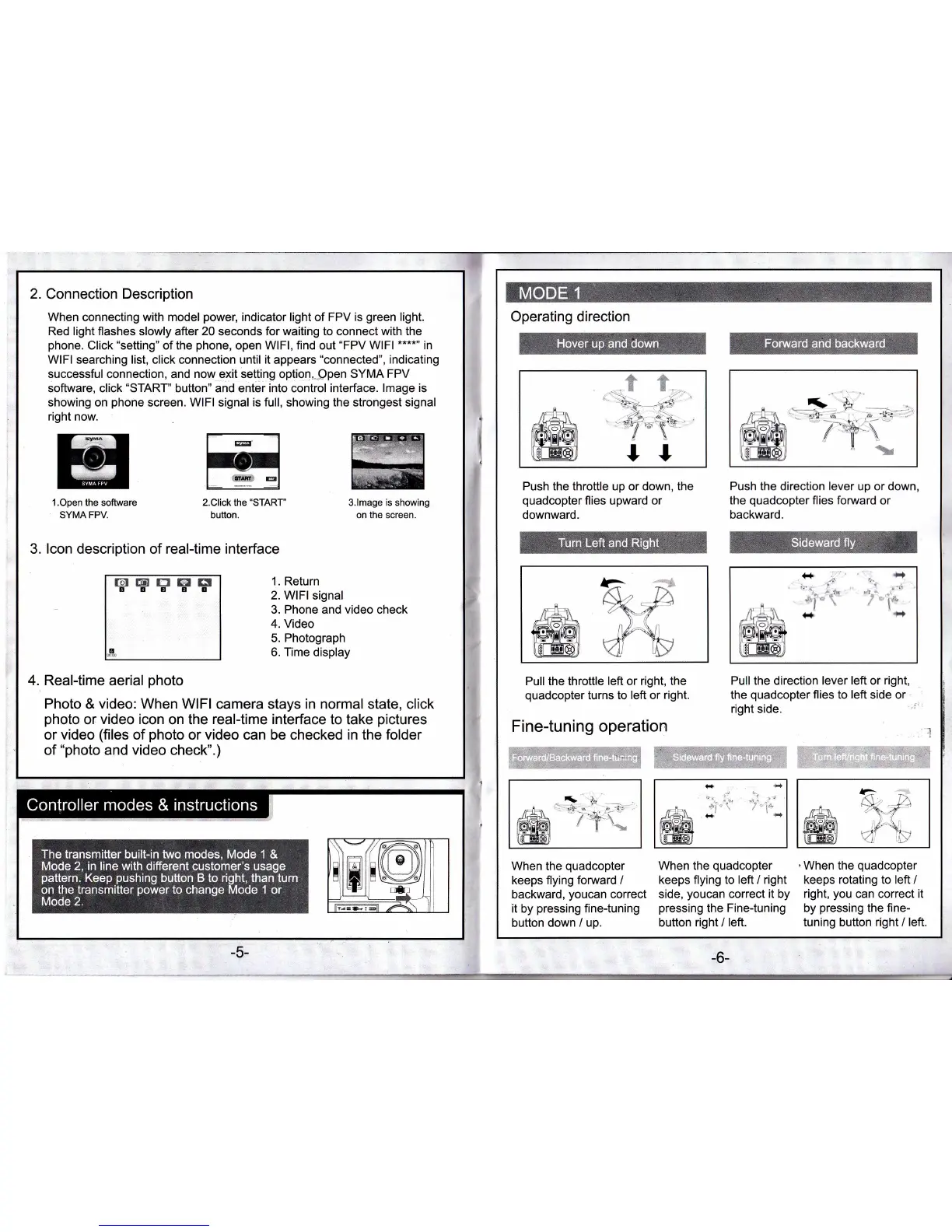
When connecting with model
power,
indicator light of FPV
is
green
light.
Red lighi flashes
slowly after
20
seconds
for waiting to connect with the
phone.
Click
"setting"
of the
phone,
open WlFl, find
out
'FPV
WlFl
****n
in
WlFl searching list, click connection until it
appears
"connected",
indicating
successful
connection,
and now exit setting
option,,ppen
SYMA
FPV
software, click
"START"
button" and enter into control interface.
lmage is
showing on
phone
screen. WlFl signal is full, showing the strongest signal
right now.
1.Open the software
SYMA FPV.
2.Click the
'START'
button.
3.lmage
is showing
on the screen.
3. lcon description
of
real-time interface
@trTE6E
6Ag3r
1. Return
2. WlFl signal
3.
Phone
and
video
check
4. Video
5. Photograph
6.
Time
display
4. Realtime
aerial
photo
Photo
&
video: When WlFl
camera stays in normal state, click
photo
or
video icon
on the
real-time interface
to take
pictures
or
video
(files
of
photo
or video can be checked in the folder
of
"photo
and video check".)
i
W
t-.
-:.
_t-
I
ttFffiil zA.\ i
I
-5-
-6-
Operating direction
rr
ri
*
*
:...
t*;
;i,
.i*
;;
s'rl-a
-N'Y
4\
ll
Push the throttle
up or down,
the
quadcopter
flies upward or
downward.
Push
the direction
lever
up or down,
the
quadcopter
flies fonarard
or
backward.
+
^.
,r.(.\.. t./x
F-Y: +
-)
/\
./
,)
(
i,l,.
-iiJl
r:N'Y IfJ
KJ/
t-\>
.* at
v'l'
i.Y
/I
++
il
Pull
the
throttle
lefl
or
right, the
quadcopter
turns to
left or right.
Fine-tuning operation
Pullthe direction lever
left
or
right,
the
quadcopter
flies
to
left
side or
right
side.
l
,:}''
:l:,tii.'ii:-r
:
:
:
fi"l"ri
anxi tttt} xsi'r.r':1;:
J:
'if,i
iii
l.;$
Xffit
i.li:::li:;;,;ri;,,
,1|,
f
.
,.
:i'.i,
r,
i:i
,,:,1r,,1.;.r.,
,.1,,,f:it,,r,,'iliilllr.,',
.';ll
l.,rt,.r.rt
.i.:
&.
+;.
n\ +'-n
\
-tr-
))
(
g'.\r
rt'
"1,"
/t
,.\
When the
quadcopter
keeps flying
forward
/
backward,
youcan
correct
it
by
pressing
finetuning
button
down / up.
When the
quadcopter
keeps flying to
left
/
right
side,
youcan
correct
it
by
pressing
the
Fine{uning
button
right
/
left.
'When
the
quadcopter
keeps rotating to left /
right,
you
can correct
it
by
pressing
the fine-
tuning
button
right / left.
-t
'F
';']-.n
ra
-*+
7
',.-i+,
x
-
In-\
lll",._
*i
rs
l-
.&-"t
r,*o
7'8.r
!
Y
t,,*
,,i
i


 To Next Page