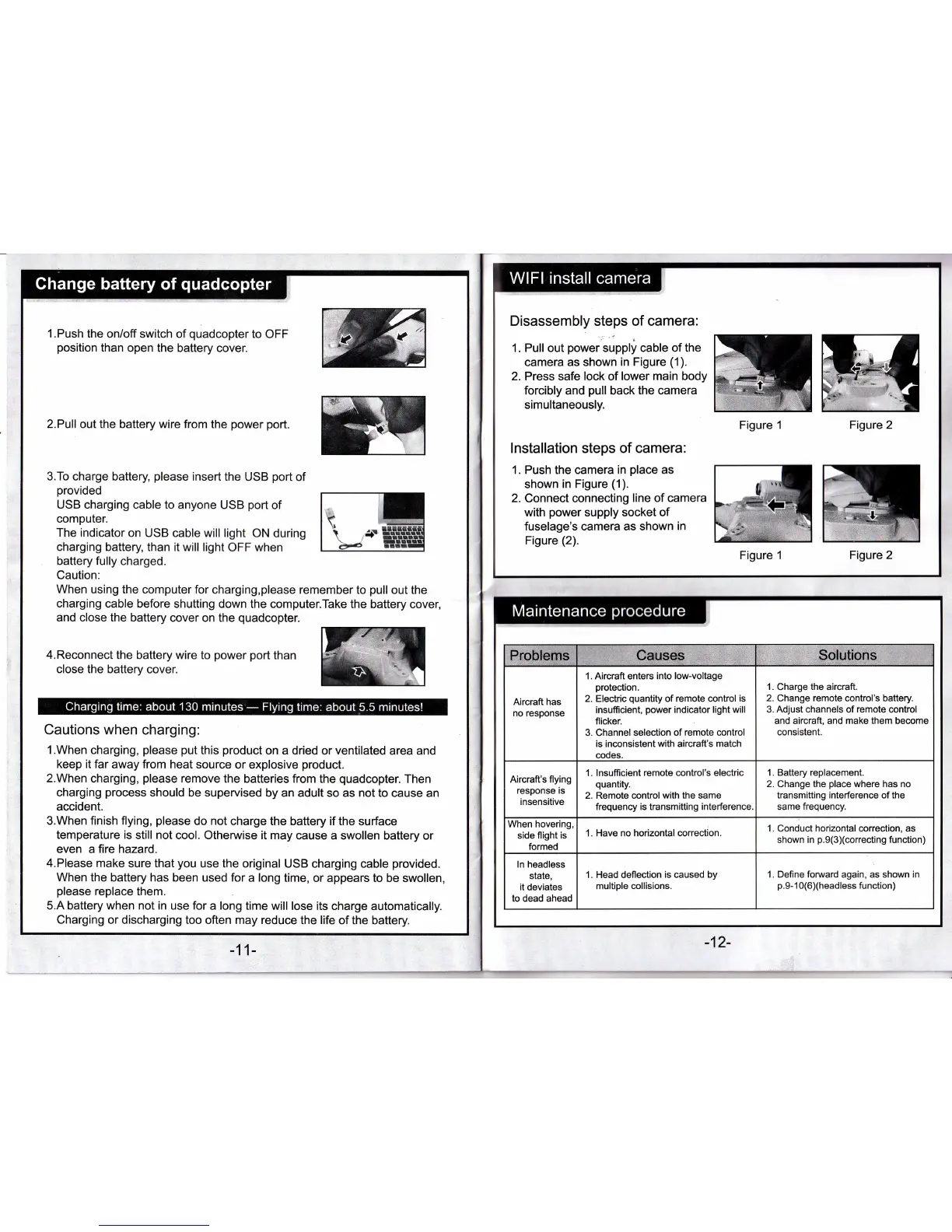
'l.Push
the
on/off switch
of
quadcopter
to OFF
position
than
oper the battery
cover.
2.Pull out the battery wire from the
power port.
3.To charge battery,
please
insert the
USB
port
of
provided
USB charging cable to anyone
USB
port
of
computer.
The indicator on USB
cable will light ON
during
charging
battery, than it will light
OFF when
battery fully
charged.
Caution:
When using the
computer for charging,please
remember to
pull
out the
charging
cable before
shutting down the computer.Take
the battery cover,
and close the
battery cover on the
quadcopter.
4.Reconnect
the battery wire to
power port
than
close the
battery cover.
Cautions when charging:
1.When
charging,
please put
this
product
on a
dried or
ventilated
area and
keep it far
away
from
heat source
or explosive
product.
2.When
charging,
please
remove
the
batteries
from
the
quadcopter.
Then
charging
process
should be
supervised by an
adult so as
not
to cause an
accident.
3.When finish
flying,
please
do not
charge the battery if the surface
temperature is
still
not
cool. Othenruise it may
cause a swollen battery
or
even a fire hazard.
4.Please make
sure that
you
use the
original USB charging cable
provided.
When the battery has
beea used for a long
time, or appears to be swollen,
please
replace
them.
5.A battery when not in
use
for
a long time
will lose its charge automatically.
Charging or discharging
too often may reduce
the life of the battery.
,
Disassembly steps of camera:
1. Pull
out
power
supply cable of the
camera
as shown
in Figure
(1).
2. Press safe lock of
lower main body
forcibly and
pull
back the camera
simultaneously.
lnstallation steps
of camera:
1. Push
the camera
in
place
as
shown
in Figure
(1).
2.
Connect connecting
line
of camera
with
power
supply socket
of
fuselage's
camera
as shown
in
Figure
(2).
Figure 2
MM
Figure 1
Figure 2
Figure 1
1. Alrcraft
enters
into low-voltage
protection.
2. Electric
quantity
of remote control
is
insufficient,
power
indicator light will
flicker.
3. Channel selection
of
remote
control
is inconsistent with aircraft's match
codes.
1.
Charge
the
aircraft.
2.
Change
remote control's battery.
3.
Adjust
channels of
remote
control
and aircraft, and
make them
become
consistent.
1. lnsufiicient
remote
control's
electric
quantity.
2. Remote control
with the
same
frequency
is transmitting interference
1. Battery replacement.
2.
Change
the
place
where has no
transmitting interference of the
same frequency.
When hovering,
side flight
is
formed
1. Have no horizontal correction.
Conduct
horizontal
correction, as
shown
in
p.9(3)(correcting
function)
1. Head deflection
is
caused
by
multiple
collisions.
1. Define forward again, as shown in
p.9-1
0(6)(headless function)


 To Next Page
 Loading...