111111111111111111111111111111111111111111111111111111111111111111111111
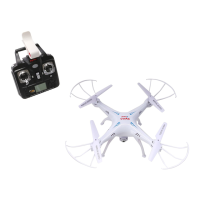
Remote control keypad and lcd manual
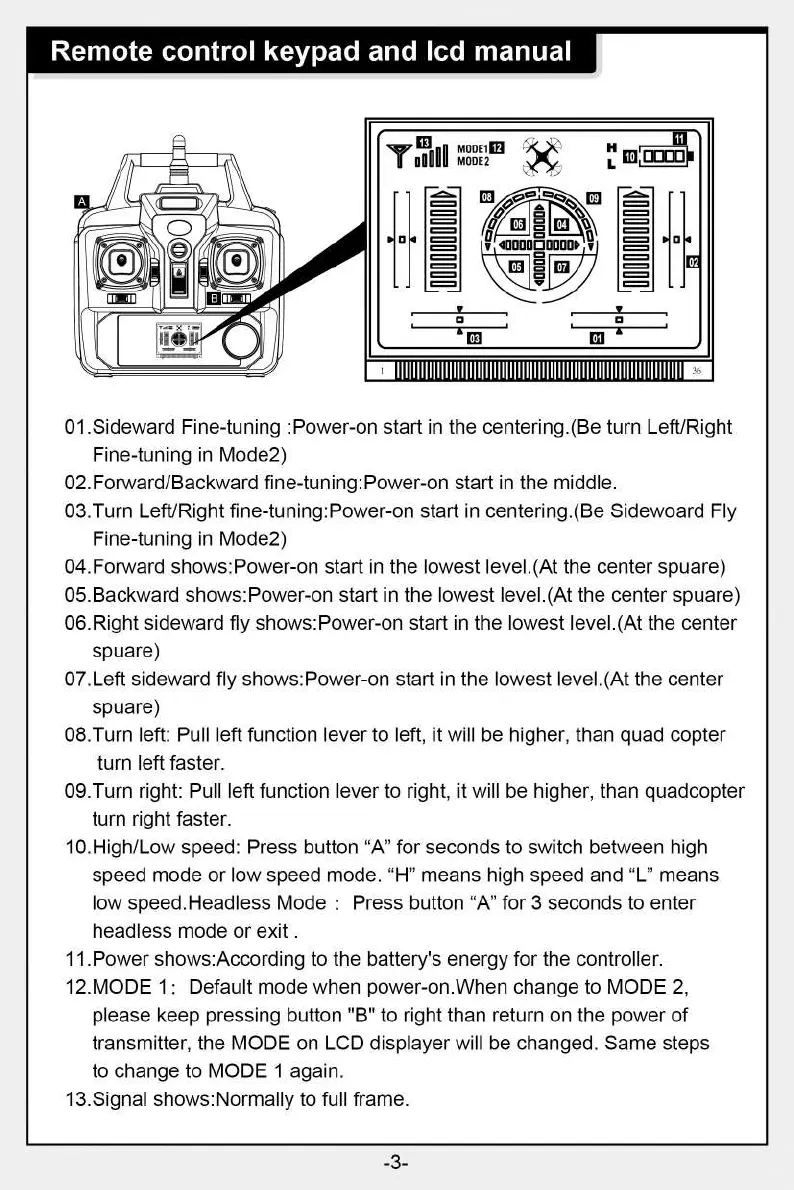
01.Sideward Fine-tuning :Power-on start in the centering.(Be turn Left/Right
Fine-tuning in Mode2)
02.Forward/Backward fine-tuning:Power-on start in the middle.
03.Turn Left/Right fine-tuning:Power-on start in centering.(Be Sidewoard Fly
Fine-tuning in Mode2)
04.Forward shows:Power-on start in the lowest level.(At the center spuare)
05.Backward shows:Power-on start in the lowest level.(At the center spuare)
06.Right sideward fly shows:Power-on start in the lowest level.(At the center
spuare)
07.Left sideward fly shows:Power-on start in the lowest level.(At the center
spuare)
08.Turn left: Pull left function lever to left, it will be higher, than quad copter
turn left faster.
09.Turn right: Pull left function lever to right, it will be higher, than quadcopter
turn right faster.
10.High/Low speed: Press button "A" for seconds to switch between high
speed mode or low speed mode. "H" means high speed and "L" means
low speed.Headless Mode : Press button "A" for 3 seconds to enter
headless mode or exit .
11.Power shows:According to the battery's energy for the controller.
12.MODE 1: Default mode when power-on.When change to MODE 2,
please keep pressing button "B" to right than return on the power of
transmitter, the MODE on LCD displayer will be changed. Same steps
to change to MODE 1 again.
13.Signal shows:Normally to full frame.
-3-


 To Next Page