.
1
1
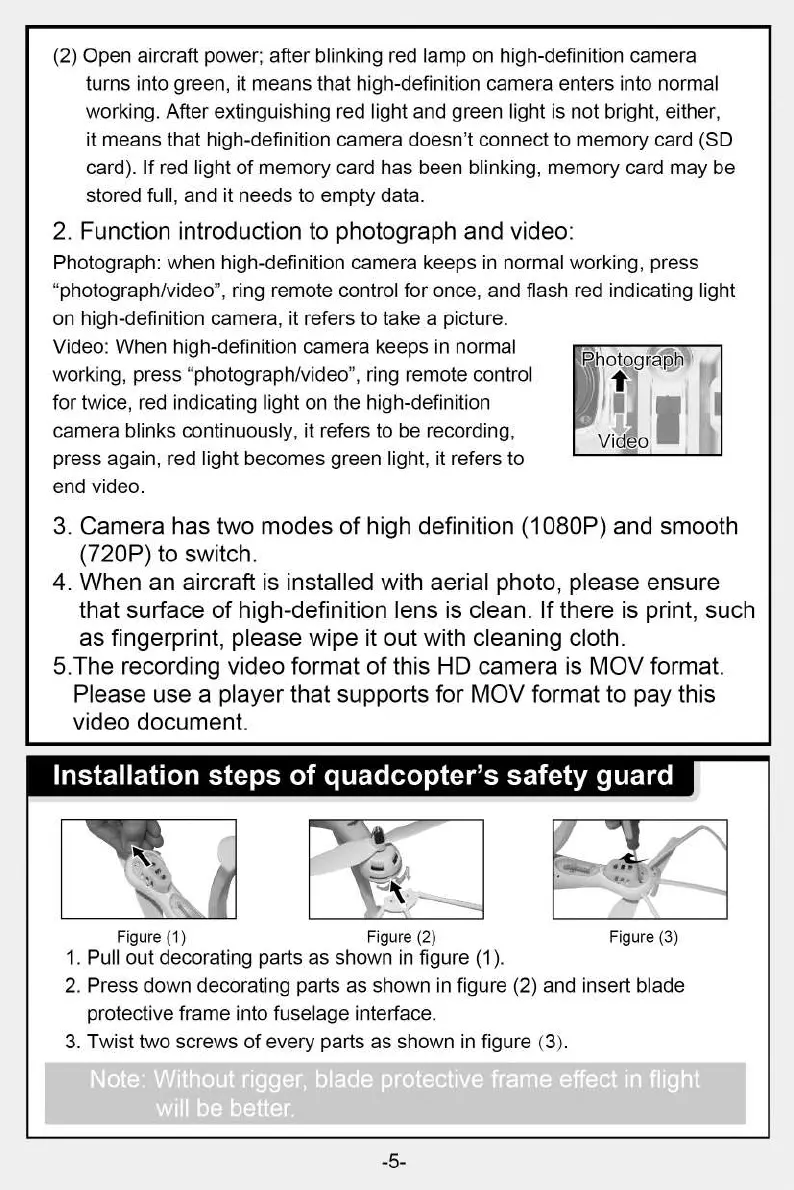
Photograph
Video
(2) Open aircraft power; after blinking red lamp on high-definition camera
turns into green, it means that high-definition camera enters into normal
working. After extinguishing red light and green light is not bright, either,
it means that high-definition camera doesn't connect to memory card (SD
card). If red light of memory card has been blinking, memory card may be
stored full, and it needs to empty data.
2.
Function introduction to photograph and video:
Photograph: when high-definition camera keeps in normal working, press
"photograph/video", ring remote control for once, and flash red indicating light
on high-definition camera, it refers to take a picture.
Video: When high-definition camera keeps in normal
working, press "photograph/video", ring remote control
for twice, red indicating light on the high-definition
camera blinks continuously, it refers to be recording,
press again, red light becomes green light, it refers to
end video.
3.
Camera has two modes of high definition (1080P) and smooth
(720P) to switch.
4.
When an aircraft is installed with aerial photo, please ensure
that surface of high-definition lens is clean. If there is print, such
as fingerprint, please wipe it out with cleaning cloth.
5.The recording video format of this HD camera is MOV format.
Please use a player that supports for MOV format to pay this
video document.
Figure (3)
Installation steps of quadcopter's safety guard
7
Figure (1)
Figure (2)
1.
Pull out decorating parts as shown in figure (1).
2.
Press down decorating parts as shown in figure (2) and insert blade
protective frame into fuselage interface.
3.
Twist two screws of every parts as shown in figure (3).
effect in fli
will be better.


 To Next Page