-4-
Figure 1
Figure 1
Figure 1 Figure 2 Figure 3
Figure 2
Figure 2
Figure 3
Component installation of WIFI real-time aerial photo
Installation of phone attaching clamp
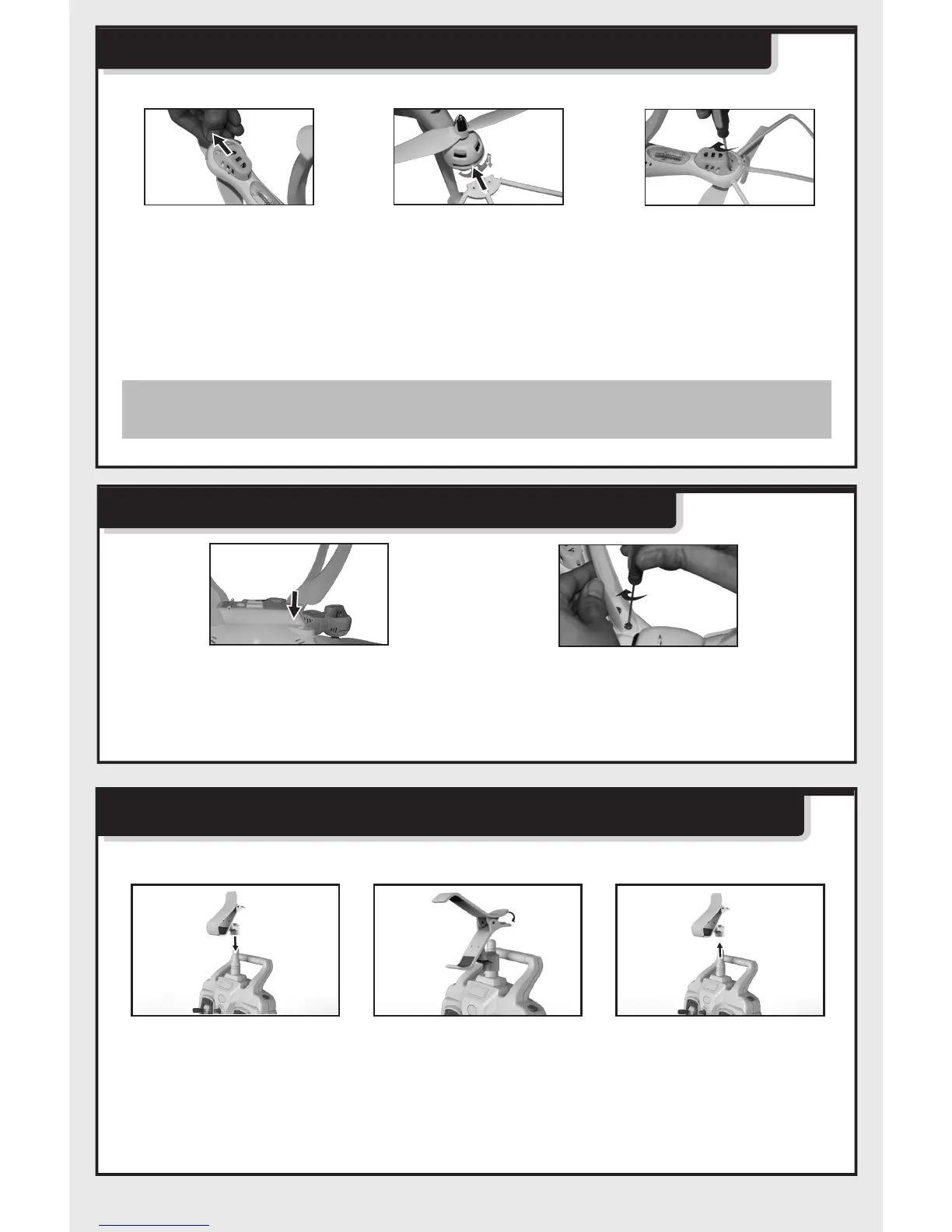
1. Insert phone attaching clamp by aiming at antenna on remote control.
(Figure 1)
2. Press spring of attaching clamp forcibly to resize.(Figure 2)
3. Hold phone attaching clamp and pull out forcibly to disassemble phone
attaching clamp.(Figure 3)
1. Pull out decorating parts as shown in Figure (1).
2. Press down decorating parts as shown in Figure (2) and insert blade
protective frame into fuselage interface.
3. Twist two screws of every parts as shown in Figure(3).
Installation steps of quadcopter’s safety guard
Note: Without blade protective frame,rolling effect in flight
will be better.
Installation steps of quadcopter’s stands
1.Insert stands into the
quadcopter body as
figure(1).
2.Twist the wide screws to
locking the stands as figure(2).


 To Next Page