2-4
LS 5700/LS 5800 Product Reference Guide
Connecting Your Scanner
To an IBM 468x/469x Terminal, Port 9E or Port 17
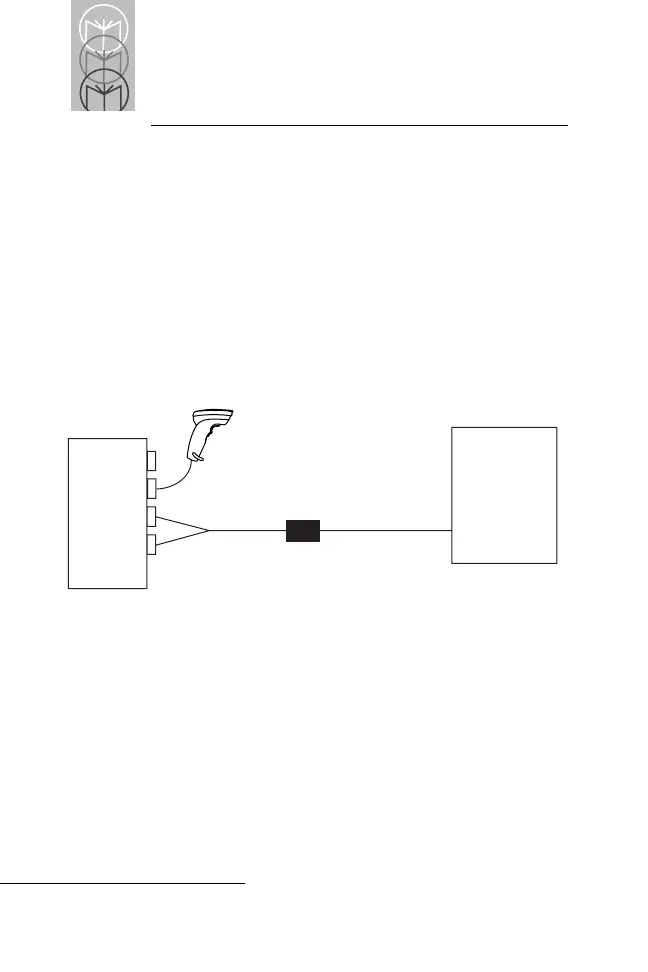
Attach the Synapse Power Regulator Y-cable as shown in
Figure 2-3. One connector goes to the Host port and the
other to the Power port. Attach a Synapse cable between
the Power Regulator cable and the IBM terminal. No
additional power supply is needed, as the IBM terminal
supplies power to the scanner. If additional scanning
versatility is desired, plug a Synapse-compatible scanner
into the Hand-Held Laser Scanner port.
Figure 2-3. Connecting to an IBM Terminal, Port 9E or Port 17
In this configuration, the scanner draws power from the host.
LS 5700/
LS 5800
IBM 468x/469x
Port 9E, 17
Synapse Cable
Synapse Cable
Regulatory Y-Cable
p/n 25-17086-01


 To Next Page