Push Commands
And to dial Speed Dial 12, use the following command
assuming the speed dial 12 button has control number 112
assigned to it:
CS 112 65535<CR>
To enter a number to dial directly by entering the digits
14257787728, send the command
SSYSS 1.1004.0.3.0=14257787728<CR>
And to dial the digits, send the following command
assuming the connect/disconnect has control number 140
assigned to it:
CS 140 65535<CR>
Dialing VoIP Strings
When using the 1004 resource to dial strings with the VoIP
interface, the maximum length phone number that may be
directly dialed is 63 characters. Valid characters include
0-9, #, *, ., and letters (for SIP URI dialing). The digit pause
character ‘,’ to generate 2 seconds of pause in a dialing
string is not supported for the VoIP interface. Direct dial is
not supported for the ATI card.
(GSYSS) Get System String
This command gets a system string such as a speed dial
name or number. The syntax of the command is:
GSYSS <unit>.<resource>.<enum>.<card>.<channel> <CR>
Gets the string resource defined by the 5 parameters above.
Supported values for <resource> are shown in the following
table:
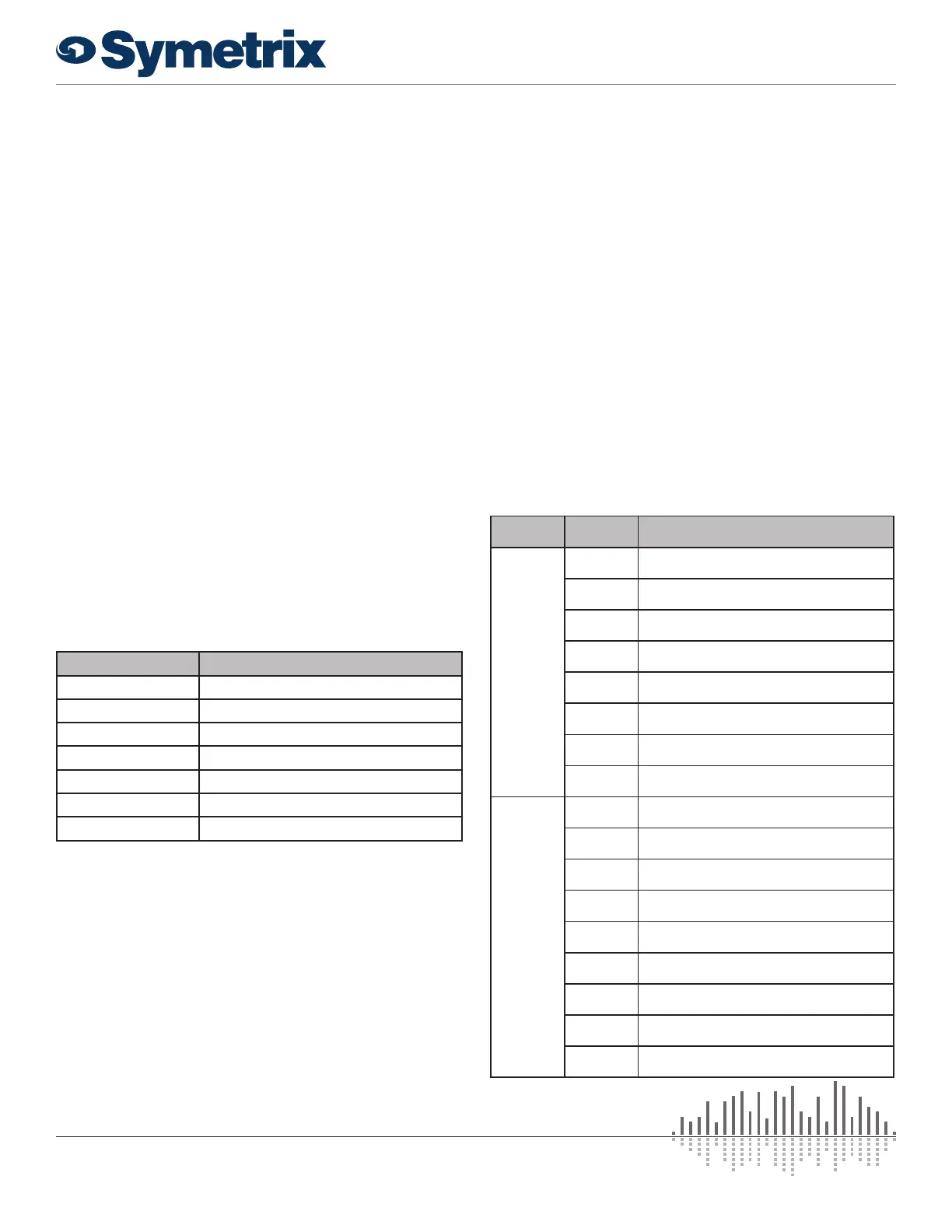
Resource Number Resource Name
1000 Speed dial number
1001 Speed dial name
1002 Dialed number
1003 Caller ID
1004 Number to dial (VoIP only)
1005 Call status (VoIP only)
1006 Elapsed time in a call (VoIP only)
<unit> is the unit enumerator after the dash shown in
Composer above each unit, e.g. “Edge-1” means <unit> =
1.
<enum> is zero based, 0-19 for speed dials.
<card> is 0-3 for A-D.
<channel> is zero based and 0 where not applicable.
For example:
GSYSS 1.1001.11.3.0<CR>
Returns the name of speed dial #12 on unit 1, card D. No
channel specification is necessary.
GSYSS 2.1003.0.3.1<CR>
Returns the caller ID on unit 2 for line 2 on card D.
If the command is accepted, the unit will respond with string:
ACK<CR>
If the command is interpreted but fails for any reason the unit
will respond with the string:
NAK<CR>
Other examples from an existing system are shown below:
GSYSS 1.1003.0.3.0<CR>
Returns: 710 ‘Room 710’ 4/15 7:15
GSYSS 1.1005.0.4.0<CR>
Returns: In Call: 710
GSYSS 1.1006.0.3.0<CR>
Returns: Time 0:00:35
Valid values of Resource Number 1005 are shown in the
following table. The parameter <dialed number> represents
the digits that were dialed, if any, to initiate the call.
Telephony
Interface
Status
Message
Description
VoIP
Interface
Busy: The call appearance is busy
Dialing: The call appearance is being dialed.
Hold: The call appearance is in hold mode
Idle The call appearance is in idle state.
In Call:
The remote caller has answered and a call is
connected.
Remote
Hold:
The remote caller has placed the call on hold.
Ringing The call appearance is ringing.
Unavailable: The call appearance cannot connect.
Analog
Telephone
Interface
Reset The telephone line has been reset.
Ready The line onhook and ready for a call.
Outgoing Call The line is dialing a call
Ringing The line is actively ringing.
Ring Silence The line is quiet between active rings.
Incoming Call
An incoming call has dialed the telephony
interface.
Disconnect The call has been disconnected.
In Use
The telephone line is already in a call – perhaps
due to a shared line with another phone.
No Line There is no analog phone line connected.
12 25
of
www.symetrix.co | T +1.425.778.7728


 To Next Page