Push Commands
Pushing GSYSS String Values
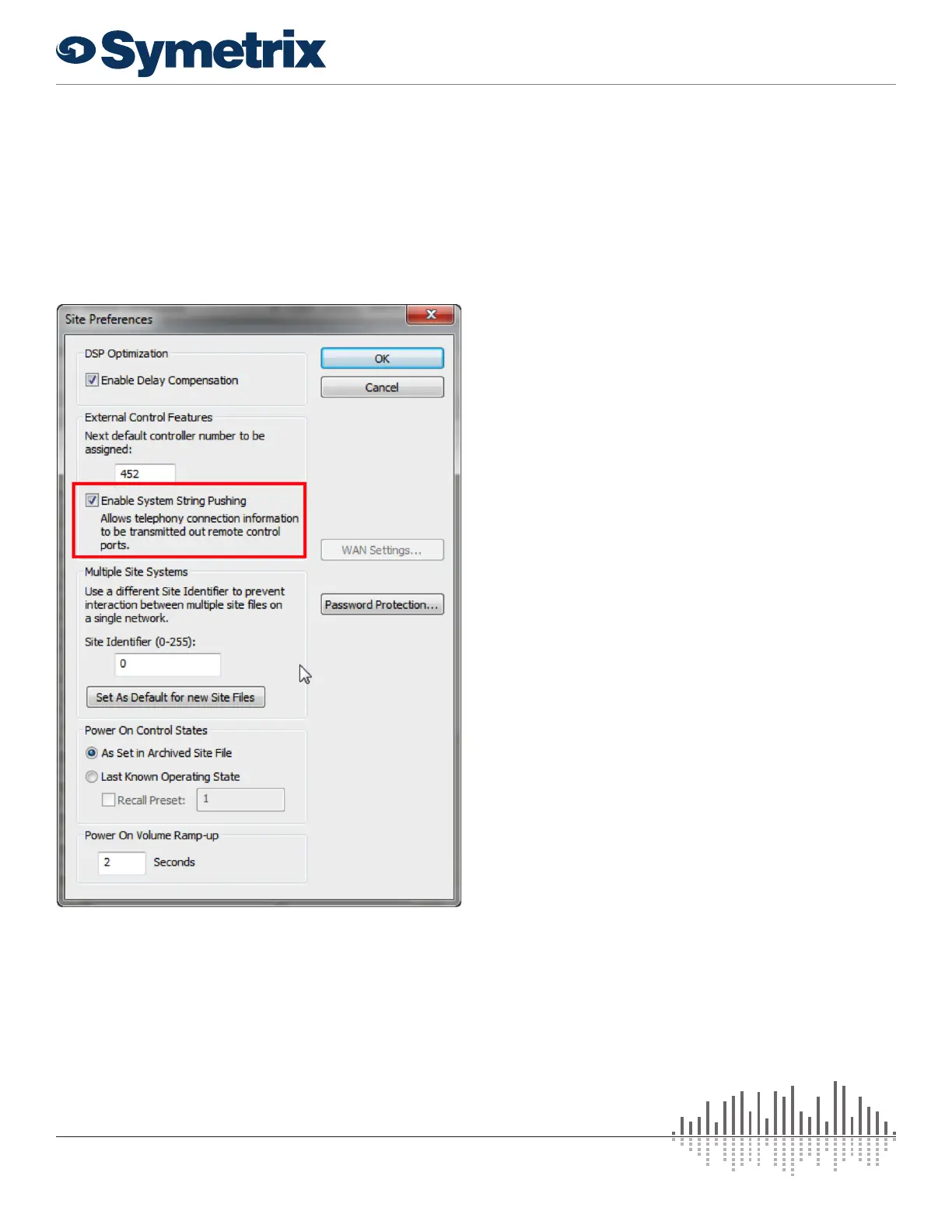
To have changes in the GSYSS string values automatically
sent to the control system, enable the option “Enable System
String Pushing” under the Tools->Site Preferences menu and
re-push the configuration file to the device. Afterwards, any
changes in the values will be automatically sent to the control
ports.
Push Commands
Units can send out unsolicited RS-232 and Ethernet data as
a result of parameter values changing within the unit.
All parameters that can be externally controlled can be
configured to automatically send out their values whenever
they change. This method, referred to as pushing data, can
be used instead of, or in addition to, polling (asking for data).
When using this feature, ensure that your system can handle
the volume of data you set up and that it can differentiate
between responses to commands and pushed data.
Commands used to control the push feature are described
below. Also, the following questions and answers provide
a detailed discussion of this feature, including real-world
problems and solutions.
When is data pushed?
For data to be pushed
1) a controller number must be enabled for push in
Composer
2) individual parameters must be enabled to push using the
Push Enable command.
Then, the controller value will be sent out
1) whenever the control’s underlying parameter changes or
2) when a refresh command is issued via RS-232 or
Ethernet.
Regardless of if the parameter change is made via the
control application, RS-232, RS-485, preset recall, analog
control or any other method, the data will be pushed. This
means for example that if your control system changes a
controller value set up for push, you will immediately receive
notification of that change.
Where (out what port) is the data pushed?
The data is sent out the RS-232 port and the Ethernet port
(both UDP and TCP) of the Symetrix unit.
What does the pushed data look like?
The format for unsolicited or “push” data is the same as the
GSB2 command. Strings consist of the controller number
and its value in the following format:
#<CONTROLLER NUMBER>=<CONTROLLER POSITION><CR>
Where <CONTROLLER NUMBER> is the decimal
controller number (1-10000) assigned in Composer and
<CONTROLLER POSITION> is a 16-bit number in decimal
(0-65535). The values for the controller number and position
will always be five digits, with leading zeros added as
necessary (e.g. 7 would be returned as 00007).
13 25
of
www.symetrix.co | T +1.425.778.7728


 To Next Page