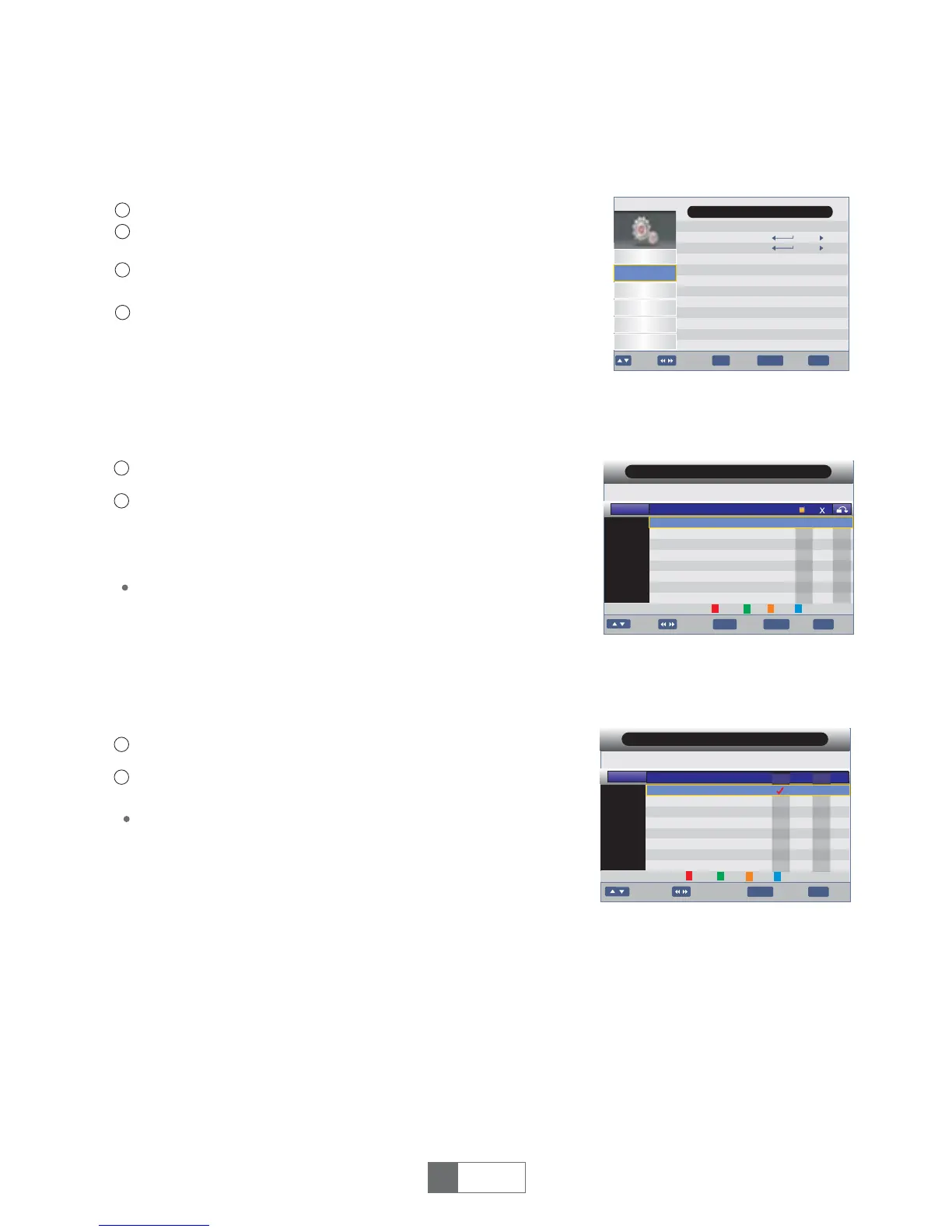
5.1 Channel menu
5 CHANNEL
5.2 Channel Manager
In the Channel menu, select "Channel Manager", press "OK"
button to enter Channel Manager menu.
1
2
Use this menu to lock, delete, skip, swap and rename
channel.
Press"UP"or"DOWN" button tohighlightchannel.
1
English
6
4
1
2
3
Press the "MENU" button to enter main menu.
Press"UP"or"DOWN"buttontohighlight"Channel",press
"RIGHT" button to enter the Channel menu.
Press"UP"or"DOWN"cursorbutton tohighlightthedesireditem
andpress"OK"buttontoenterthesub-menu.
Press"EXIT"buttontoexit.
Press"color"button,thenpress"OK"buttontoeditthe
corresponding function.
5.3 Favorite List
GEO
GEO ENT B
GEO ENT U
GEO NE
AAG
AAG INTL
GEO SUPER
EXIT
Move
Exit
BACK
BackPage+-
Program Name
Favorite List
No.
0001
0002
0003
0004
0005
0006
0007
0008
Fav1
GEONEWSNTL
Fav1 Fav2
Fav3
Fav4
In the Channel menu, select "Favorite List", press "OK"
button to enter Favorite List menu.
1
2
Press"UP"or"DOWN" button tohighlightchannel.
Press buttontoaddthechannel
to the Fav1~Fav4 List. An icon indicates which favorite list a
channelisin.Press againtocancel."1~4" button
RED/GREEN/YELLOW/BLUE
numeric
Channel Manager
Favorite List
Channel
Preference
Setting
AV
Game
Installation
Main Menu
OK
EXIT
Move Enter
Exit
BACK
BackPage+-
Fav4
Fav2
Fav3
GEO
GEO ENT B
GEO ENT U
GEO NE
AAG
AAG INTL
GEO SUPER
OK
EXIT
Move Swap
Exit
BACK
BackPage+-
Channel Manager
No.
0001
0002
0003
0004
0005
0006
0007
0008
Lock
Del
Skip
Rename
Program Name
GEONEWSNTL


 To Next Page