
 Need help?
Do you have a question about the Synology DiskStation DS118 and is the answer not in the manual?
Lists the items included in the product package.
Overview of the DiskStation's components and ports.
Important safety guidelines for using the device.
Details necessary tools and compatible drives for installation.
Step-by-step guide to installing hard drives into the unit.
Instructions for powering on and connecting the DiskStation.
Guide to installing DiskStation Manager using the Web Assistant tool.
Information on where to find additional resources and support.
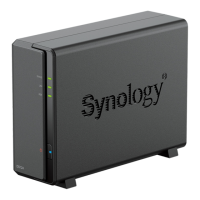
The Synology DiskStation DS118 is a single-bay Network Attached Storage (NAS) device designed for home and small office users, offering a centralized solution for data storage, backup, and sharing. It functions as a personal cloud, allowing users to access their files from anywhere with an internet connection, while maintaining full control over their data.
At its core, the DS118 serves as a file server, enabling users to store a wide variety of data, including documents, photos, videos, and music, in one secure location. It supports both 3.5" and 2.5" SATA drives, providing flexibility in choosing storage capacity and drive type. Once a drive is installed and the DiskStation Manager (DSM) operating system is set up, the device becomes accessible over a local network.
The primary function of the DS118 is to provide reliable data storage. Users can create shared folders to organize their files and grant different access permissions to various users or groups, making it suitable for collaborative environments. Beyond simple storage, the DS118 excels in data protection. It supports various backup solutions, allowing users to back up data from their computers to the DiskStation, or even back up the DiskStation's data to external drives, other Synology NAS devices, or cloud services. This multi-layered approach to backup helps safeguard against data loss due to hardware failure, accidental deletion, or other unforeseen events.
The DS118 also acts as a media server, enabling users to stream multimedia content to various devices such as smart TVs, mobile phones, and computers. With compatible applications, users can organize their photo collections, manage music libraries, and stream videos seamlessly across their network. This transforms the DiskStation into a central entertainment hub for the home.
For remote access, the DS118 allows users to create their own private cloud. Through Synology's QuickConnect service or by configuring port forwarding, users can access their files, stream media, and manage their DiskStation from outside their local network using web browsers or mobile apps. This feature provides the convenience of cloud storage without the recurring subscription fees and with enhanced privacy.
The device also supports various network services, including file sharing protocols like SMB/CIFS, AFP, NFS, and FTP, making it compatible with Windows, macOS, and Linux environments. It can also function as a print server, allowing multiple users to share a single USB printer connected to the DiskStation.
Setting up the DS118 involves a straightforward hardware installation followed by software configuration. The physical installation requires opening the upper case, sliding a hard drive into the bay, and securing it with screws. For 2.5" drives, an optional disk holder is used. Once the drive is in place, the case is reattached and secured. Power and network cables are then connected.
The software setup is facilitated by Synology's Web Assistant. After powering on the DiskStation and connecting it to the network, users can open a web browser on a connected computer and navigate to find.synology.com or diskstation:5000. The Web Assistant will detect the DiskStation and guide the user through the installation of DiskStation Manager (DSM), Synology's intuitive browser-based operating system. DSM provides a user-friendly interface that resembles a desktop operating system, making it easy to navigate and manage the DiskStation's features.
The front panel of the DS118 features several LED indicators that provide quick visual feedback on the device's status. The Status indicator shows the overall system health, indicating whether the volume is normal, degraded, or if DSM is not installed. The LAN indicator displays the network connection status, showing if the network is connected or active. The Disk indicator shows the status of the installed drive, indicating if it's ready and idle, being accessed, or if there's an error. The Power button, also illuminated, indicates if the device is powered on, booting up, or shutting down. These indicators are crucial for quickly diagnosing any issues without needing to access the DSM interface.
On the back panel, the DS118 includes USB 3.0 ports for connecting external hard drives or other USB devices, expanding storage or enabling backup to external media. A LAN port allows connection to a network switch, router, or hub. A Kensington Security Slot provides a physical security option to deter theft. The RESET button offers two functions: a short press and hold restores the default IP address, DNS server, and admin password, while a longer press and hold (until three beeps are heard) returns the DiskStation to an "Not Installed" status, allowing DSM to be reinstalled.
The DS118 is designed with ease of maintenance in mind, primarily through its DSM operating system and physical indicators. The LED indicators on the front panel are the first line of defense for troubleshooting. For instance, a blinking orange Status LED might indicate a degraded volume or that DSM is not installed, prompting the user to investigate further. A solid orange Disk LED could signal a drive error, suggesting the need to check the drive's health.
Within DSM, users have access to a comprehensive suite of tools for monitoring and maintaining the DiskStation. The Storage Manager allows users to monitor the health of their installed drives, perform S.M.A.R.T. tests to detect potential drive failures, and manage storage volumes. Regular checks of drive health are essential for proactive maintenance and preventing data loss.
DSM also provides system logs and notifications, which alert users to critical events, such as fan malfunctions, network issues, or drive errors. These notifications can be configured to be sent via email or SMS, ensuring that users are promptly informed of any problems even when they are not actively monitoring the DiskStation.
The fan on the back panel is responsible for disposing of excess heat and cooling the system. If the fan malfunctions, the DiskStation will emit a beeping sound, alerting the user to a potential overheating issue that needs immediate attention. This audible alert is a critical safety feature to prevent hardware damage.
Software updates for DSM are regularly released by Synology, providing new features, security patches, and bug fixes. Users can easily update DSM through the Control Panel, ensuring their DiskStation remains secure and performs optimally. These updates are crucial for maintaining the stability and security of the device over time.
In case of more severe issues, the RESET button offers recovery options. If network settings are misconfigured, a soft reset can restore them without affecting data. If the DSM installation becomes corrupted or a fresh start is desired, a hard reset allows for a complete reinstallation of the operating system.
Overall, the Synology DiskStation DS118 is a robust and user-friendly NAS solution that simplifies data management, enhances data security, and provides versatile multimedia capabilities, all while offering intuitive setup and maintenance features.
 General
| RAID support | - |
|---|---|
| Storage drive size | - \ |
| Storage drive capacity | 0 GB |
| Supported file systems | FAT, HFS+, NTFS, exFAT, ext3, ext4 |
| Storage drives installed | No |
| Storage drive sizes supported | 2.5, 3.5 \ |
| Supported storage drive types | HDD & SSD |
| Total installed storage capacity | 0 TB |
| Maximum supported storage capacity | 16 TB |
| Number of storage drives installed | 0 |
| Number of storage drives supported | 1 |
| Supported storage drive interfaces | Serial ATA |
| AC input voltage | 100 - 240 V |
| AC input frequency | 50 - 60 Hz |
| Power supply location | Built-in |
| Power consumption (typical) | 9.4 W |
| Power consumption (HDD standby) | 4.22 W |
| Power supply unit (PSU) capacity | 36 W |
| Processor cores | 4 |
| Processor model | RTD1296 |
| Processor family | Realtek |
| Processor frequency | 1.4 GHz |
| Processor operating modes | 64-bit |
| Cables included | AC, LAN (RJ-45) |
| Quick installation guide | Yes |
| Internal memory | 1 GB |
| Internal memory type | DDR4 |
| Ethernet LAN data rates | 10, 100, 1000 Mbit/s |
| USB 2.0 ports quantity | USB 2.0 ports have a data transmission speed of 480 Mbps, and are backwards compatible with USB 1.1 ports. You can connect all kinds of peripheral devices to them. |
| USB 3.2 Gen 1 (3.1 Gen 1) Type-A ports quantity | 2 |
| Chassis type | Compact |
| Cooling type | Active |
| Fan diameter | 60 mm |
| Product color | Black |
| Number of fans | 1 fan(s) |
| Cable lock slot type | Kensington |
| Type | NAS |
| Device class | Home & Home Office |
| Backup features | Cloud, iSCSI LUN |
| Number of users | 2048 user(s) |
| Operating system installed | DiskStation Manager |
| Storage temperature (T-T) | -20 - 60 °C |
| Operating temperature (T-T) | 5 - 40 °C |
| Operating relative humidity (H-H) | 5 - 95 % |
| Sustainability certificates | RoHS |
| Harmonized System (HS) code | 84714100 |
 Weight and Dimensions
| Depth | 224 mm |
|---|---|
| Width | 71 mm |
| Height | 166 mm |
| Weight | 700 g |







 To Next Page