
 Need help?
Do you have a question about the Synology DiskStation DS1515 and is the answer not in the manual?
Lists the items included in the product package for initial setup.
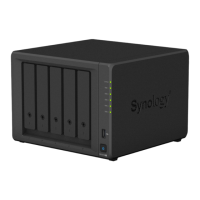
Details the various ports, indicators, and components on the DiskStation unit.
Provides essential safety precautions for operating the device to prevent damage or injury.
Lists necessary tools and components for installing storage drives.
Step-by-step guide on how to pop out and remove a hard drive tray.
Detailed instructions for loading 3.5" and 2.5" drives into the drive trays.
Instructions for inserting loaded drive trays and locking them with the key.
Guide to connecting cables and powering on the DiskStation.
Initial steps for shutting down and preparing for fan replacement.
Detailed steps for removing the old fan and installing the new one.
Guide to installing DiskStation Manager using the Web Assistant tool.
Information on where to find additional resources and support for your device.
Technical specifications and features of the DiskStation DS1515.
Explains the meaning of different LED indicators on the device.
This document serves as a Quick Installation Guide for the Synology DiskStation DS1515, a network-attached storage (NAS) device designed for data storage, sharing, and management. The guide provides essential information for setting up, using, and maintaining the device, ensuring users can quickly get their DiskStation online and operational.
The Synology DiskStation DS1515 functions primarily as a centralized storage solution, allowing users to store, back up, and share files across a network. It supports multiple hard drives, enabling the creation of RAID volumes for data redundancy and improved performance. The device is designed to be accessible from various client operating systems, including Windows, Mac OS X, and Ubuntu, making it a versatile option for diverse computing environments. Its core functionality revolves around the DiskStation Manager (DSM) operating system, a web-based interface that provides a rich set of features for managing the NAS, including file management, user and group permissions, network settings, and various applications.
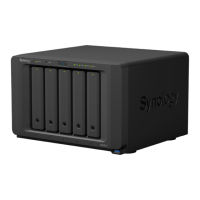
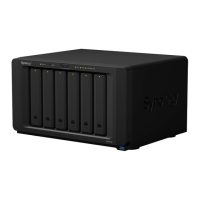
Key usage features of the DS1515 include its multi-bay design, accommodating up to five 3.5" or 2.5" SATA drives. This allows for significant storage capacity and flexibility in configuring storage pools and volumes. The device is equipped with multiple LAN ports, enabling network connectivity and potentially link aggregation for increased throughput and failover capabilities. USB 3.0 ports are available for connecting external storage devices, printers, or other USB peripherals, expanding its utility. eSATA ports further enhance connectivity options for external SATA drives or Synology Expansion Units, allowing for scalable storage as needs grow. The front panel features LED indicators for system status, alerts, LAN activity, and individual drive status, providing at-a-glance information about the device's operational state. A power button is located on the front for easy power control, with specific press-and-hold functions for graceful shutdown. The device also includes a RESET button on the back panel, offering options to restore default network settings or return the DiskStation to an "Not Installed" status for DSM reinstallation, which is useful for troubleshooting or reconfiguring the system. The drive trays are lockable with a provided key, adding a layer of physical security to the installed drives.
Maintenance features are also covered in the guide, particularly regarding fan replacement. The DiskStation is designed to emit beeping sounds if a system fan malfunctions, alerting the user to a potential issue. The guide provides clear, step-by-step instructions for replacing a faulty fan, which involves shutting down the DiskStation, disconnecting cables, removing screws, detaching the fan panel, disconnecting the fan cable, and then installing a new fan. This process is made user-friendly with illustrations and detailed steps, emphasizing the importance of proper cable management and correct fan orientation. The device's design allows for relatively straightforward access to components that may require maintenance, such as the system fans, ensuring longevity and reliable operation. The guide also implicitly suggests regular monitoring of LED indicators for early detection of issues, such as drive errors or system warnings, which can prompt timely maintenance actions. Furthermore, the ability to reinstall DSM via the RESET button can be considered a maintenance feature, allowing users to recover from software issues or perform a clean reinstallation of the operating system. The emphasis on backing up important data before drive installation or system reinstallation underscores a crucial aspect of data maintenance and protection. The inclusion of safety instructions at the beginning of the guide, covering aspects like environmental conditions, cleaning procedures, and proper power supply, also contributes to the overall maintenance and safe operation of the DiskStation.
 General
| Model | DS1515 |
|---|---|
| Category | Storage |
| Hardware Encryption Engine | Yes |
| Memory | 2 GB DDR3 |
| Drive Bays | 5 |
| Compatible Drive Type | 3.5" SATA HDD, 2.5" SATA HDD, 2.5" SATA SSD |
| Hot Swappable Drive | Yes |
| External Ports | USB 3.0 x 4, eSATA x 2 |
| LAN | Gigabit x 4 |
| Link Aggregation | Yes |
| Wake on LAN/WAN | Yes |
| AC Input Power Voltage | 100V to 240V AC |
| Power Frequency | 50/60Hz, Single Phase |
| Operating Temperature | 5°C to 35°C (40°F to 95°F) |
| Storage Temperature | -20°C to 60°C (-5°F to 140°F) |
| Relative Humidity | 5% to 95% RH |
| RAID Support | Synology Hybrid RAID, Basic, JBOD, RAID 0, RAID 1, RAID 5, RAID 6, RAID 10 |
| Dimensions (H x W x D) | 157 mm x 248.5 mm x 233 mm |
| File System | EXT4 |
| CPU | Intel Atom C2538 2.4 GHz quad-core |
| System Fan | 80 mm x 80 mm x 2 |







 To Next Page