11
Chapter 2: Hardware Setup
To make sure DiskStation recognizes the new memory capacity:
1
Install DiskStation Manager (DSM). (See the next chapter for more information.)
2
Log in to DSM as
admin
or a user belonging to the
administrators
group.
3
Check
Total Physical Memory
in
Control Panel
>
Info Center
.
If your DiskStation does not recognize the memory or does not start up successfully, conrm that the memory is
installed correctly.
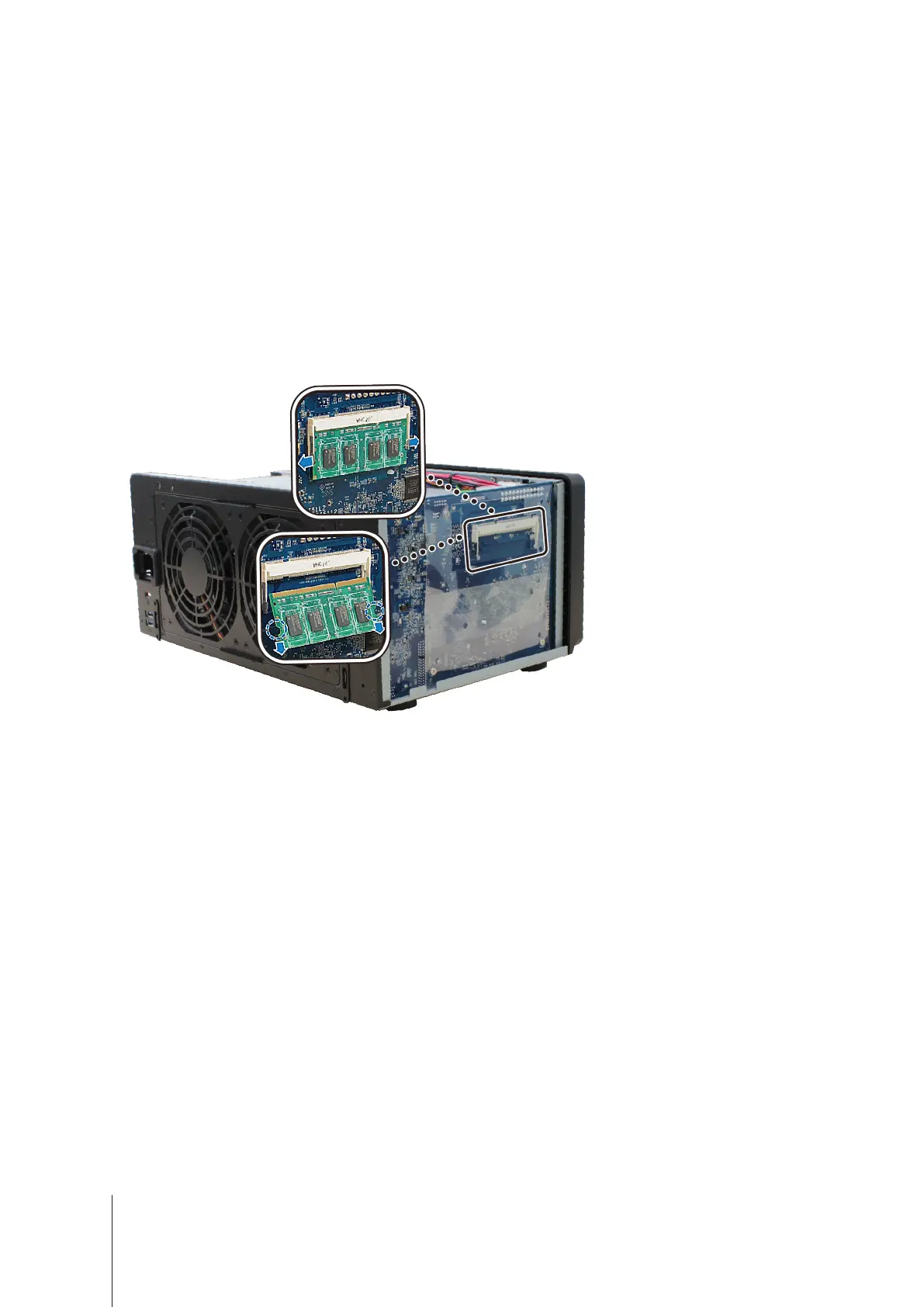
To remove the RAM Module:
1
Follow step 1 and 2 of the "To install the RAM module" section to shut down your DiskStation, disconnect the
cables, and then remove the top case.
2
Push the levers on the sides of the memory module in an outward direction to release the module from the
memory card slot.
3
Hold the memory module by its notches and remove it from the slot.
4
Replace the top case. Replace and tighten the screws you removed in step 2.
5
Reconnect the cables you removed in step 1, and then press and hold the power button to turn on your
DiskStation.








 To Next Page