7
Chapter2:HardwareSetup
3
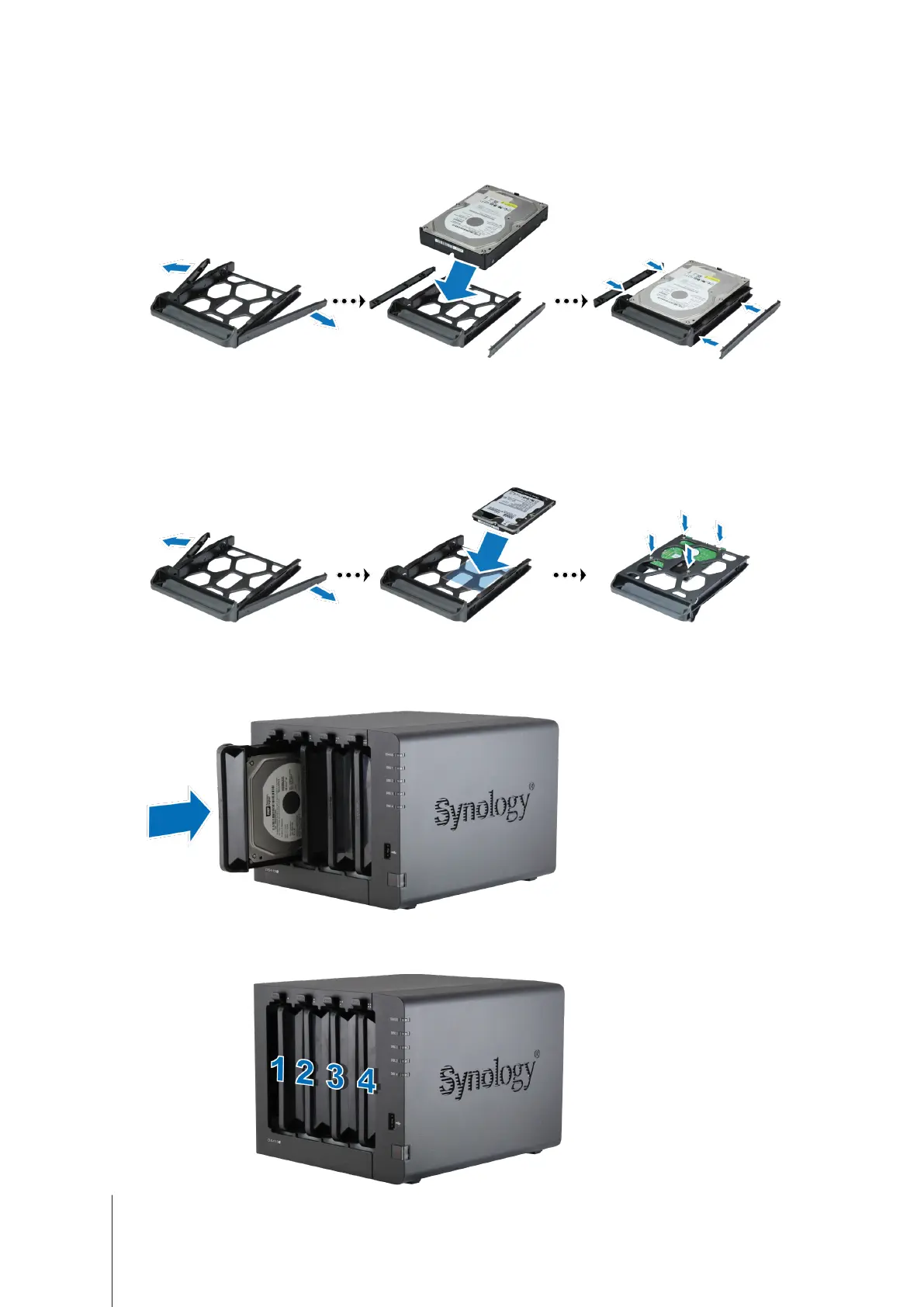
Loaddrivesinthedrivetrays.
•
For 3.5” drives:
Removethefasteningpanelsfromthesidesofthedrivetray.Placethedriveinthedrive
tray.Theninsertthefasteningpanelstosecurethedriveinplace.
•
For 2.5” drives:
Removethefasteningpanelsfromthesidesofthedrivetrayandstoretheminasafe
place.Placethedriveinthebluearea(shownbelow)ofthedrivetray.Turnthetrayupsidedownandtighten
thescrewstosecurethedriveinplace.
4
Makesurethesidemarkedwith"UP"isfacingup,andinsertthedrivetrayintotheemptydrivebay.Youshould
hearaclickwhenthetrayislockedintoplace.
5
Ifyouhavepreparedaseconddrive,repeatthestepsabovetoinstallit.
6
Drivesarenumberedasshownbelow:











 To Next Page