15 Chapter 3: Install DSM on DiskStation
5 To run Synology Assistant, you can either use the following command:
/path/install/SynologyAssistant/SynologyAssistant
Or run the shortcut:
/usr/local/bin/SynologyAssistant
If /usr/local/bin exists in your environment variable $PATH, just type:
SynologyAssistant
If you want to install using the GUI:
1 Go to /usr/local and /usr/local/bin and delete the following folders (if any):
Synology, SynologyAssistant
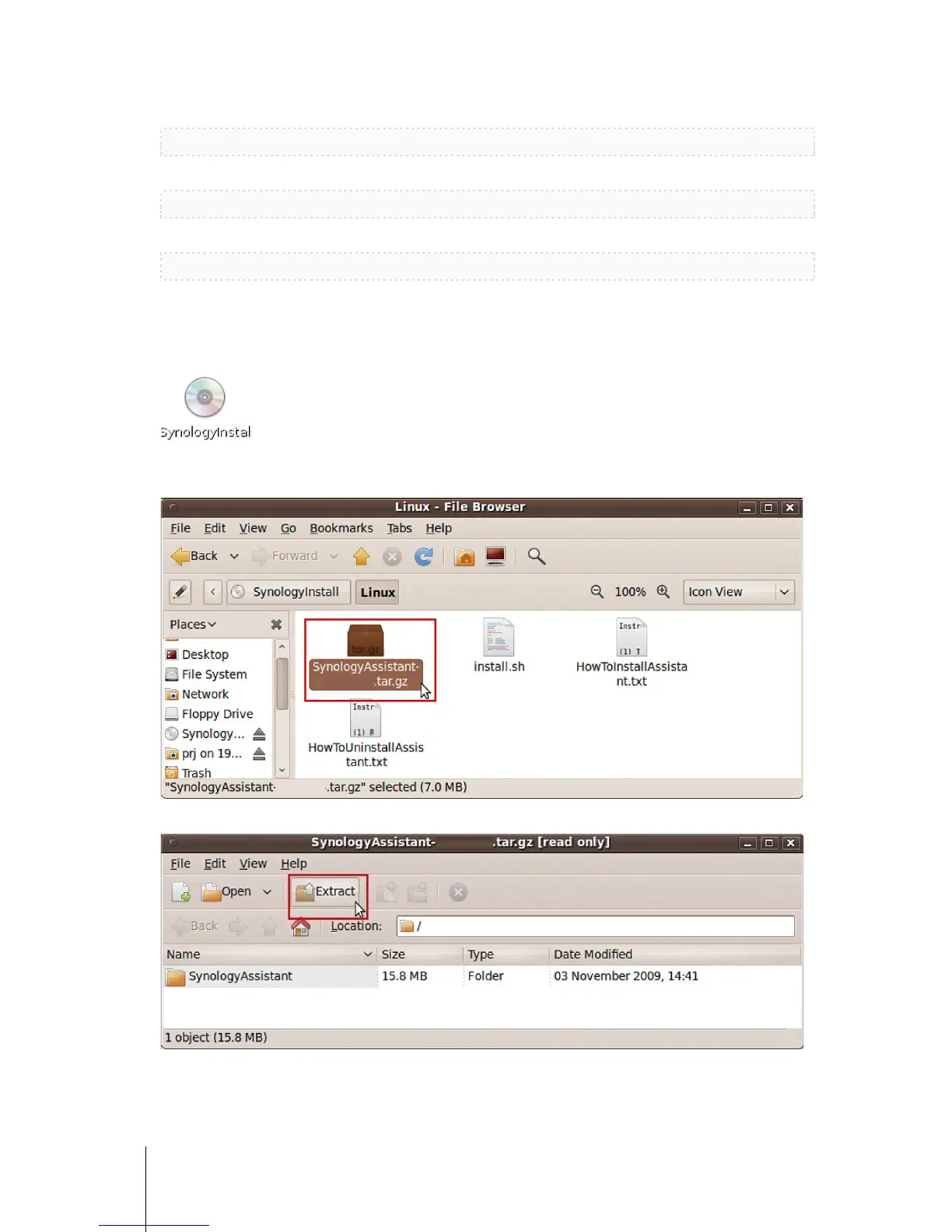
2 Insert the installation disc into your computer, and then double-click the SynologyInstall icon on the desktop.
3 In the File Browser window that appears, double-click the Linux folder, and then double-click Synology
Assistant-[number].tar.gz.
4 Click Extract, and then extract the SynologyAssistant directory to /usr/local or any other path.









 To Next Page