Appendix B: LED Indication Tables
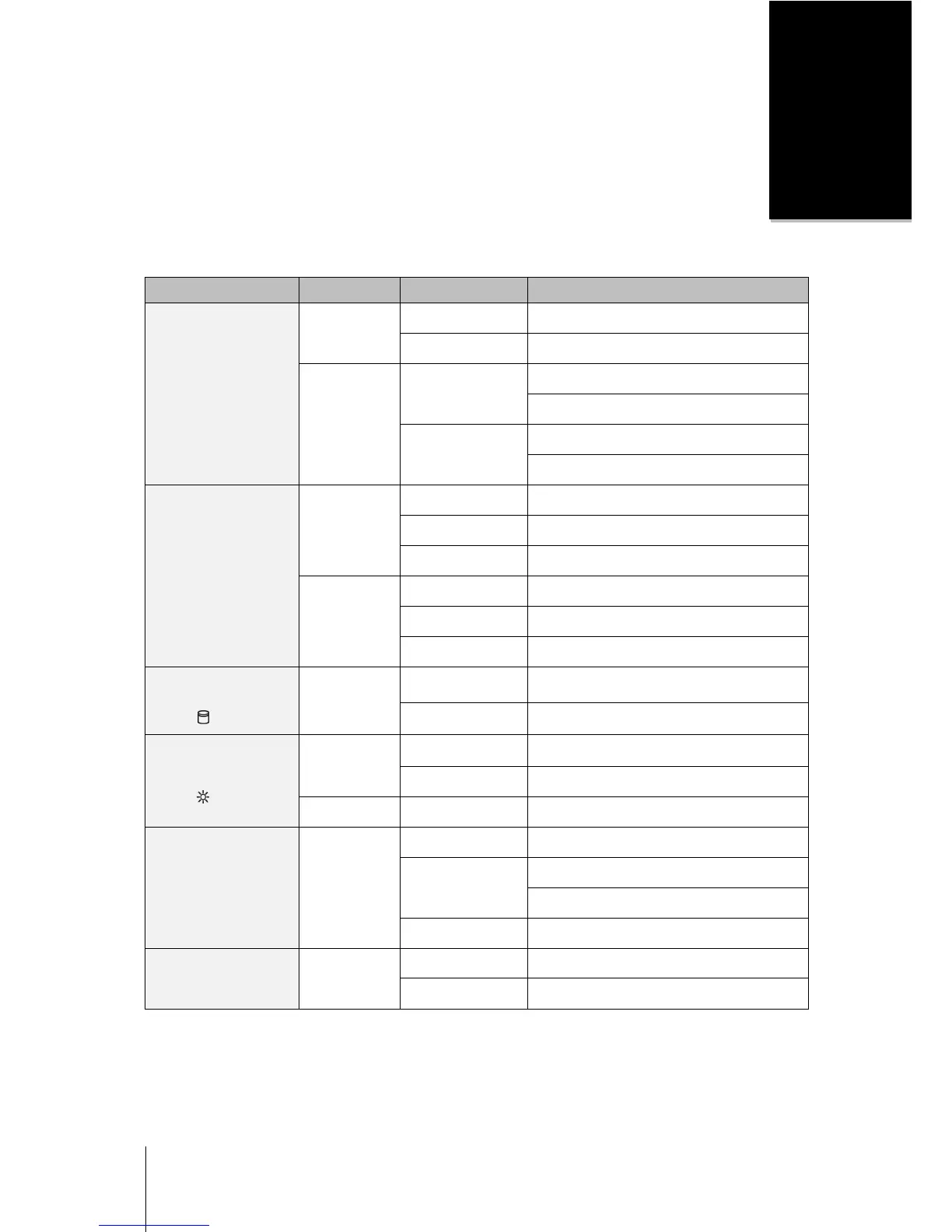
LED Indication Color Status Description
STATUS
Green
Static Volume Normal
Off HDD Hibernation
Orange
Static
Available volume space < 1GB
Available volume space < 1 %
Blinking
Volume degraded or crashed
No volume
LAN
Green
Static Gigabit Link
Blinking Network is active
Off Network is down
Orange
Static 10/100M Link
Blinking Network is active
Off Network is down
Hard Drive Activity
Indicator
( on tray)
Green
Blinking Disk is being accessed
Off Disk is idle
Hard Drive Status
Indicator
( on tray)
Green
Static Disk ready and idle
Off No internal disk
Orange Static Cannot read/write or any error
Power Blue
Static Power ready
Blinking
Booting up
Shutting down
Off Power off
ALERT Orange
Blinking FAN fail or over temperature
Off System normal
Note: Model specifications are subject to change without notice. Please refer to www.synology.com for the latest information.









 To Next Page