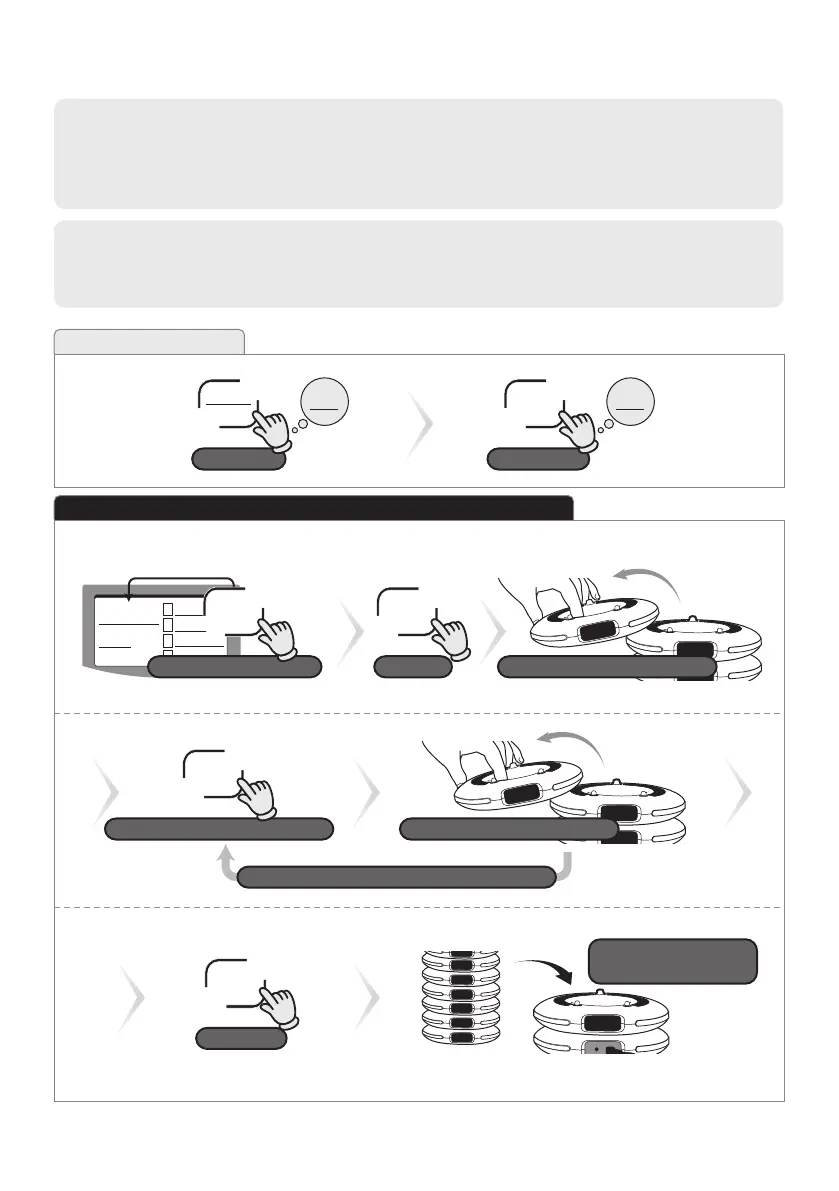
Fixed Number Setting is able to allocate guest pager’s numbers beforehand. (ex. 1~10 or 11~20)
Advantage : Simply call the preset number.
It does not need to allocate the number every time when it uses.
★ 5-3. Fixed Number Setting
FUN
DEL
NEXT
Move to [Fn]
Enter to General Functions
0
Rc
0
Fn
★ 5-3-1. Input the Fixed Number ▶ [7P] 6-1-2. How to Call the Fixed Number
ex) Preset the guest pager number 1 to 10
CALL
Enter
CALL
Proceed next number automatically
1
2
3
4
44
P33 GP2
N
Gn
1
Fn
-n
Input the starting number
1A
Separate the guest pager on top
Repeat this procedure until the last one
ESC
Exit
Place the guest pagers
in order
Press it longer
Separate the guest pager on top
Caution! The transmitter’s group & channel numbers and guest pagers’ group & channel numbers
should be identical. Please stack up all guest pagers on the charger before setting.


 To Next Page