EasyManua.ls Logo

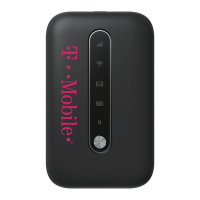
T-Mobile Franklin T9 - User Manual

T-Mobile Franklin T9
4 pages
Print Icon
To Next Page IconTo Next Page
Loading...
Step 1: Request a Hotspot online @
Step 2: Read User Agreement & complete online request form.
Step 3: You will receive a conrmaon email when your Hotspot kit is shipped. A USPS
tracking number is included. Delivery within 2-3 days, direct to your home, with contact-
free delivery.
Step 4: Unpack your Hotspot and review the quick start guide. Hotspots arrive fully
charged. *Be sure to save the return mailing envelope, included in your package . It has a pre-paid return
mailing address aached and you will need this to return the Hotspot to the Library when your check-out
expires.
Step 5: Enjoy the Internet wherever you take the Hotspot and charge it as needed.
Need help? Email the P.I.T. Library at library@pit.edu.
hps://nyurl.com/hotspotsform

Other manuals for T-Mobile Franklin T9

Question and Answer IconNeed help?

Do you have a question about the T-Mobile Franklin T9 and is the answer not in the manual?

Summary

Take the Internet Home With You

Requesting and Receiving Your Hotspot

Steps to request a hotspot online, receive a confirmation, and get delivery within 2-3 days.

Unpacking and Using Your Hotspot

Instructions for unpacking, reviewing the quick start guide, and enjoying internet access.

Welcome Start Guide

Introduction to the T9 Hotspot

Guide to getting started with your new T9 Mobile Hotspot and accessing resources.

Connecting to Your Hotspot

Steps to connect a Wi-Fi enabled device to the hotspot using its Wi-Fi name and password.

Resetting Your Hotspot

Instructions for resetting Wi-Fi settings or restoring the device to factory default settings.

Charging the Battery

Procedure for charging the hotspot's battery using the provided USB cable and adapter.

Getting Started with Your Mobile Hotspot

Hotspot Components Overview

Details the essential components of the T9 Mobile Hotspot, including buttons, ports, and slots.

Using Your Mobile Hotspot for the First Time

Guidance on initial setup, compatibility, and basic operations for first-time users.

Battery Management and Charging

Information on charging times, battery life factors, and important precautions for device care.

Troubleshooting Common Issues

Connecting to Wi-Fi

How to find and connect to your Mobile Hotspot's Wi-Fi network using the SSID and password.

Resolving Hotspot Problems

Tips for common issues like restarting devices or addressing unexpected power-offs.

Summary

Take the Internet Home With You

Requesting and Receiving Your Hotspot

Steps to request a hotspot online, receive a confirmation, and get delivery within 2-3 days.

Unpacking and Using Your Hotspot

Instructions for unpacking, reviewing the quick start guide, and enjoying internet access.

Welcome Start Guide

Introduction to the T9 Hotspot

Guide to getting started with your new T9 Mobile Hotspot and accessing resources.

Connecting to Your Hotspot

Steps to connect a Wi-Fi enabled device to the hotspot using its Wi-Fi name and password.

Resetting Your Hotspot

Instructions for resetting Wi-Fi settings or restoring the device to factory default settings.

Charging the Battery

Procedure for charging the hotspot's battery using the provided USB cable and adapter.

Getting Started with Your Mobile Hotspot

Hotspot Components Overview

Details the essential components of the T9 Mobile Hotspot, including buttons, ports, and slots.

Using Your Mobile Hotspot for the First Time

Guidance on initial setup, compatibility, and basic operations for first-time users.

Battery Management and Charging

Information on charging times, battery life factors, and important precautions for device care.

Troubleshooting Common Issues

Connecting to Wi-Fi

How to find and connect to your Mobile Hotspot's Wi-Fi network using the SSID and password.

Resolving Hotspot Problems

Tips for common issues like restarting devices or addressing unexpected power-offs.

T-Mobile Franklin T9 Specifications

General IconGeneral
CategoryWireless Router
Network Technology4G LTE
Wi-Fi802.11 b/g/n
Battery Capacity2450 mAh
SIM Card TypeNano SIM
Max Supported DevicesUp to 15 devices
Wi-Fi Frequency2.4 GHz
ModelFranklin T9
Max Battery Life8 hours

Related product manuals