Modem
Here, the connection may be established via an installed analogue modem
or an ISDN card (optional). In Connection Type activate Modem. Then
enter your telephone number, access number (user name) and the
password in Provider Connection.
Please enter the password a second time in Confirm. Fig. 1.0 on Page 32
describes Page 2 for connection settings. Make sure that no entries or
activations have been made here.
• External modem
The connection is made via an external GPRS modem. The settings for
telephone, user name and password vary from network to network. This
information may be obtained from your network provider.
Make sure that Connection Type is set to External Modem and enter the
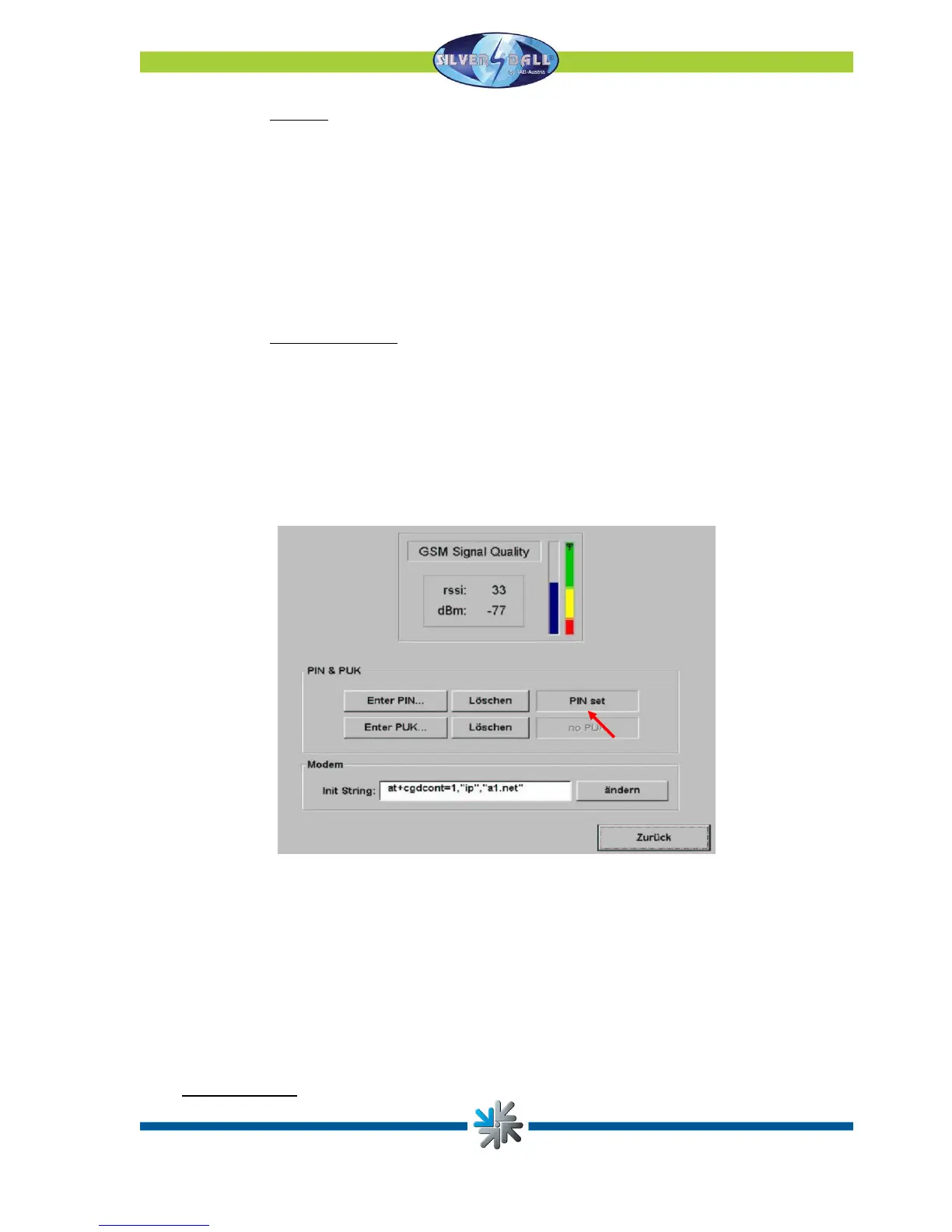
connection data in Provider Connection. Press “GPRS/GSM” to configure
the GPRS modem.
Sometimes, alongside the connection data just entered, you will also receive
an Init String from your network provider. If so, you must enter this string in the
Modem section. You must also enter your SIM card’s PIN number (to be
obtained from your network provider). If PIN set appears, the PIN has been
correctly entered and you may exit the dialogue by pressing Back.
Fig. 1.0 on Page 32 describes Page 2 for the connection settings. Make sure
that no entries or activations have been made here.
• Network Direct
Page 29


 To Next Page